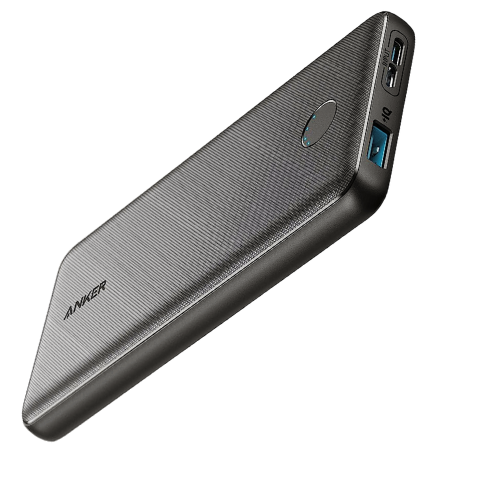
Ever been stuck on a long trip with a dying phone? A portable charger can be a lifesaver in situations like this, ensuring you stay connected and powered up throughout the day. Enter the Anker PowerCore Slim 10000, a pocket-sized powerhouse that packs a punch.
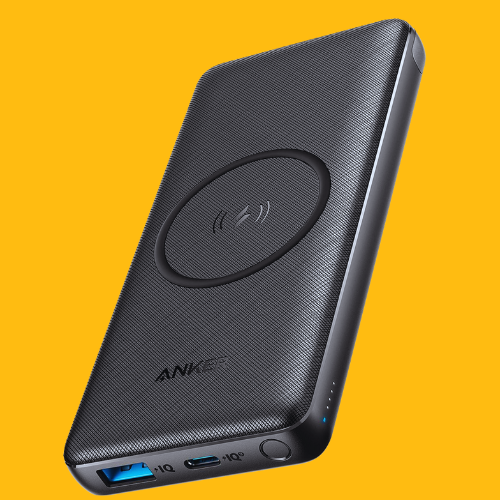
Anker PowerCore Slim 10000 portable charger
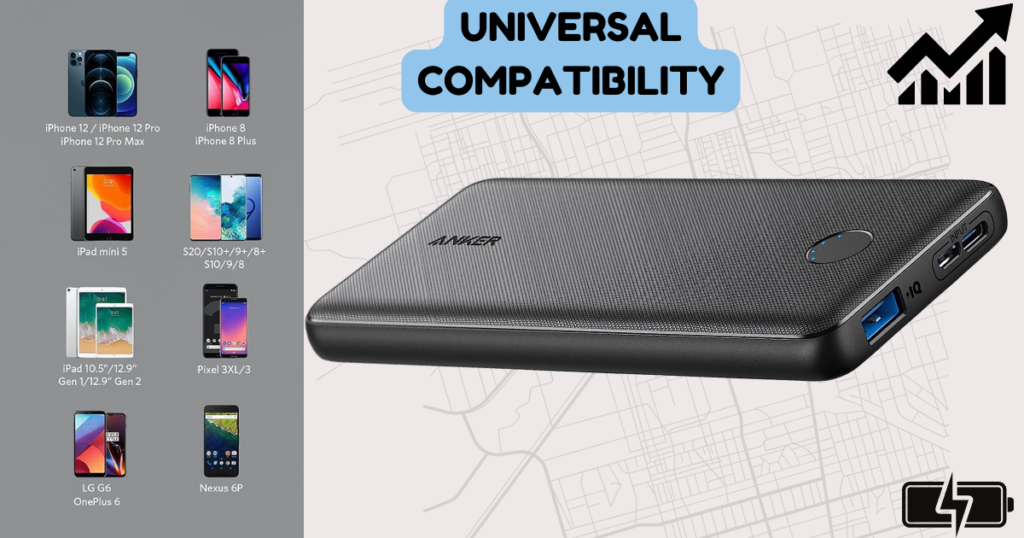
This Anker offering is a portable charger, essentially a power bank. Its PowerIQ charging technology promises optimized charging speeds for your devices. However, the USB-C port is for input only, meaning it can only be used to recharge the power bank itself. Compatible devices include iPhone 15 and earlier models, as well as Samsung Galaxy phones and likely other Android devices.
This Anker 10000 slim option boasts a 10,000mAh capacity, offering multiple charges for your devices without weighing you down. While I’ve used various portable chargers in the past, the Anker PowerCore Slim 10000 stands out for its impressive combination of size and capacity.
Key Specifications
Brand
Anker
Battery Capacity
10000
Connector Type
USB-C, USB-A, Micro-USB
Special Feature
Fast Charging
Model Number
A1229
Weight
7.5 ounces
Color
Black
Features
The Anker PowerCore Slim lives up to its name with a slim and compact design. This makes it easy to slip into your pocket or bag, perfect for carrying around all day. Despite its size, it packs a significant punch with a 10,000mAh capacity. However, it’s important to note that due to voltage conversion, the usable capacity is closer to 8,000mAh. This still translates to real-world benefits, typically offering multiple charges for your smartphone.
Anker is known for its innovative charging technology, and the Anker PowerCore Slim 10000 is no exception. It features PowerIQ, which intelligently identifies your device and adjusts the charging speed for optimal performance. This ensures your devices get the fastest possible charge without any risk of damage.
Another thoughtful feature is the trickle-charging mode. This mode is perfect for low-power devices like Bluetooth headphones or fitness trackers, providing a gentle charge that prevents the power bank from shutting off prematurely. The Anker PowerCore Slim 10000 boasts two input ports, a USB-C and a Micro-USB, for recharging the unit itself.
For charging your devices, it features a single USB-A output port. (While it doesn’t come with a built-in cable, most users likely have spare cables already.) Anker prioritizes safety with their MultiProtect safety system (if included in this model), which safeguards against overcharging, short circuits, and temperature control, giving you peace of mind while charging your devices.sharemore_vert
Performance
In my real-world testing of the Anker PowerCore Slim 10000, I found it to be a reliable and convenient companion. It easily fit into my pocket without feeling bulky, making it perfect for carrying around during errands or day trips. Charging my phone was a breeze.
The phone charged quickly, and the charging speed seemed to match Anker’s claims. For example, it took roughly two hours to fully charge my smartphone with a 3000mAh battery, which aligns with the expected charging speed for a device with this capacity.
The portability of the Anker 10000 slim is a major advantage. Whether you’re commuting to work, exploring a new city, or simply lounging at the park, it’s easy to keep this power bank on hand to avoid running out of juice. It’s small and lightweight enough to not feel like a burden, ensuring you always have a backup charge within reach.
The Anker PowerCore Slim 10000 is incredibly user-friendly. There’s no complicated setup required. It’s a true plug-and-play experience. Simply connect your device’s charging cable to the USB-A output port and the power bank will automatically begin charging. Some models may feature an indicator light that displays the charging status or indicates when trickle mode is activated. If your model has this feature, consult the included manual (or search online for the Anker PowerCore Slim 10000 manual) for specific details on the light’s meaning.
Value
The Anker PowerCore Slim 10000 typically falls within a price range of [$16 to $22] (be sure to check current pricing). Considering its features and performance, this price represents a good value. The combination of a slim design, decent capacity, fast charging (for compatible devices), and Anker’s reputation for quality makes it a worthwhile investment.
It’s important to note that there are other Anker Power Bank options available, including the Anker PowerCore Slim 10000 PD, which offers faster charging through its USB-C Power Delivery port. However, these models may come at a slightly higher price point. If fast charging with USB-C isn’t crucial for you, the standard Anker PowerCore Slim 10000 offers excellent value for its features.
The Anker PowerCore Slim 10000 has impressed me with its portability, reliable performance, and user-friendly design. It lives up to its name, offering a slim and compact form factor that easily fits in your pocket or bag.
Despite its size, it packs a punch with a 10,000mAh capacity, providing multiple charges for your smartphone and other compatible devices. Anker’s PowerIQ technology ensures optimized charging speeds, while the trickle-charging mode caters to low-power devices. Safety features like the MultiProtect system (if included) provide peace of mind.
Overall, the Anker PowerCore Slim 10000 is an excellent choice for anyone who needs a reliable and portable power source on the go. Frequent travelers, business professionals, gamers, and anyone who spends a lot of time away from an outlet will find this power bank to be a valuable companion. It ensures you stay connected and powered up throughout your day, eliminating the worry of a dead battery.
For those seeking even faster charging with USB-C Power Delivery, consider the Anker PowerCore Slim 10000 PD, though it may come at a slightly higher cost. Whichever model you choose, the Anker PowerCore Slim series offers a compelling combination of features and performance, making it a top contender in the portable charger market.
In our increasingly mobile world, staying connected and powered throughout the day is crucial. Anker power banks have become a go-to solution for people on the go, offering a reliable source of portable charging
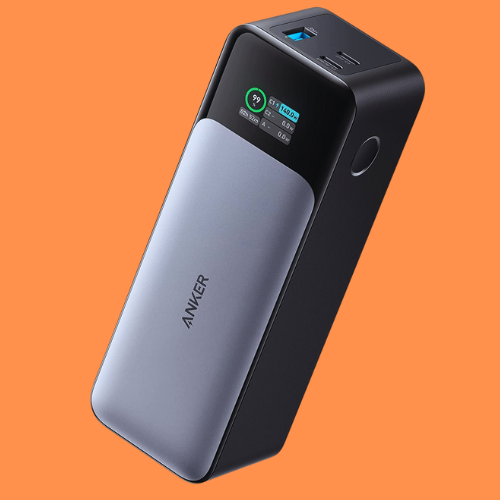
Anker, a renowned brand in the portable charger market, consistently delivers high-quality and innovative products. The Anker 737 Power Bank, also known as the Anker 737 or PowerCore 24K, is a powerhouse when it comes to portable charging solutions. Designed by Anker, a trusted brand in the tech industry, this power bank offers impressive features that cater to the needs of modern users. Let’s dive into its key attributes:
High Capacity: With a massive 24,000mAh battery, the Anker 737 ensures you stay connected throughout the day. Whether you’re on a long flight, a road trip, or simply away from a power outlet, this power bank has your back.
Ultra-Powerful Charging: The Anker 737 boasts an impressive 140W output, making it suitable for charging a wide range of devices. From smartphones and tablets to laptops and cameras, it can handle them all.
This Anker powerhouse packs a 24,000mAh punch, featuring 140W output, a smart display, and compatibility with various devices like iPhones, Samsung phones, and laptops.
In this review, we will delve into the specifics of this charger, analyse its technical specifications, explore its functionality, and provide real-world usage scenarios. We’ll also compare it to similar products on the market to help you decide if the Anker 737 is the ideal choice for you.
Product Specifications
Product Name
Anker 737 Power Bank/PowerCore 24K
Product Dimensions
4.56 x 2.15 x 1.95 inches
Weight
1.4 pounds (roughly 0.64 kg)
Model number
A1289
Battery
1 Lithium Polymer
Manufacturer
Anker
Country of Origin
China
Technical Specifications:
Battery Capacity: 24,000mAh (milliampere-hours)
Power Output: Up to 140W (watts)
Ports: 2x USB-C ports, 1x USB-A port
Supported Charging Protocols: Power Delivery 3.1
Anker 737 Power Bank is a powerhouse designed to conquer your charging woes. Packed with a whopping 24,000 mAh capacity, this gadget is like a portable energy station in your pocket. Think of it as having multiple charges for your smartphone, topping off your tablet, or even giving your laptop a boost—all without needing to scramble for an outlet.
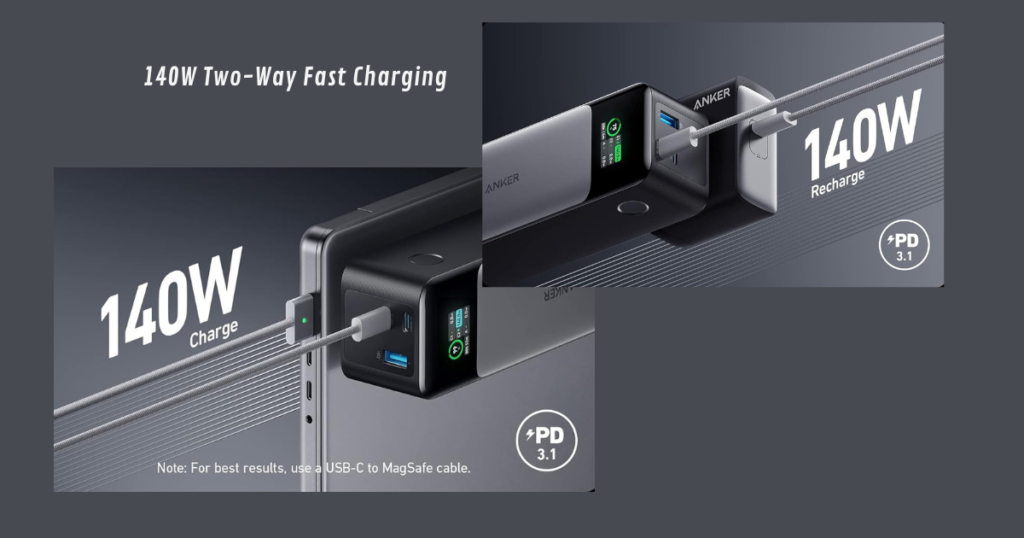
But the Anker 737 isn’t just about brute force. It’s equipped with 140W Power Delivery 3.1, the latest and greatest in charging technology. Imagine going from near dead to fully charged in a fraction of the time—perfect for those moments when you need a quick power-up.
Here’s the beauty: the Anker 737 isn’t playing favorites with your devices. It boasts two USB-C ports and one USB-A port, allowing you to charge up to three devices simultaneously. Traveling with friends? No problem! Everyone can stay connected and powered on during the adventure.
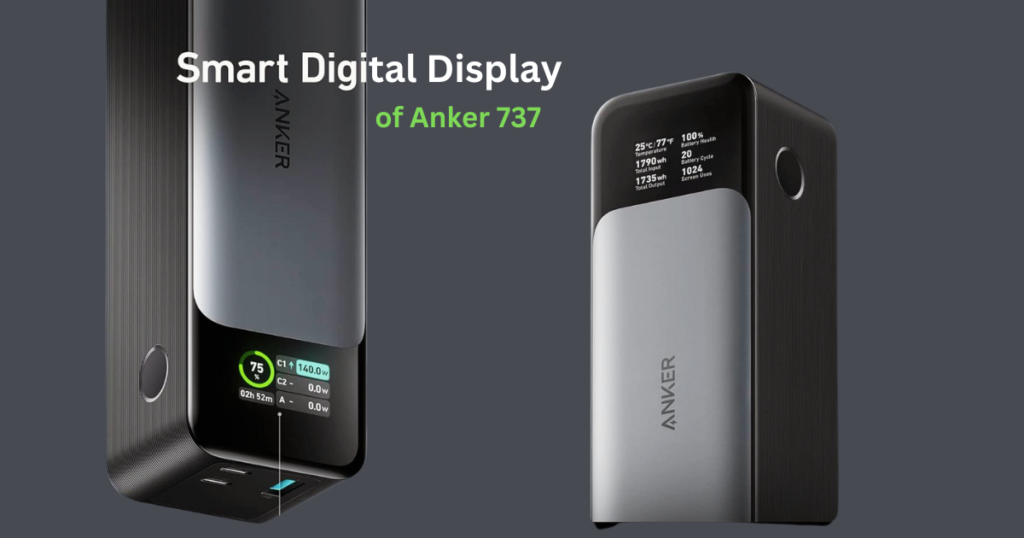
Smart Digital Display
The power bank features an intuitive digital display. This display provides real-time information, including:
Output Power: Easily monitor the power being delivered to your devices.
Input Power: Keep track of the charging speed when refilling the power bank.
Recharge Time: Know how long it’ll take to fully charge the Anker 737.
Functionality Breakdown:
High Capacity (24,000 mAh): This impressive capacity allows you to charge your phone multiple times, tablets, and even some laptops, making it ideal for extended trips or situations where access to power outlets is limited.
140W Power Delivery 3.1: Equipped with the latest charging technology, the Anker 737 delivers fast charging capabilities, significantly reducing charging times for compatible devices.
Multiple Ports (2x USB-C, 1x USB-A): The presence of three ports provides flexibility, allowing you to charge up to three devices simultaneously. This is perfect for charging your phone, tablet, and other gadgets on the go.
Let’s compare the Anker 737 Power Bank with some other popular Anker models:
Anker PowerCore 26800 PD: While the 737 offers 24,000mAh, the PowerCore 26800 PD boasts a whopping 26,800mAh capacity. However, the 737 wins in terms of portability and display features.
Anker PowerCore+ 26800: Similar in capacity to the 737, the PowerCore+ 26800 includes Qualcomm Quick Charge 3.0 support. If fast charging is your priority, consider this model.
Anker PowerCore Essential 20000: If you’re looking for a more compact option, the PowerCore Essential 20000 offers 20,000mAh and weighs less. It lacks the digital display but gets the job done efficiently.
In summary, the Anker 737 Power Bank strikes a balance between capacity, features, and convenience. It’s a reliable choice for anyone seeking a versatile portable charger.
Pros:
High Capacity (24,000mAh): The Anker 737 Power Bank boasts a massive 24,000mAh capacity, allowing you to charge your smartphone multiple times, tablets, and even some laptops. This extensive capacity makes it a suitable companion for extended journeys or situations where frequent access to power outlets is limited.
Powerful and Fast Charging: Equipped with 140W Power Delivery 3.1 technology, the Anker 737 delivers exceptional charging speeds, significantly reducing charging times for compatible devices. This ensures you can quickly power up your gadgets and stay connected throughout the day.
Informative Digital Display: An integrated digital display provides users with valuable insights, including the remaining charge level and estimated recharge time. This transparency allows for informed charging decisions and efficient power management.
Relatively Quick Recharge Time: The Anker 737 can be fully recharged in approximately 2.5 hours using the included wall charger. This is a significant advantage compared to other high-capacity power banks, which often require longer charging times.
Cons:
Bulkier and Heavier: Due to its high capacity, the Anker 737 is slightly bulkier and heavier compared to some other portable chargers on the market. This might be a minor drawback for users prioritizing extreme portability.
Lack of Wireless Charging Support: Unfortunately, Anker 737 does not offer wireless charging capabilities. If you prefer cable-free charging, this might be a drawback.
Conclusion
The Anker 737 Power Bank ( Anker 737 PowerCore 24k) is a compelling option for users seeking a powerful and high-capacity portable charger. Its high capacity, fast charging capabilities, and smart display make it a standout choice.
Whether you’re a frequent traveler, a digital nomad, or simply someone who values reliable power on the go, the Anker 737 is worth considering. It caters to individuals with demanding power requirements, especially those who frequently travel or work in locations with limited access to power outlets. So, don’t miss out—grab your Anker 737 Power Bank today!
If you’re looking for a portable charger that can keep your devices powered throughout the day and even charge your laptop, the Anker 737 is definitely worth considering. Remember to consult product manuals (like the Anker 737 power bank manual available online) for detailed information and to ensure compatibility before making a purchase.
What is the return policy of Anker 737 Power Bank?
You’ll need to check Anker’s website or the retailer you purchased it from (e.g., Amazon) for their specific return policy on the Anker 737 Power Bank.
What is the capacity of Anker 737 Power Bank?
The Anker 737 Power Bank has a capacity of 24,000mAh (milliampere-hours). This is a high capacity that allows it to charge your devices multiple times.
How long does it take to charge a laptop with this power bank?
Charging time will vary depending on your laptop model and battery size. However, the Anker 737’s powerful output should significantly reduce charging time compared to a standard charger.
Can I use this power bank for my camera?
Yes, the Anker 737 Power Bank should be suitable for your camera if it uses a standard USB charging cable (check your camera manual for confirmation).
The digital landscape has soared to new heights. More and more businesses are migrating their operations to the cloud, entrusting it with their critical web applications, data, and infrastructure. This paradigm shift, while offering undeniable advantages in scalability and agility, necessitates a robust security apparatus—enter Cloud Web Security.
Cloud Web Security stands as the vigilant protector in this digital realm. It’s a comprehensive strategy encompassing a suite of tools and best practices designed to safeguard web-based applications, data, and the underlying infrastructure residing within the cloud environment.
Just as a physical security system shields a commercial building, Cloud Web Security acts as an invisible force field, deflecting cyberattacks and thwarting malicious attempts to infiltrate the cloud.
Cloud Security VS Cloud Web Security
Cloud web security and cloud security, although closely related, address distinct aspects of safeguarding the cloud environment. Let’s explore their differences:
Cloud Security: Cloud security refers to the umbrella of practices, technologies, and policies designed to safeguard data, applications, and infrastructure residing in the cloud environment.
Broader Scope: Encompasses the overall protection of data, applications, and infrastructure residing within the cloud.
Focus: Secures the entire cloud ecosystem, including data at rest, in transit, and during processing.
Responsibility: Shared between the cloud service provider (CSP) and the organization using the cloud service.
Measures: Involves data encryption, access control mechanisms, identity and access management (IAM), threat detection & prevention, and adherence to compliance regulations.
Cloud Web Security: Cloud web security builds upon the foundation of cloud security, specifically focusing on protecting web-based elements within the cloud environment.
Specific Focus: Secures web applications and resources deployed on the cloud platform.
Protects Against: Web-based threats like injection attacks, cross-site scripting (XSS), denial-of-service (DoS) attacks, and malicious code.
Implementation: Often involves web application firewalls (WAFs), secure coding practices, and vulnerability scanning of cloud-based web applications.
Key Differences:
Scope: Cloud security addresses the entire cloud environment, while cloud web security specifically focuses on securing web applications within the cloud.
Responsibility: Cloud security involves a shared responsibility model, whereas cloud web security primarily falls under the organization’s responsibility.
Here’s an analogy:
Cloud security is like securing your house (the cloud environment) with alarms, security doors, and a monitored security system.
Cloud web security is like installing additional security measures on your home’s specific entry points (web applications) like reinforced doors and high-security locks.
In essence, cloud security forms the foundation, while cloud web security strengthens specific aspects within the cloud environment. Both are crucial for ensuring a comprehensive security posture in the cloud.
Importance of Cloud Web Security
The adoption of cloud services has revolutionized how businesses operate. However, this shift also introduces security risks. Here’s why cloud web security matters:
Data Protection: Sensitive information, such as customer data, financial records, and intellectual property, resides in the cloud. Robust security measures are essential to prevent unauthorized access and data breaches.
Availability and Reliability: Cloud services must be available and reliable. Downtime due to security incidents can disrupt business operations and harm reputation.
Compliance: Organizations must adhere to industry-specific regulations (e.g., GDPR, HIPAA). Proper cloud security ensures compliance.
Shared Responsibility: While cloud service providers (CSPs) offer secure infrastructure, customers share the responsibility for securing their applications and data.
Benefits of Cloud Web Security
In today’s perilous digital landscape, cyber threats lurk around every corner. Cloud Web Security serves as an unwavering defense against a barrage of malicious activities. Here’s how it bolsters your cloud defenses:
Shielding Against Digital Onslaught: Cloud Web Security safeguards your web applications from Distributed Denial-of-Service (DDoS) attacks, where malicious actors attempt to overwhelm your systems with a flood of traffic, rendering them inaccessible to legitimate users.
Eradicating Malicious Code: Cloud Web Security employs advanced techniques to identify and thwart malware injection attempts, where attackers embed malicious code into your applications to steal data or disrupt operations.
Fortress Around Your Data: Data breaches are a significant concern in the digital age. Cloud Web Security encrypts data at rest and in transit, acting as an impenetrable shield against unauthorized access, ensuring the confidentiality and integrity of your sensitive information.
Beyond Security
Cloud Web Security isn’t confined solely to safeguarding your digital assets. It plays a pivotal role in ensuring adherence to an ever-evolving regulatory landscape. By implementing robust cloud security measures, organizations can demonstrate their commitment to meeting industry standards and complying with data privacy regulations like the General Data Protection Regulation (GDPR).
Scalability and Cost-Effectiveness
One of the significant advantages of cloud-based security solutions lies in their inherent scalability. As your business grows and your cloud footprint expands, Cloud Web Security scales seamlessly to accommodate your evolving needs. Additionally, cloud-based security solutions can offer potential cost benefits. By eliminating the need for upfront investment in hardware and software infrastructure, businesses can leverage the expertise and resources of cloud security providers, often at a predictable and cost-effective rate.
By implementing a comprehensive Cloud Web Security strategy, organizations can venture confidently into the ever-expanding digital frontier. Remember, securing your cloud environment isn’t just about protecting data; it’s about safeguarding your business reputation, fostering trust with your customers, and ensuring the unhindered operation of your mission-critical applications. As the reliance on cloud services continues to surge in 2024 and beyond, mastering Cloud Web Security becomes an essential tenet for guaranteeing a secure and prosperous digital future.
Key Components of Cloud Web Security
In the dynamic landscape of cloud web security, understanding the key components is essential for safeguarding your digital assets. Let’s explore the critical elements that contribute to a robust security posture:
1. Access Control and Authentication
Effective access control ensures that only authorized users can access cloud resources. Consider the following components:
Multi-Factor Authentication (MFA): MFA requires users to provide multiple forms of identification before granting access. Common factors include passwords, SMS codes, biometrics, or hardware tokens. By combining these factors, MFA significantly enhances security.
Identity and Access Management (IAM): IAM is the cornerstone of access control. It allows organizations to manage user permissions and roles systematically. With IAM, you can define who can access specific resources, set fine-grained permissions, and enforce the principle of least privilege.
2. Data Encryption
Encryption is a fundamental practice to protect data from unauthorized access. Consider the following aspects:
At Rest: Encrypt data stored in databases, object storage, and backups. Whether it’s customer records, financial data, or intellectual property, encryption ensures that even if an unauthorized party gains access to the storage, the data remains indecipherable.
In Transit: Use secure protocols (such as HTTPS) for data transmission. When data moves between clients, servers, or services, encryption prevents eavesdropping and tampering. It’s crucial for maintaining confidentiality and integrity.
3. Network Security
Securing the cloud network infrastructure is paramount. Consider the following components:
Virtual Private Clouds (VPCs): Isolate resources within a private network. VPCs allow you to create logically isolated environments where you can deploy your applications securely. They provide network segmentation, control over IP addressing, and fine-grained security groups.
Firewalls: Control inbound and outbound traffic. Firewalls act as gatekeepers, filtering traffic based on predefined rules. They prevent unauthorized access, block malicious requests, and ensure compliance with security policies.
Network Segmentation: Divide networks to limit lateral movement. By segmenting your network, you reduce the attack surface. If an intruder gains access to one segment, they won’t automatically have access to the entire network.
Security Groups and ACLs: Define rules for traffic flow. Security groups and access control lists (ACLs) allow you to specify which resources can communicate with each other. They act as virtual firewalls at the instance level, controlling traffic at the network interface level.
Now, let’s delve into the critical aspects of Cloud Web Security, focusing on common threats, best practices, and incident response:
Common Threats and Risks
While the cloud offers undeniable advantages, it also introduces a new battleground for cyber threats. Cloud Web Security becomes paramount in safeguarding your valuable data and applications from a multitude of adversaries.
Here, we delve into some of the most common threats and risks organizations face in the cloud environment:
Data Breaches and Unauthorized Access
Data breaches are a constant cause for concern, occurring when sensitive information stored in the cloud is accessed, stolen, or exposed without proper authorization. These breaches can stem from various factors:
Misconfigured Permissions: Inadequate security protocols or granting excessive access rights can lead to unintended data exposure. Example: A public cloud storage bucket misconfigured to allow public read access, potentially exposing sensitive customer information like financial records or personally identifiable data (PII). A misconfigured Amazon S3 bucket allows public access to confidential customer records.
2. Credential Theft: Malicious actors actively employ various techniques to steal login credentials (usernames and passwords). Example: A phishing campaign successfully tricks an employee into revealing their cloud login credentials, enabling unauthorized access to sensitive data.
3. Insider Threats: Internal actors, including employees, contractors, or partners with malicious intent, can exploit their access to compromise data. Example: A disgruntled employee with access to a customer database downloads and leaks confidential financial information to a competitor.
Malware and Insider Threats
The cloud environment is not immune to malware infiltration. Malicious software (malware) can find its way into cloud systems through various means:
Cloud Malware Types: Ransomware, trojans, and spyware are some common types of malware that can wreak havoc on cloud-based systems. Example: A cloud server compromised by ransomware encrypts critical data, rendering it inaccessible until a ransom is paid. A compromised cloud server hosts malware that spreads across the organization’s network.
2. Insider Threats: A Double-Edged Sword: While external threats are significant, insider threats pose a unique challenge due to their inherent level of access and potential for both malicious and unintentional harm: Malicious Insiders: These individuals intentionally exploit their access to steal data, disrupt operations, or plant malware within the cloud environment. Unintentional Insiders: Negligence or lack of proper training can lead to accidental data exposure. Example: A contractor tasked with managing a cloud database accidentally shares sensitive customer information due to a configuration error.
These scenarios highlight the critical need for a robust Cloud Web Security strategy. By implementing a layered defense that includes access controls, data encryption, and user awareness training, organizations can significantly mitigate these risks and safeguard their cloud-based assets. Remember, a vigilant approach is crucial in the face of ever-evolving cyber threats.
Keeping your cloud environment safe is crucial, and we’ve got your back. Securing your cloud environment requires constant vigilance. Here are two essential practices to supercharge your Cloud Web Security:
Regular Security Audits and Assessments
Imagine a security guard meticulously examining every corner of your cloud infrastructure. Regular security audits and assessments function similarly. Imagine you’re giving your entire digital house (the cloud) a thorough inspection now and then. That’s what security audits and assessments do. They involve:
Vulnerability Scanning: Think of these as automated security guards constantly patrolling your cloud for weaknesses. They identify potential security gaps in your setup, like unlocked doors or hidden crawl spaces.
Regularly scan cloud resources for vulnerabilities.
Use automated tools to identify weaknesses in configurations.
Example: Running vulnerability scans on your cloud servers weekly is like getting regular security reports highlighting areas that need extra attention.
Penetration Testing: Picture ethical hackers trying their best to break into your cloud, just like a security expert testing your home alarm system. Penetration tests uncover vulnerabilities that real attackers might exploit.
Simulate attacks to identify security gaps.
Ethical hackers attempt to exploit vulnerabilities.
Example: Hiring a penetration testing firm is like inviting security ninjas to try and bypass your defenses, pinpointing areas where intruders might sneak in.
Compliance Checks: Regularly reviewing your security policies and controls is like checking a compass – it ensures you’re following the right security path and haven’t strayed off course.
Ensure compliance with industry standards (e.g., PCI DSS, ISO 27001).
Regularly review policies and controls.
Example: Making sure your cloud setup meets GDPR (protecting user privacy in Europe) shows your commitment to keeping user information safe.
Continuous Monitoring and Incident Response
So, we’ve talked about checking your cloud’s defenses regularly, but what about constant vigilance? That’s where continuous monitoring comes in. Imagine having security cameras set up throughout your digital house (the cloud), keeping a watchful eye 24/7. Here’s how it works:
Real-Time Monitoring: These “security cameras” are advanced tools that constantly monitor your cloud activity for anything out of the ordinary. They’re like having hawk eyes, detecting suspicious activity like unauthorized access attempts or unusual login patterns.
Implement tools for continuous monitoring.
Detect anomalies, unauthorized access, and suspicious activities promptly.
Example: Setting up alerts to notify you whenever someone tries to log in from an unexpected location helps you catch potential security breaches early on.
Having a Plan B: Even with the best security measures, unexpected situations can arise. That’s why having a comprehensive incident response plan is crucial. Think of it as your personal “fire drill” for the cloud.
Develop a comprehensive incident response plan.
Define roles, responsibilities, and communication channels.
Example: Imagine a data breach occurs. By following your pre-defined steps, you can quickly contain the situation, minimize the damage, and get things back on track.
Equipping Yourself for the Journey
Mastering cloud web security is an ongoing pursuit. Here’s your comprehensive toolkit for success:
Embrace Certifications: Consider pursuing certifications like the Certified Cloud Security Professional (CCSP) or the AWS Certified Security – Specialty to validate your expertise and demonstrate your commitment to cloud security best practices. These certifications can also enhance your career prospects in the in-demand field of cloud security.
Stay Updated: The cloud security landscape is constantly evolving. Subscribe to security blogs from reputable vendors and industry publications. Attend industry events, both physical and virtual, to connect with security professionals and learn about the latest threats and defense strategies. Actively seek out the latest knowledge by participating in online forums and communities dedicated to cloud security.
Practice Makes Perfect: Set up a lab environment to experiment with security tools and configurations. This hands-on experience will solidify your understanding of cloud security concepts and allow you to test different security approaches in a safe environment. There are many free and paid cloud sandbox environments available that can be used for this purpose.
Conclusion
The digital landscape has soared to new heights, and with this ascension comes the immense responsibility of safeguarding our valuable assets in the cloud. Cloud Web Security isn’t a mere option; it’s the cornerstone of a secure digital future.
Key Takeaways for Unwavering Cloud Security:
Shared Responsibility: Remember, securing the cloud isn’t a solitary endeavor. Cloud providers offer a robust foundation, but the onus lies with users to configure their environment securely and vigilantly protect their data.
Knowledge is Power: The ever-evolving threat landscape necessitates staying informed about the latest cyber threats and best practices in Cloud Security.
Proactive Defense: Implementing a comprehensive Cloud Web Security strategy is paramount. Regular security audits, robust data encryption, and real-time monitoring are the cornerstones of a fortified digital defense.
By prioritizing Cloud Web Security, you not only safeguard your mission-critical applications, data, and infrastructure but also contribute to a more secure online environment for everyone. Investing in web cloud security and cloud application security strengthens the entire digital ecosystem, fostering trust and protecting the integrity of the web.
As we navigate the ever-expanding digital frontier, prioritizing Cloud Web Security becomes an essential tenet for every organization. By understanding the shared responsibility, staying informed about evolving threats, and implementing robust security measures, you can ensure a secure and prosperous digital future.
Remember, online security starts with securing your cloud environment – and with the right approach, you can transform your cloud into a safe and reliable haven for your data and applications.
What are the benefits of Cloud Web Security?
Cloud Web Security Benefits: Enhanced Protection: Protects data from breaches using encryption and access controls. Scalability: Easily adjusts security measures to meet changing needs. Threat Detection & Prevention: Advanced tools identify and block cyberattacks.
How Does Cloud Web Security Work?
Cloud-based tools analyze web traffic for malware, phishing, and other threats. Security measures like firewalls and intrusion prevention stop suspicious activity. Cloud-Based Web Filtering: Filters web traffic to block access to malicious websites and content. Cloud Web Security Scanner: Analyzes websites for vulnerabilities and security risks. Cloud Web Security Connector: Integrates cloud security services with existing IT infrastructure.
What is cloud-based web filtering?
Cloud-based web filtering acts as a gatekeeper for your organization’s internet traffic. It’s like a security guard in the cloud. Here’s a breakdown: Location: Hosted on a remote server (the cloud) by a security provider. Function: Analyzes web traffic in real-time. Action: Blocks access to harmful websites and content:Malicious sites containing malware or phishing attempts. Inappropriate content based on pre-defined categories (e.g., gambling, adult content).
What are the 4 types of cloud computing?
Types of Cloud Computing: Public Cloud: Shared resources delivered over the internet (e.g., Amazon Web Services). Private Cloud: Dedicated cloud infrastructure for a single organization. Hybrid Cloud: Combines public and private cloud resources. Multi-Cloud: Utilizes multiple public cloud providers.
In today’s fast-paced world, staying connected is more important than ever. Whether you’re navigating a busy day of meetings or exploring the great outdoors, your devices are your lifeline to the world. But what happens when your battery levels plummet and there’s not an outlet in sight?
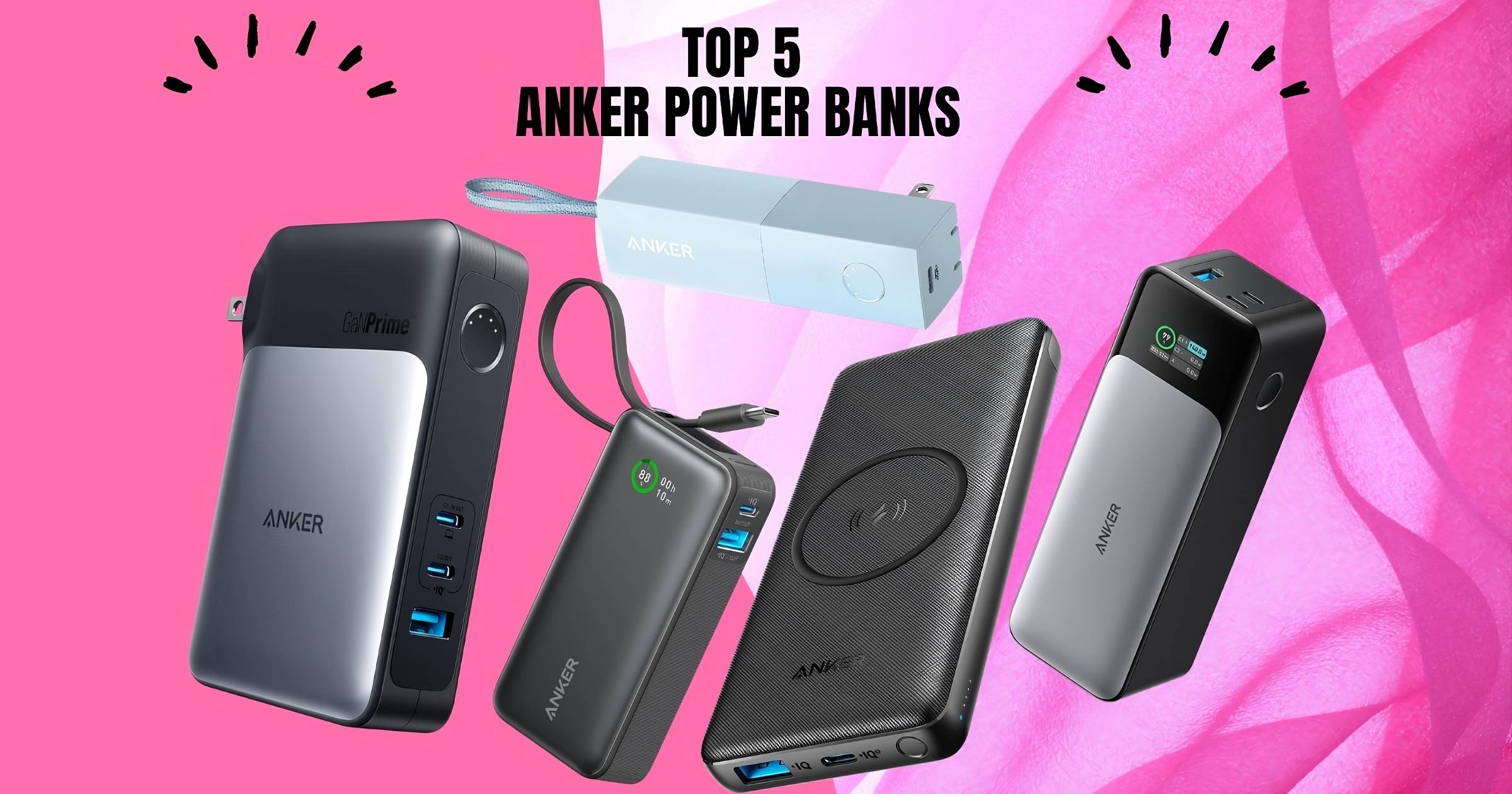
Enter Anker Power Banks, the portable charging solution that ensures your devices never run out of juice when you need them most.
From the sleek Anker Nano Power Bank to the robust Anker 737 Power Bank, Anker offers a range of power banks designed to meet the diverse needs of modern life. With high-speed charging capabilities and cutting-edge technology, Anker Power Banks are more than just a battery pack; they’re a reliable companion for your on-the-go lifestyle.
Features and Benefits
Anker Power Banks stand out in the market for their exceptional features and benefits. Here’s why they are the go-to choice for mobile power:
High-Speed Charging: Ditch the waiting game. Anker’s proprietary technology ensures rapid charging, thanks to features like PowerIQ 3.0. Power up your devices in record time and get back to what matters most. For instance, the Anker PowerCore series boasts advanced charging capabilities that can revive your smartphone or tablet significantly faster than standard chargers.
Variety of Capacities: No matter your charging scenario, there’s an Anker Power Bank to match. Need a quick top-up for a night out? The Anker Nano Power Bank, with its compact design, is your perfect companion. Embarking on a camping trip and requiring extended power? The Anker Prime Power Bank offers a larger capacity to keep you juiced up for days.
Advanced Safety Features: Anker prioritizes safety. Each power bank is equipped with a multi-protection system to safeguard your devices against overcharging, overheating, and short circuits. With Anker, you can have peace of mind knowing both you and your gadgets are protected.
Unmatched Portability: Anker understands mobility is key. Models like the Anker 737 Power Bank showcase a sleek, lightweight design that effortlessly fits in any bag or pocket, making it ideal for travel or everyday adventures.
Built to Last: Durability is a hallmark of Anker Power Banks. Constructed with high-quality materials, they can withstand the rigors of everyday use. Anker power banks are reliable companions, ensuring you have a constant power source wherever life takes you.
Choosing Anker goes beyond just a power bank; it’s an investment in peace of mind. With Anker, you’re always a plug away from a full charge, ready to conquer any challenge.
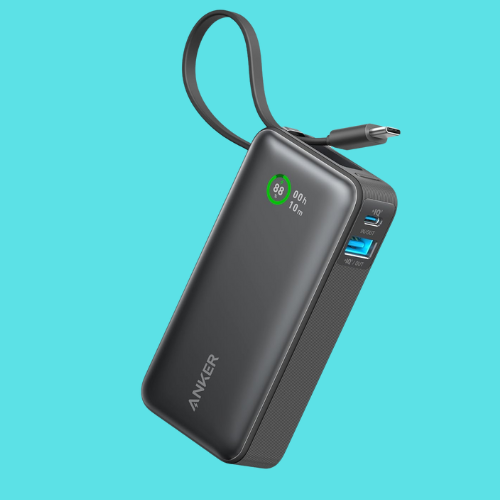
The Anker Nano Power Bank is an ultra-portable charger that packs a punch. Despite its compact size (around 4 inches long), it boasts a 10,000mAh capacity, enough to provide multiple charges for your smartphone or other compatible devices.
Let’s dive into the features that make the Anker Nano Power Bank a must-have:
Built-in USB-C Cable: Eliminate the need to carry separate cables. The integrated cable ensures effortless charging for your devices and the power bank itself.
30W Fast Charging: Experience lightning-fast charging speeds. Power up the power bank to 50% in just 45 minutes or charge your iPhone 15 halfway within 30 minutes, keeping you connected wherever you go.
10,000mAh Capacity: Despite its compact size, the Anker Nano Power Bank packs a punch with a 10,000mAh capacity, offering multiple charges for your smartphone or other compatible devices.
Ultra-Portable Design: Measuring only 10.4 × 5.2 × 2.6 cm, this power bank easily fits in your pocket or bag, making it the perfect travel companion.
Multiple Color Options: Choose from a variety of stylish colors to match your personal preference, including Black Stone, Ice Lake Blue, Lilac Purple, Shell White, and Sprout Green.
Beyond the core functionality, here are some additional perks you’ll enjoy:
Wide Compatibility: It charges a wide range of devices, including iPhones, Android smartphones, tablets, laptops, and more.
Advanced Safety Features: Built-in safeguards protect your devices from overcharging, overheating, and short circuits.
Sustainable Choice: The outer casing is made from 80% recycled plastic, making it an eco-friendly option.
Perfect for:
Business professionals on the go.
Students carrying multiple devices.
Travelers seeking a lightweight charging solution.
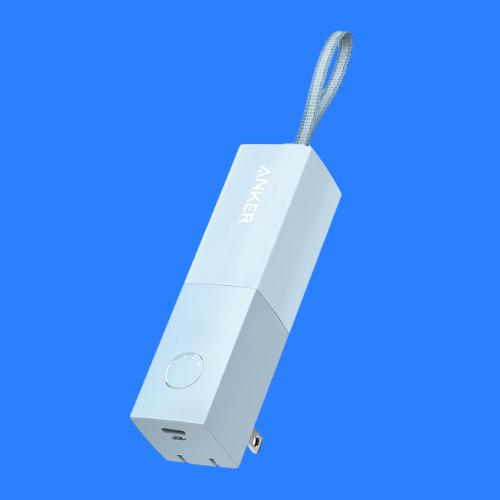
The Anker 511 Power Bank is a versatile 2-in-1 solution. Its built-in foldable plug allows you to charge directly from a wall outlet, eliminating the need for a separate adapter. When you’re on the go, the 5,000mAh battery provides portable power to keep your devices juiced up.
For those seeking a convenient and portable charging option, the Anker 511 Power Bank is a perfect choice. This innovative 2-in-1 design combines the functionality of a wall charger and a portable power bank, offering ultimate versatility for your on-the-go needs.
This versatile device goes beyond just a portable charger. Let’s explore the features that make it a game-changer:
2-in-1 Design: Charge your devices directly from a wall outlet using the built-in foldable plug, eliminating the need for a separate adapter. When you’re on the move, the 5,000mAh battery provides reliable power wherever you go.
Ultra-Compact Size: The sleek cuboid shape and foldable plug make this power bank remarkably compact and easy to carry in your pocket or bag.
Long-lasting Performance: Anker’s advanced technology ensures the battery maintains a maximum capacity of 90% even after 20 months, providing reliable power for extended periods.
High-Speed Charging: Equipped with Anker’s PowerIQ 3.0 technology, the Anker 511 Power Bank delivers rapid charging speeds for various devices, including iPhones, Android smartphones, and more.
On top of its 2-in-1 convenience, the Anker 511 Power Bank offers some additional benefits you’ll appreciate:
Wide Compatibility: It charges a broad range of devices, making it your one-stop charging solution.
Safety Certified: Built with multiple safeguards to protect your devices from overcharging, overheating, and short circuits.
Peace of Mind: Backed by Anker’s industry-leading 24-month warranty and friendly customer service.
Perfect for:
Everyday use: Keep it in your bag for a quick charge throughout the day.
Travel: The compact size and foldable plug make it ideal for carrying on trips.
Business professionals: Ensure your devices stay powered during meetings and business travels.
The Anker PowerCore III offers the freedom of both wireless and wired charging. This portable charger boasts a 10,000mAh capacity, allowing you to wirelessly charge your compatible devices at 10W or use the built-in USB-C and USB-A ports for high-speed wired charging.
The Anker PowerCore III 10K Wireless redefines convenience with its innovative combination of wireless charging and a portable power bank. This versatile device caters to users who demand both portability and the freedom of cable-free charging.
Let’s delve into the features that make this a versatile charging companion:
Wireless Charging on the Go: Experience the ease of Qi-certified wireless charging. Simply place your compatible smartphone or earbuds on the pad for effortless power up to 10W.
High-Speed Wired Charging: In addition to wireless charging, the PowerCore III 10K boasts 18W USB-C and USB-A ports, allowing you to quickly charge other devices with cables.
10,000mAh Capacity: This power bank packs enough juice to provide multiple charges for your smartphone, tablet, or other compatible devices.
Desktop Mode: Connect the power bank to a power source through the USB-C port and transform it into a wireless charging pad. This allows you to charge your device wirelessly while simultaneously recharging the power bank itself.
Beyond its core charging capabilities, the Anker PowerCore III boasts additional features you’ll love:
Anker Advantage: Backed by Anker’s renowned reputation for quality and reliable technology.
Wide Compatibility: It works seamlessly with a variety of Qi-enabled devices.
Travel-Friendly Design: Compact and lightweight for easy portability in your bag or pocket.
Safety Features: Equipped with safeguards to protect your devices from overcharging, overheating, and short circuits.
Perfect for:
Business professionals seeking a versatile charging solution for meetings and travels.
Tech enthusiasts who appreciate the convenience of wireless charging.
Anyone who wants a reliable power bank for various devices.
The Anker 733 Power Bank combines the power of a 65W wall charger with a 10,000mAh portable battery. Featuring 2 USB-C ports and 1 USB-A port, it allows you to simultaneously charge up to 3 devices, making it ideal for families, professionals, or group activities.
The Anker 733 Power Bank takes portable charging to a whole new level. This innovative 2-in-1 device combines the functionality of a powerful wall charger with a portable power bank, offering exceptional versatility and speed for all your charging needs.
Let’s explore the features that turn this into a must-have for any mobile charger:
2-in-1 Design: This power bank doubles as a 65W wall charger, eliminating the need for a separate adapter. Plug it directly into the wall to power your devices or detach the portable charger for on-the-go use.
Triple Charging Power: Equipped with 2USB-C ports and 1 USB-A port, the Anker 733 allows you to simultaneously charge up to 3 devices, making it ideal for families, business trips, or group activities.
Next-Gen GaNPrime Technology: Anker’s cutting-edge GaNPrime technology ensures faster charging times, efficient power delivery, and a compact design compared to traditional chargers.
High-Speed Charging: With 65W Power Delivery support, the Anker 733 can rapidly charge compatible laptops, tablets, and smartphones.
Packing a punch beyond just portability, the Anker 733 Power Bank offers some additional benefits:
Widespread Compatibility: Charges a broad range of devices, from smartphones and tablets to laptops and more.
Advanced Safety Features: Anker’s ActiveShield 2.0 technology safeguards your devices against overcharging, overheating, and short circuits.
Durable Design: Built with high-quality materials to withstand everyday wear and tear.
Peace of Mind: Backed by Anker’s industry-leading 24-month warranty and reliable customer service.
Perfect for:
Power users who need to charge multiple devices simultaneously.
Professionals who require a reliable charging solution for laptops and mobile devices.
Travelers seeking a versatile and powerful portable charger.
The Anker 737 Power Bank is a charging beast with a 24,000mAh capacity and 140W fast charging. Perfect for power users who need to stay charged all day.
The Anker 737 Power Bank is the ultimate powerhouse for users with relentless charging demands. This high-capacity portable charger boasts an exceptional array of features, making it ideal for professionals, frequent travelers, and anyone who needs to stay connected throughout the day.
Dive deep into the features that make this a portable charging champion:
Massive 24,000mAh Capacity: This power bank packs enough juice to charge an iPhone 13 nearly 5 times or a 12.9-inch 2021 iPad Pro almost 1.3 times. Conquer long journeys or power through intensive tasks without worrying about running out of battery.
Smart Digital Display: Gain real-time insights into the charging process. The integrated display shows output/input power and estimates the remaining charging time for the power bank itself, ensuring informed and efficient power management.
Blazing-Fast 140W Two-Way Charging: Experience unparalleled charging speeds with Anker’s Power Delivery 3.1 technology. This allows for rapid energy delivery to laptops, phones, and other compatible devices, keeping you powered up on the go.
While the Anker 737 Power Bank excels in high-capacity charging, it also comes with some additional perks:
Wide Compatibility: It charges a vast array of devices, including laptops, tablets, smartphones, and more.
Advanced Safety Features: Built-in safeguards protect your devices from overcharging, overheating, and short circuits.
Compact and Portable: Despite its high capacity, the Anker 737 remains remarkably portable for easy carrying in your bag.
Peace of Mind: Backed by Anker’s industry-leading 24-month warranty and reliable customer service.
Perfect for:
Professionals who require a reliable power source for laptops and mobile devices during extended work hours or travel.
Gamers and content creators seeking a power bank that can handle demanding tasks.
Frequent travelers who need to stay connected in remote locations with limited access to outlets.
Anker offers a diverse range of power banks, each catering to specific needs. Choosing the right one can seem overwhelming, but fret not! Here’s a guide to help you find your ideal portable charging companion:
1. Identify Your Power Requirements:
Light Users: For occasional top-ups of smartphones or tablets, a compact power bank like the Anker Nano Power Bank with its 10,000mAh capacity might suffice.
Moderate Users: If you regularly charge your phone and other devices throughout the day, consider a mid-range option like the Anker PowerCore 10K or Anker 511 Power Bank (5,000mAh) for extended use.
Heavy Users: For powering laptops, tablets, and multiple devices simultaneously, a high-capacity powerhouse like the Anker 737 Power Bank (24,000mAh) is ideal.
2. Prioritize Charging Speed:
Look for power banks with PowerIQ or Power Delivery technology for faster charging times. This is especially crucial if you’re constantly on the go and need quick power boosts.
3. Consider Portability:
Frequent travelers: Opt for a compact and lightweight option like the Anker Nano Power Bank that easily fits in your pocket or bag.
Occasional travelers: A mid-sized power bank like the Anker PowerCore 10K offers a good balance between capacity and portability.
4. Multiple Ports: Do you juggle multiple devices?
Power banks with multiple ports, like the Anker 733 Power Bank, allow you to simultaneously charge your phone, tablet, and other gadgets, eliminating the need for multiple chargers.
By evaluating these factors, you’ll be well-equipped to choose the Anker Power Bank that perfectly aligns with your charging habits and lifestyle. Don’t settle for low battery anxiety! Visit their website to explore the entire Anker Power Bank collection and find your perfect match.
Are you ready to untether yourself from wall sockets and embrace the freedom of portability? Purchasing an Anker Power Bank is a decision that promises convenience and reliability. Whether it’s the Anker 737 Power Bank with its colossal energy reserve or the Anker Nano Power Bank for those seeking sleek efficiency, Anker has you covered.
With high-speed charging technology, robust build quality, and customer-centric warranties, these power banks are a smart investment for anyone on the move.
To sum up, Anker Power Banks like the Anker PowerCore and Anker Prime Power Bank offer a blend of high capacity, durability, and high-speed charging that stands out in the portable power market. They are not just gadgets but lifelines that keep our digital world spinning without interruption. With Anker, you’re choosing a brand synonymous with quality and innovation.
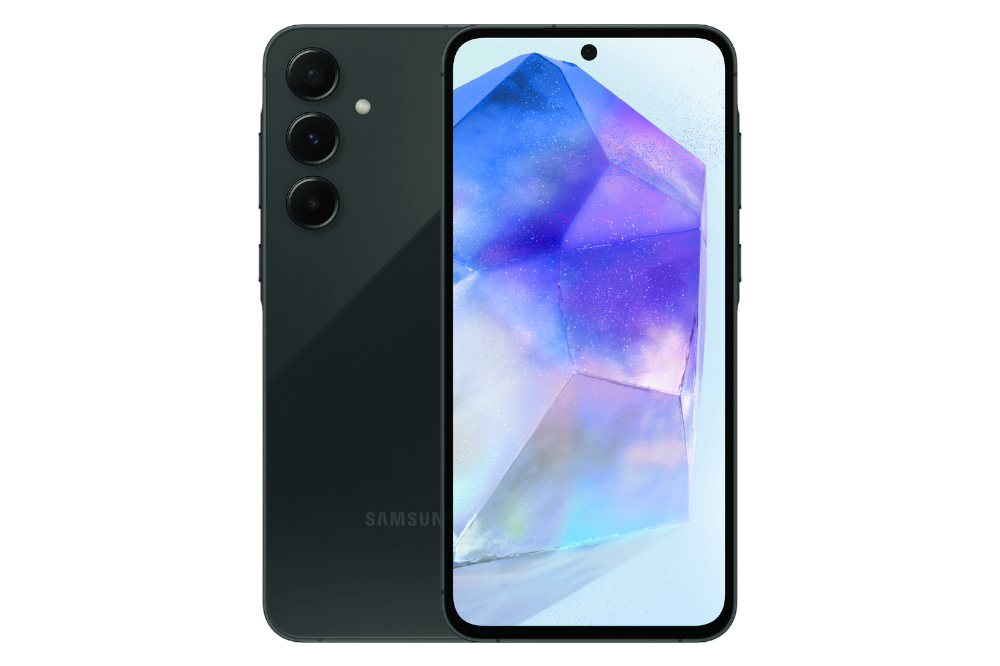
As the world embraces the next generation of mobile connectivity, Samsung has once again raised the bar with the unveiling of the highly anticipated Samsung Galaxy A55 5G. This mid-range powerhouse promises to deliver an unprecedented combination of cutting-edge features, impressive performance, and affordability, making it a tempting proposition for tech enthusiasts and value-conscious consumers alike.
This phone promises a blend of affordability, 5G connectivity, and functionalities that cater to everyday users. But with numerous options available, a crucial question arises: Is the Samsung Galaxy A55 5G the perfect fit for you?
Delving into the Specs
The Samsung Galaxy A55 5G exudes a premium look and feel that belies its mid-range positioning. It boasts a spacious 6.6-inch Super AMOLED display with FHD+ (1080 x 2340 pixels) resolution. This translates to vibrant colors, deep blacks, and a sharp viewing experience, ideal for watching videos or browsing the web. The 120Hz refresh rate ensures smooth scrolling and transitions, adding a touch of premium feel to the user experience.
The device’s body is crafted from a combination of Gorilla Glass Victus on the front and back, complemented by an aluminum frame, providing a perfect balance of style and durability.
The phone comes with an IP67 rating for dust and water resistance. This means it can withstand accidental splashes and brief submersion in up to 1 meter of freshwater for 30 minutes, providing peace of mind in case of minor spills or unexpected downpours.
Under the hood, the phone houses the new Exynos 1480 processor, built on a 4nm architecture. This promises significant performance improvements over its predecessor, with up to 32% better GPU performance and 15% better CPU performance, according to Android Authority. This translates to efficient handling of everyday tasks and the ability to run even moderately demanding games without hiccups.
The phone comes in three storage variants: 128GB with 8GB RAM, 256GB with 8GB RAM, and a top-of-the-line option with 256GB storage and 12GB RAM. While the base model offers ample space for most users, the option to expand storage via a micro SD card up to 1TB provides additional flexibility for those who require extra room for media or applications.
Camera Capabilities of Samsung Galaxy A55
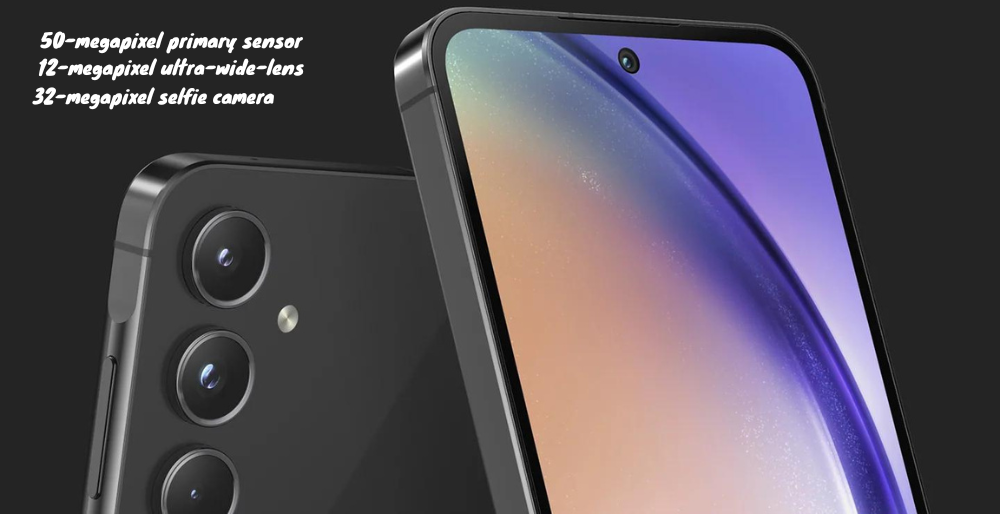
The Samsung Galaxy A55 5G sports a triple-camera system on the rear. It boasts an impressive triple-camera setup on the rear, led by a 50-megapixel primary sensor with an f/1.8 aperture, 1/1.56-inch sensor size, 1.0µm pixel size, and optical image stabilization (OIS).
This is complemented by a 12-megapixel ultra-wide-angle lens with a 123-degree field of view and a 5-megapixel macro lens for capturing intricate details.
The rear camera system is further bolstered by features like LED flash, panorama mode, HDR, and the ability to record 4K video at 30 frames per second. On the front, the device houses a 32-megapixel selfie camera with an f/2.2 aperture, capable of recording 4K video at 30fps, ensuring stunning self-portraits and video calls.
Network and Connectivity
The Galaxy A55 5G lives up to its name by offering support for the next generation of mobile data connectivity. This translates to blazing-fast internet speeds, allowing for faster downloads, smoother streaming, and a more responsive online experience.
At the heart of the Samsung Galaxy A55 5G lies the powerful Exynos 1480 chipset, an octa-core processor that combines four Cortex-A78 cores clocked at 2.75GHz and four Cortex-A55 cores running at 2.0GHz. This potent combination, coupled with up to 12GB of RAM and UFS storage options of 128GB or 256GB (expandable via microSD), ensures seamless multitasking and lightning-fast app performance.
However, the true highlight of this device is its 5G connectivity, which promises to unlock unprecedented download and upload speeds, low latency, and a future-proof mobile experience.
The phone also supports the following network technologies: GSM / HSPA / LTE.
In terms of physical connectivity, the phone comes equipped with a USB Type-C 2.0 port for charging and data transfer. It also supports Wi-Fi 802.11 a/b/g/n/ac/6 with dual-band capability and Bluetooth 5.3 for wireless connections. NFC (market/region dependent) allows for contactless payments and other functionalities.
In addition to its 5G capabilities, the Samsung Galaxy A55 5G offers an in-display optical fingerprint sensor for secure and convenient biometric authentication, as well as sensors like an accelerometer, gyroscope, compass, and barometer (in select regions).
Battery and Charging
Keeping the Samsung Galaxy A55 5G powered through your busiest days is a massive 5000mAh non-removable battery. This impressive battery capacity, combined with Samsung’s power optimization algorithms, promises exceptional battery life, allowing you to stream, game, and multitask without worrying about frequent recharges. Furthermore, the phone supports 25W fast charging, allowing you to quickly top up the battery when needed.
Design and Software
The Galaxy A55 5G features a sleek and stylish design with a glass front (Gorilla Glass Victus), a glass back (Gorilla Glass), and an aluminum frame. This gives the phone a premium look and feel while offering protection against scratches and minor bumps. It comes in four color options: Ice Blue, Lilac, Navy, and Lemon.
The Samsung Galaxy A55 5G runs on the latest Android 14 operating system, complemented by Samsung’s intuitive One UI 6.1 skin. This combination offers a smooth and user-friendly experience, with a wealth of customization options and features tailored to enhance your productivity and entertainment needs. From the always-on display to the virtual proximity sensing, the Galaxy A55 5G is designed to provide a seamless and convenient user experience.
The Price Factor of the Samsung Galaxy A55
The Samsung Galaxy A55 5G sits comfortably within the affordable mid-range smartphone category. While the exact pricing might vary depending on your region, retailer, and chosen storage variant, here’s a general breakdown to guide your decision:
Budget-Conscious Choice (128GB + 8GB RAM): Starting at an attractive price of $525, this base model caters perfectly to users seeking a balance between affordability and essential features. It offers ample storage for most users and delivers a smooth experience for everyday tasks.
Storage Upgrade for Power Users (256GB + 8GB RAM): Requiring more space for media and applications? This variant boasts 256GB of storage, priced slightly higher at around $580. This option provides peace of mind for those who store a significant amount of photos, videos, and games on their phone.
Top-Tier Performance (256GB + 12GB RAM): For users prioritizing uncompromised performance and multitasking capabilities, the top-of-the-line option with 256GB storage and 12GB RAM hits the mark. This configuration is expected to be priced at around $600, offering the most powerful combination within the A55 5G series.
Remember: These prices are estimates and might differ slightly depending on your specific market and retailer.
So, the question remains: Is the Samsung Galaxy A55 5G the right phone for you?
Here’s who might find it ideal:
Budget-conscious users: This phone offers excellent value for the price, catering to those who don’t want to splurge on a top-of-the-line flagship.
5G enthusiasts: Looking to experience the next generation of connectivity? The Galaxy A55 5G provides access to blazing-fast internet speeds.
Users seeking a capable everyday device: The phone offers a smooth user experience with a long-lasting battery, a decent camera system, and a large, vibrant display, making it suitable for everyday tasks, browsing, and casual gaming.
However, if you:
Prioritize top-of-the-line camera performance: While the camera system is decent, it might not satisfy photography enthusiasts seeking the absolute best image quality.
Demand the absolute fastest processing power: For hardcore gamers or users who require the most powerful processing muscle, high-end flagships might be a better fit.
Prefer a phone with a headphone jack: The Galaxy A55 5G omits the 3.5mm headphone jack, so you’ll need to use wireless headphones or a USB-C adapter.
The Samsung Galaxy A55 5G emerges as a compelling option in the mid-range segment. It delivers a blend of affordability, 5G connectivity, a feature set that caters well to everyday users, and a stylish design. With a spacious display, a capable processor, a long-lasting battery, and a decent camera system, the phone offers excellent value for the price. Carefully consider your needs and preferences to determine if the Samsung Galaxy A55 5G aligns with your smartphone requirements.
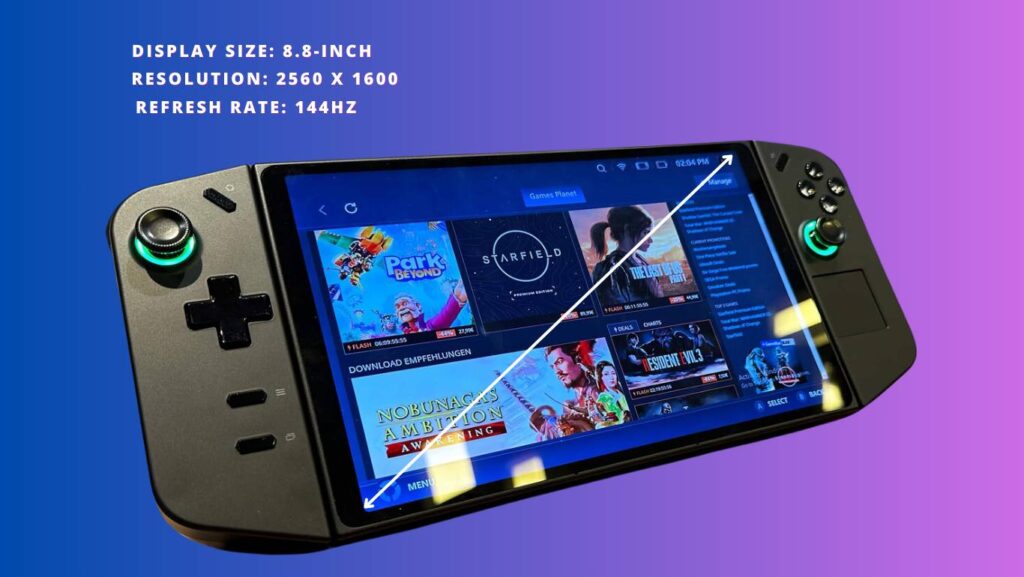
The Lenovo Legion Go has carved a niche for itself in the burgeoning high-performance handheld gaming market. This portable Ryzen Z1 gaming device boasts impressive features that cater to gamers seeking a cloud-compatible QHD+ gaming console experience on the go.
Lenovo Legion Go 8.8″
Brand: Lenovo Screen Size: 8.8 inches Color: Black RAM: 16 GB Operating System: Windows 11 Home CPU: 3.3 GHz processor Storage: Solid state hard drive (SSD)
However, its strengths come with some caveats, making it a compelling option for a specific kind of user. This extensive Lenovo Legion Go review delves into the device’s capabilities, limitations, and target audience to help you decide if it’s the right fit for you.
Display and Refresh Rate
The crown jewel of the Legion Go is undoubtedly its 8.8-inch display. Unlike its competitors with 7-inch screens, the Legion Go offers a stunning QHD+ resolution (2560 x 1600) for incredibly sharp visuals. Coupled with an industry-leading 144Hz refresh rate, the display delivers butter-smooth gameplay, especially for fast-paced titles.
The 16:10 aspect ratio offers a unique viewing experience compared to traditional 16:9 displays, providing a slightly taller canvas that feels immersive for various game genres. The 500 nits brightness display ensures excellent visibility even in well-lit environments.
Performance and Software
At the heart of the Legion Go lies the AMD Ryzen Z1 processor. While not the absolute top-of-the-line option, it delivers capable performance for a portable gaming console. Paired with 16GB of LPDDR5 RAM, the Legion Go can handle most modern titles at 1080p resolution with high settings and maintains smooth frame rates in many less demanding games even at the native QHD+ resolution.
However, users pushing the device to its limits with the most demanding AAA titles at QHD+ might encounter occasional frame drops. This trade-off between power and portability is crucial to remember when comparing the Legion Go to bulkier gaming laptops.
The Legion Go utilizes Lenovo Vantage software for managing system performance, fan settings, and RGB lighting. Additionally, the Legion Go is cloud-gaming compatible, allowing users to stream games from services like Xbox Cloud Gaming and NVIDIA GeForce Now for an expansive library of titles. However, its Legion Space software dedicated to gaming features is still under development.
Compared to competitors like the Steam Deck and ROG Ally, Legion Space currently lacks features like extensive gamepad remapping capabilities or the ability to save custom mappings for individual games. Additionally, users have reported issues like stuttering SD card readers and the absence of proper gyro support at launch.
Despite these shortcomings, Lenovo has shown commitment to improving the software. They have been transparent with the community, actively addressing bugs and implementing new features based on user feedback. For instance, they have addressed initial launch issues like requiring users to manually update the software or reach for specific buttons on the device.
They are also working on features like adjustable fan curves, joystick deadzone adjustments, and FPS limiters. This ongoing development process offers hope for future improvements to the Legion Go’s software experience.
Design and Ergonomics: Lenovo Legion Go Review
The Legion Go boasts a detachable controller design, offering both handheld and traditional console-like gaming experiences. The controllers are well-sized and feature responsive buttons, analog sticks, and triggers.
However, some users might find the overall design a bit bulky and heavy compared to other mobile gaming options, especially considering its weight of 1.88 pounds, which is half a pound heavier than the Steam Deck and ROG Ally. The 10-point touch screen allows for intuitive control in certain games and provides versatility when navigating the Windows interface.
The Legion Go includes a sturdy kickstand that allows users to prop the device up on a table for comfortable tabletop gaming or even vertical positioning for reading. This versatility adds to the device’s appeal for users who want a multifunctional entertainment device beyond just gaming.
Battery Life and Connectivity
The Legion Go’s battery life is decent, lasting around 3–4 hours on average, depending on usage and settings. This falls short of the Steam Deck, which can offer closer to 5 to 6 hours of gameplay on similar titles. It supports fast charging via its USB-C port, allowing users to quickly recharge during breaks.
In terms of connectivity, the Legion Go offers Wi-Fi 6 for smooth online gaming and Bluetooth 5.1 for connecting wireless peripherals. It also boasts two USB-C ports with 40Gbps of USB4 bandwidth, allowing users to plug in a keyboard, SSD, or even a Thunderbolt 3 external GPU without removing their charger lead. This connectivity advantage is worth considering for users who plan to use the Legion Go for tasks beyond gaming.
The Legion Go runs on Windows 11 Home, which offers flexibility and familiarity for users accustomed to the Windows ecosystem. This allows them to access a wider range of software and games beyond those specifically designed for handheld gaming platforms.
However, Windows 11 isn’t necessarily optimized for handheld gaming in the same way that Valve’s SteamOS on the Steam Deck is. This can manifest in issues like games not launching in full-screen mode or requiring additional configuration for optimal performance.
Ultimately, the choice between Windows and SteamOS depends on individual preferences and needs. If you prioritize extensive software options and the flexibility of a traditional PC experience, Windows might be a good fit.
However, if you prioritize a more streamlined and gaming-focused experience optimized for handheld use, the Steam Deck’s SteamOS might be a better choice.
Pros and Cons of the Lenovo Legion Go
While the Lenovo Legion Go boasts impressive features for a handheld gaming PC, it’s not without its drawbacks. Let’s break down the key advantages and limitations to help you decide if it’s the right choice for you.
Pros:
Large, high-resolution display: The Legion Go boasts an impressive 8.8-inch QHD+ display, offering stunning visuals and a more immersive gaming experience compared to smaller-screened competitors.
Detachable controllers: The ability to detach the controllers provides versatility, allowing users to switch between handheld and traditional console-like gaming experiences.
Windows 11 compatibility: Running on Windows 11, the Legion Go offers wider software and game compatibility compared to dedicated handheld gaming consoles.
Functional Windows tablet: The touchscreen and Windows 11 make it usable beyond gaming, allowing users to browse the web, read ebooks, and stream video.
Decent performance: While not the absolute top performer, the Legion Go delivers capable performance for a handheld gaming PC, handling most modern titles at 1080p with high settings.
Unique mouse mode: The detachable controller can transform into a five-button vertical mouse, offering an alternative control option for specific tasks.
Extensive connectivity: Two USB-C ports with 40Gbps bandwidth allow for connecting various peripherals like keyboards, external storage, and even a Thunderbolt 3 GPU.
Cons:
Shorter battery life: Compared to some competitors, the Legion Go’s battery life falls short, lasting around 3-4 hours on average, which might be limiting for extended gaming sessions.
Software quirks: The Legion Space software is still under development and lacks features like extensive gamepad remapping capabilities currently offered by competitors.
Windows not optimized for handheld gaming: While offering broader software compatibility, Windows 11 isn’t necessarily optimized for handheld gaming like SteamOS on the Steam Deck, potentially leading to issues like games not launching in full screen.
Bulkier design: Weighing 1.88 pounds, the Legion Go is heavier than some competitors and might not be ideal for users who prioritize ultra-portability.
Unreliable sleep mode: Users have reported issues with the device waking up unexpectedly from sleep mode, further impacting battery life.
Limited mouse mode functionality: The transformation process for the mouse mode isn’t entirely seamless, and the small touchpad on the remaining controller might not be suitable for extended use compared to dedicated laptops.
By weighing these pros and cons, you can make an informed decision about whether the Lenovo Legion Go aligns with your needs and preferences as a potential handheld gaming PC.
Who Should Consider the Lenovo Legion Go?
Desire a functional Windows tablet: The Windows 11 operating system and touchscreen functionality allow for use beyond gaming, making it a suitable option for tasks like web browsing, reading, and streaming video.
Prioritize extensive software compatibility: Windows offers access to a wider range of software and games compared to dedicated handheld gaming consoles.
Are comfortable managing battery life: While not the worst, the Legion Go’s battery life falls short of some competitors, and users might need to be mindful of power consumption for extended gaming sessions.
Are receptive to software updates and improvements: Lenovo has shown commitment to improving the Legion Go’s software, and users should be comfortable with potential updates and bug fixes.
Who Might Want to Look Elsewhere?
While the Legion Go offers a compelling package, it might not be the ideal choice for everyone. Users who:
Prioritize pure power and performance: The Legion Go might not be as powerful as some high-end gaming laptops in a more portable form factor.
Demand exceptional battery life: For extended gaming sessions without access to a power outlet, the Legion Go’s battery life might be insufficient.
Prefer a more streamlined and gaming-focused experience: SteamOS on the Steam Deck might be a better choice for users who prioritize a system optimized for handheld gaming.
Dislike bulky devices: The Legion Go is heavier than some competitors and might not be suitable for users who prefer ultra-portable options.
Conclusion
The Lenovo Legion Go is a compelling option for gamers seeking a powerful and versatile handheld gaming PC. It is a capable handheld gaming PC offering a large, high-resolution display, detachable controllers, and Windows 11 versatility. Its high-resolution display, smooth refresh rate, and cloud gaming capabilities make it a standout choice. However, its bulkier design and occasional performance limitations at the highest resolution might deter some users. Its shorter battery life, software quirks, and Windows-specific considerations make it essential to weigh the pros and cons carefully before making a purchase decision. Ultimately, the Lenovo Legion Go caters to a specific niche of gamers looking for a powerful and portable gaming solution for both local and cloud-based titles.
The modern business landscape is a whirlwind of dynamic challenges and fierce competition. In this environment, fostering a high-performing and engaged workforce is no longer a perk but a fundamental necessity. Regular performance reviews serve as a cornerstone for achieving this goal, offering invaluable opportunities to:
Identify and cultivate employee strengths and areas for improvement.
Establish clear, measurable goals that align with individual and organizational aspirations.
Provide constructive feedback that fosters professional development and growth.
Ultimately, drive employee engagement and propel your organization towards success.
However, traditional paper-based review methods often fall short, becoming time-consuming, susceptible to bias, and lacking the structure necessary for effective feedback and goal tracking. This is where employee review software steps in, revolutionizing the way organizations approach performance management.
In this comprehensive guide, we’ll delve deep into the world of employee review software in 2024, empowering you to:
Supercharge your performance evaluation processes with efficient and streamlined tools.
Gather valuable feedback from various perspectives, fostering a culture of continuous learning and growth.
Drive organizational growth by unlocking the full potential of your workforce.
By the end of this exploration, you’ll be equipped to find the perfect employee performance management software solution that aligns seamlessly with your specific needs and empowers your organization to thrive in the ever-evolving business landscape.
The Power of Effective Reviews in the Modern Workplace
Regular performance reviews offer numerous benefits for both organizations and employees. They provide a structured framework for continuous feedback, development, and goal setting, fostering a culture of growth and engagement in the modern workplace.
Setting clear expectations and goals: Aligning individual aspirations with organizational objectives fosters focus and motivates employees to strive for excellence.
Identifying areas for development: By pinpointing strengths and weaknesses, organizations can invest in targeted training and development opportunities, empowering employees to reach their full potential.
Providing and receiving constructive feedback: Regular feedback, both positive and constructive, is crucial for employee growth. Employee review software facilitates this process by creating a platform for open communication and continuous improvement.
Improving employee engagement: Feeling valued and appreciated is a key driver of employee engagement. Effective performance reviews demonstrate an organization’s commitment to its workforce, fostering a sense of ownership and loyalty.
Top Employee Review Software Options in 2024
While the ideal employee review software ultimately depends on your specific needs and priorities, here’s a glimpse into some top contenders in 2024, showcasing their unique strengths:
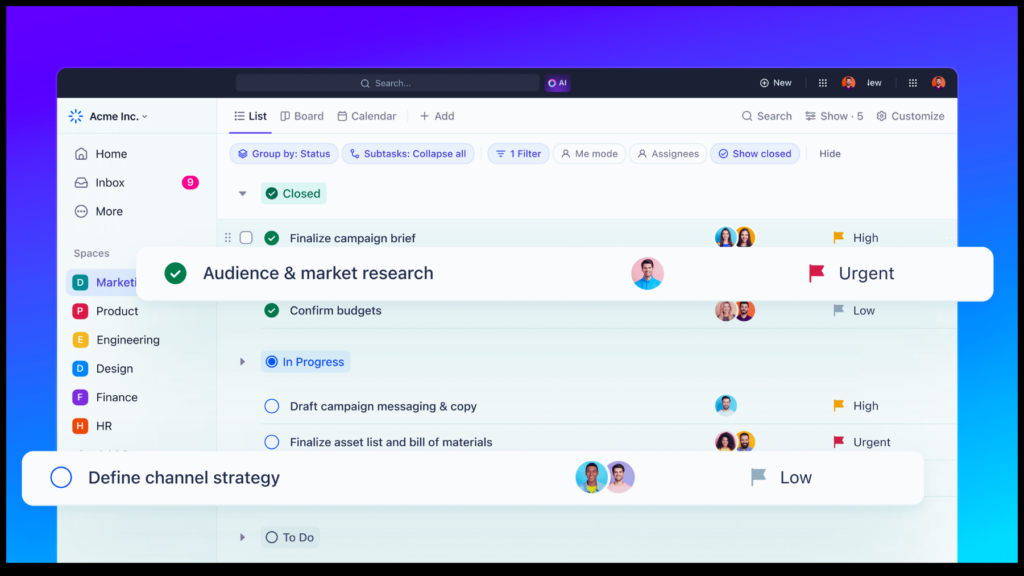
ClickUp isn’t just software, it’s your strategic command center. Imagine a centralized hub where your team effortlessly plans, organizes, and collaborates on every project, big or small. ClickUp empowers you to do just that, with a suite of powerful tools at your fingertips.
Think tasks, documents, chats, goals, whiteboards, and more, are all seamlessly integrated into a single platform. No more juggling between multiple apps, no more scattered information hindering your progress. ClickUp fosters a streamlined workflow, allowing your team to focus on what truly matters: delivering exceptional results.
Customization is key. ClickUp understands that every team has unique needs. That’s why it offers unmatched flexibility, allowing you to tailor the platform to perfectly fit your specific workflows. With just a few clicks, you can configure views, automate tasks, and set up features that empower your team to reach its full potential.
ClickUp is built for all teams, of all sizes. Whether you’re a bustling startup or a well-established enterprise, ClickUp scales to your needs, ensuring maximum productivity regardless of your team’s structure. Boost your efficiency, streamline collaboration, and achieve new heights of success—all within the powerful ecosystem of ClickUp.
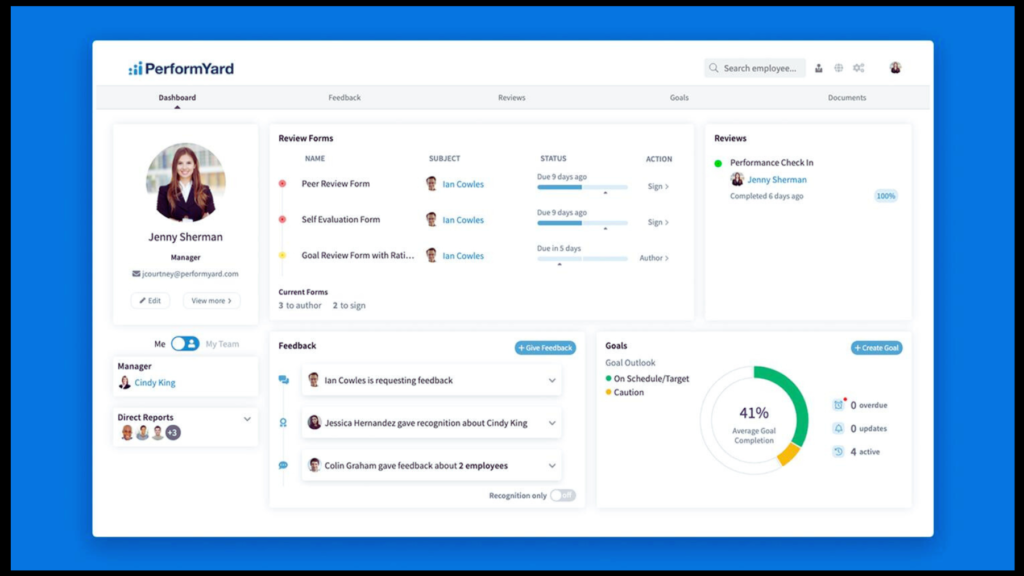
Struggling to navigate the complexities of traditional performance management? Introducing PerformYard, your one-stop shop for streamlined and engaging employee reviews. This user-friendly platform goes beyond basic review forms, offering a comprehensive toolkit that empowers you to build your vision of performance management.
PerformYard seamlessly integrates performance reviews, check-ins, goal management, continuous feedback, and engagement surveys into a single platform. This natural feedback loop fosters a continuous development culture, allowing you to unlock the full potential of your workforce. With scientifically validated engagement surveys informing your strategy and a highly adaptable platform, PerformYard becomes your trusted partner on the journey toward a highly engaged and productive team.
PerformYard caters to organizations seeking a flexible solution. It boasts a robust feature set, including:
360-degree reviews: Gain comprehensive insights from various perspectives, fostering a well-rounded understanding of employee performance.
Project-based reviews: Evaluate performance on specific projects, offer targeted feedback, and recognize individual contributions.
Rating scales: Customize rating scales to align with your organization’s specific values and performance expectations.
Continuous feedback: Encourage ongoing dialogue and development through continuous feedback features, promoting a growth mindset within your workforce.
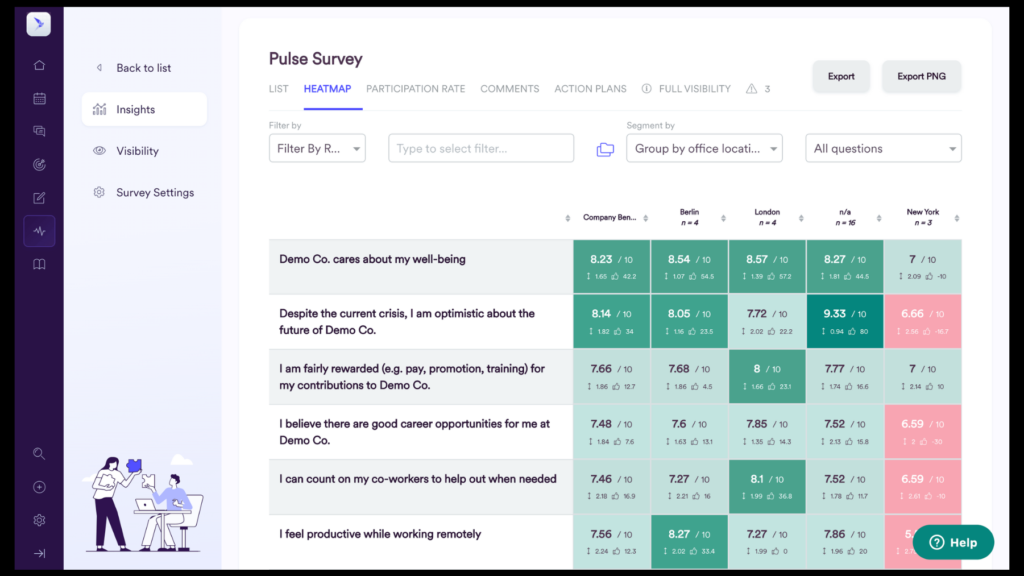
Leapsome isn’t just performance management software, it’s a catalyst for growth. Imagine a platform that empowers you to bridge the gap between performance, engagement, and development within your workforce. Leapsome, trusted by CEOs and HR teams at companies like Spotify and Unity, is your one-stop shop for achieving exactly that.
Leapsome goes beyond traditional solutions, offering a comprehensive people enablement platform. This means you get a powerful suite of tools, all seamlessly integrated, to manage:
Goals & OKRs: Set clear, measurable objectives and track progress towards success, fostering alignment and accountability.
Performance Reviews & 360s: Conduct effective reviews, gather valuable feedback from multiple perspectives, and gain a well-rounded understanding of employee performance.
Development Frameworks: Implement structured development plans to empower employees to continuously learn and grow.
Employee Learning & Onboarding: Streamline onboarding processes and provide seamless access to comprehensive learning resources.
Employee Engagement Surveys: Gauge employee sentiment and uncover insights to drive meaningful engagement initiatives.
Feedback & Praise: Foster a culture of open communication through continuous feedback mechanisms and timely recognition.
Compensation & Promotions: Make informed decisions regarding compensation and promotions with data-driven insights.
Meetings: Facilitate efficient and productive meetings with integrated collaboration tools.
Leapsome caters to forward-thinking organizations seeking a holistic approach to people management. It equips you to create a thriving work environment where employees are engaged, empowered, and continuously developing.
15Five isn’t just software, it’s a catalyst for thriving people and businesses. Imagine a performance management platform that goes beyond traditional methods, combining cutting-edge technology with human-centered principles. 15Five empowers HR leaders to accelerate engagement, performance, and retention through a suite of powerful tools.
Powered by generative AI and custom analytics, 15Five equips you with the insights needed to make data-driven decisions and cultivate a thriving workforce. Experience the impact of:
360° performance reviews: Gain a comprehensive understanding of employee performance from various perspectives, fostering a culture of open communication and shared ownership.
Engaging surveys: Identify strengths and areas for improvement through in-depth engagement surveys, allowing you to tailor strategies that resonate with your employees.
Goal tracking: Set clear, measurable goals that align with individual and organizational aspirations, keeping everyone focused and motivated.
Manager development: Equip your managers with the skills and resources they need to become effective coaches and development partners for their teams.
Ongoing feedback tools: Foster a culture of continuous learning and growth through features like guided 1-on-1s and regular check-ins, ensuring ongoing dialogue and personalized development opportunities.
15Five prioritizes the human element, recognizing that successful performance management requires more than just data points. Its human-centered approach fosters a positive and supportive work environment, where employees feel valued and empowered to reach their full potential.
BambooHR eliminates inefficiencies by centralizing everything you need on a single, user-friendly platform. Automate routine tasks, workflows, and integrations to free up valuable time and ensure consistent, accurate data management. Imagine collecting and storing electronic signatures with ease, streamlining your people operations while saving time and the environment.
BambooHR caters to the entire employee lifecycle, providing tools to manage everything from onboarding and performance reviews to time tracking and benefits administration. This holistic approach ensures your organization runs smoothly, leaving you with the peace of mind to focus on what matters most—your people.
BambooHR brings clarity and unity to your HR data, offering you the accuracy, security, and coordination you need to manage your workforce with confidence. Sleep soundly knowing your HR information is securely centralized and readily accessible, empowering you to make informed decisions and keep your organization thriving.
BambooHR is a cloud-based HR platform offering various functionalities, including:
Employee data management: Store and manage employee information efficiently in a centralized system.
Time-off tracking: Track employee leave requests and absences seamlessly.
Performance management: Conduct performance reviews, set goals, and provide feedback within the platform, streamlining the entire process.
Review: 4.4/5
Price: $6 per user per month.
Essential Factors to Consider
Selecting the ideal employee review software is akin to finding the perfect puzzle piece—it needs to seamlessly integrate with your existing systems, cater to your specific needs, and empower your people. To ensure you make an informed decision, here’s a comprehensive breakdown of key factors to consider when evaluating different software options:
Ease of Use: Imagine a scenario where your employee review software becomes a barrier to adoption, not a facilitator. User-friendliness is paramount. Intuitive interfaces, clear navigation, and readily available support resources are crucial for ensuring widespread user acceptance and maximizing the software’s impact. Consider the technical expertise of your HR team and employees when evaluating different platforms.
Features and Functionalities: Not all employee review software is created equal. Each offers a unique set of features and functionalities. Identify the specific needs of your organization. Do you prioritize goal setting and progress tracking? Or are features like 360-degree feedback and performance analytics essential? Create a clear list of desired functionalities and ensure the software you choose adequately addresses them, without offering unnecessary bells and whistles that might complicate workflows.
Integration Capabilities: Seamless integration with existing HR systems, payroll software, or learning management platforms can significantly enhance efficiency and streamline data management. Evaluate the software’s integration capabilities and ensure it can connect with your existing ecosystem, eliminating the need for manual data entry and fostering a centralized platform for talent management.
Customization Options: A one-size-fits-all approach rarely works in the dynamic world of HR. Look for employee review software that offers customization options. This could include tailoring performance review templates, setting specific evaluation criteria, or personalizing dashboards to display the most relevant metrics for your organization. Customization empowers you to adapt the software to your unique workflows and organizational culture.
Scalability and Adaptability: Organizations are not static entities. As your company grows, your employee review software should be able to grow with you. Choose a solution that is scalable and adaptable, accommodating an expanding workforce and evolving needs. Look for features like adding new users, increasing storage capacity, or integrating with additional software as your requirements change.
Data Security and Privacy: Employee data is highly sensitive, and protecting it is paramount. Ensure the employee review software you choose prioritizes robust data security measures. Look for features like encryption, access controls, and regular security audits to safeguard confidential information. Additionally, the software should comply with relevant data privacy regulations, such as GDPR and CCPA.
Customer Support and Training Resources: Even the most user-friendly software might require occasional assistance. Choose a vendor that offers reliable customer support, readily available through multiple channels like phone, email, or live chat. Additionally, access to comprehensive training resources, including video tutorials, user guides, and webinars, empowers your team to leverage the software’s full potential and troubleshoot any challenges they might encounter.
Pricing and Value for Money: Employee review software comes in a range of pricing options, from free versions with limited features to comprehensive solutions with advanced functionalities. Determine your budget allocation for this software and ensure it aligns with the value it offers. Don’t solely focus on the price tag; consider the return on investment (ROI) by evaluating the software’s potential to improve efficiency, enhance employee engagement, and ultimately, contribute to the organization’s success.
By carefully considering these factors, you can move beyond simply choosing employee review software. You can strategically select a solution that empowers your people, streamlines processes, and propels your organization towards achieving its full potential. Remember, the ideal software should be a seamless extension of your talent management strategy, not a cumbersome add-on.
Ready to harness the power of employee review software and unlock the full potential of your workforce? Here are some recommended next steps:
Download free trials: Many vendors offer free trials, allowing you to explore the software firsthand and evaluate its suitability for your needs.
Contact vendors: Schedule demos with shortlisted vendors to gain a deeper understanding of their offerings and ask specific questions relevant to your organization.
Seek industry resources: Utilize industry publications, webinars, and online communities to stay updated on the latest trends and best practices in employee review software.
By following these steps and carefully considering the information presented in this comprehensive guide, you’ll be well-equipped to choose the ideal employee review software solution for your organization. Remember, investing in effective performance management is not just an expense, but a strategic investment in the future success of your workforce and your organization as a whole.
What are the benefits of using employee review software?
Top 5 FAQs about employee review software: What are the benefits of using employee review software? employee review software offers numerous benefits, including: Streamlined processes: Automating workflows and centralizing data saves time and effort compared to traditional paper-based review methods. Improved efficiency: Simplifies the review process, allowing managers and employees to focus on providing and receiving valuable feedback. Enhanced data-driven decision-making: Provides valuable insights through comprehensive reporting and analytics, enabling data-driven decisions regarding performance management and development. Reduced bias: Standardized review structures and consistent feedback mechanisms help minimize bias and ensure fair evaluations. Fostered continuous feedback: Encourages ongoing conversations and development through features like goal tracking and progress updates.
How much does employee review software cost?
Pricing for employee review software varies significantly depending on several factors, including: Features and functionalities: More comprehensive solutions with advanced features typically carry higher price tags. Number of users: The cost often scales based on the number of employees who will be using the software. Deployment model: Cloud-based solutions typically have subscription fees, while on-premise solutions might involve upfront licensing costs. It’s crucial to research and compare pricing options from different vendors to find a solution that aligns with your budget and needs.
Is employee review softwarecomplex to use?
User-friendliness varies across different software options. Many platforms offer intuitive interfaces and readily available resources like training materials and support channels to ensure a smooth learning curve, even for users with limited technical expertise.
What are some key features to consider when choosing employee review software?
Here are some key features to consider: Goal setting and tracking: Allows setting clear goals, monitoring progress, and aligning individual aspirations with organizational objectives. Performance reviews: Provides structured templates and functionalities for conducting effective performance evaluations. Feedback management: Facilitates the exchange of constructive feedback between managers and employees. Reporting and analytics: Generates insightful reports and data visualizations to track performance trends and make informed decisions. Integration with existing HR systems: Seamlessly integrates with existing HR software for centralized data management.
What are some emerging trends in employee review software?
Here are some trends to watch: Increased focus on employee experience: Software is being incorporated with features that enhance the employee experience, fostering a sense of ownership and engagement in the review process. Integration with artificial intelligence (AI): AI-powered features like automated feedback analysis and personalized recommendations are becoming more prevalent, offering deeper insights and tailored guidance. Mobile-first design: As the workforce continues to embrace mobile devices, employee review software is prioritizing mobile-friendly interfaces for on-the-go access and convenience.
In the ever-evolving world of mobile phone service, a new wave of options is gaining traction: Mobile Virtual Network Operators (MVNOs). These providers offer an alternative to traditional giants like Verizon, AT&T, and T-Mobile by leasing access to their existing networks, allowing them to deliver competitive pricing and unique plans. Among these MVNOs, US Mobile has emerged as a popular choice for budget-conscious users seeking a balance of affordability, good coverage, and valuable features.
This US Mobile review delves into the details of their offerings, helping you decide if they could be the right fit for your needs.
US Mobile Pros & Cons
Pros
Affordability: US Mobile offers budget-friendly plans, ideal for cost-conscious consumers.
Customization: Tailored plans ensure users pay only for necessary features.
Network Choice: Access to T-Mobile and Verizon networks provides flexibility.
Responsive Support: Prompt assistance is available via live chat and phone support.
Cons
Limited Features: Some plans may lack certain features, like priority data.
Coverage Constraints: Rural areas may experience coverage limitations.
Self-Service Focus: Heavy reliance on self-service options may not suit all users.
Plans and Pricing
US Mobile caters to various data consumption habits with its array of prepaid plans, both limited and unlimited. The unlimited options include the Unlimited Premium and Unlimited Starter plans, catering to different budgetary constraints and data requirements.
The Unlimited Premium plan, starting at $50 per month, boasts unlimited talk, text, and a generous 100GB of premium data, along with a substantial 50GB mobile hotspot. In contrast, the Unlimited Starter plan, priced at $29 per month, offers unlimited talk, text, and 35GB of priority data, coupled with a 10GB mobile hotspot. Both plans come with international data perks, albeit in varying amounts.
For those seeking more budget-friendly options, US Mobile presents limited data plans and talk/text-only plans. These plans are designed to cater to specific needs while ensuring affordability and flexibility.
US Mobile extends its cost-saving benefits to families through multi-line discounts and shareable data plans. The Unlimited Starter and Unlimited Premium plans offer multi-line pricing, making them enticing options for families or group plans. Additionally, shared data plans allow for cost-efficient utilization of data across multiple lines, making them ideal for households with varying data requirements.
As an MVNO, US Mobile relies on existing carrier networks for coverage. This review explores their network coverage and real-world performance to help you understand their reach and potential limitations.
Leveraging Established Networks: As mentioned earlier, US Mobile utilizes both T-Mobile and Verizon networks, offering users access to their respective coverage areas. T-Mobile boasts a nationwide footprint, while Verizon is known for its extensive 5G network. This combination provides US Mobile customers with broad coverage across the United States. However, it’s crucial to remember that coverage can vary depending on your specific location.
Coverage Considerations: While US Mobile offers broad coverage, it’s essential to check their coverage map before committing to a plan. This map, readily available on their website, allows you to input your zip code and visualize the network strength in your area. It’s important to note that, similar to major carriers, coverage can be weaker in rural areas compared to urban centers.
Real-World Performance: US Mobile users generally report positive experiences with network performance. Several online reviews and user testimonials on platforms like Trustpilot and Reddit highlight consistent data speeds and reliable call quality, particularly on the Warp 5G plans utilizing the Verizon network. However, it’s important to remember that individual experiences can vary depending on location, network congestion, and device compatibility.
To get the most accurate picture of network performance in your specific area, consider checking online forums and user reviews relevant to your location. Additionally, US Mobile offers a 10-day free trial with select plans, allowing you to test their network performance firsthand before committing to a long-term plan. This trial period can be invaluable in gauging if US Mobile’s network meets your needs and expectations.
Beyond diverse plans and network coverage, understanding the features and customer service offered by US Mobile is crucial for a well-rounded US Mobile Review 2024. This section delves into these aspects, providing valuable insights for potential users.
US Mobile Features
US Mobile goes beyond simply offering mobile data and voice services. They provide a range of features designed to enhance the user experience, including:
Self-Service Account Management: US Mobile prioritizes user empowerment by offering a user-friendly app and website for self-service account management. This allows users to manage their plans, monitor usage, make payments, and troubleshoot issues independently.
Convenient Features: Depending on the chosen plan, users can enjoy additional features like voicemail transcription, international roaming, and hotspot functionality. Voicemail transcription translates voicemails into text, offering convenient access to messages. International roaming allows users to make and receive calls and texts while traveling abroad (on select plans). Hotspot functionality transforms your phone into a mobile Wi-Fi hotspot, allowing you to share your data connection with other devices.
Bring Your Own Device (BYOD) Compatibility: US Mobile is compatible with a wide range of unlocked GSM phones, allowing users to bring their existing devices instead of being locked into specific phone contracts. This flexibility is a significant advantage for individuals who prefer to choose their own handsets.
It’s important to note that US Mobile, unlike some major carriers, does not offer priority data on all plans. This means that during peak usage times, data speeds might be throttled compared to users on premium plans with prioritization. However, their diverse plan options allow users to choose a level of data prioritization that aligns with their needs and budget.
Customer Service & Support
US Mobile prides itself on delivering exceptional customer service. They offer a variety of support channels to assist users with any questions or concerns:
24/7 Live Chat: This real-time chat option allows users to connect with a customer service representative immediately, addressing inquiries promptly and efficiently.
Phone Support: US Mobile also provides traditional phone support for those who prefer a voice interaction with a customer service representative. Here is the phone number that you can contact: 1(878) 205-0088.
Online Resources: Their website features a comprehensive knowledge base with FAQs, troubleshooting guides, and other helpful resources, empowering users to find solutions independently. Additionally, you can contact them via email at “help@usmobile.com“.
Positive User Experiences:
Customer reviews on platforms like Trustpilot and Reddit generally commend US Mobile’s customer service. Users frequently highlight the responsiveness, helpfulness, and professional demeanor of their customer service representatives. This positive feedback reinforces US Mobile’s commitment to providing a customer-centric experience.
Conclusion
US Mobile is ideally suited for budget-conscious users seeking a balance of affordability, features, and coverage. They cater to individuals with unlocked GSM phones who prioritize customizable plans and appreciate responsive customer service. However, it’s essential to acknowledge potential drawbacks like limited features on some plans, possible coverage limitations, and a reliance on self-service options.
Before committing to any mobile service provider, it’s crucial to carefully consider your individual needs and priorities. Compare plans from various providers, including US Mobile, to ensure you find the best fit for your budget, data usage, and desired features. Additionally, explore their coverage map and user reviews in your specific location to understand signal strength and potential limitations.
If you’re interested in learning more about US Mobile, we encourage you to visit their website to explore their plans, features, and coverage details in greater depth. This US Mobile review aims to equip you with the necessary information to make an informed decision and determine if US Mobile is the right choice for your mobile service needs.
In an era of ever-increasing mobile phone bills, Boost Mobile prepaid plans offer a breath of fresh air for budget-conscious users. Ditching the complexities and hidden fees of traditional postpaid contracts, Boost Mobile empowers users to take control of their mobile spending with a variety of flexible and affordable prepaid plans.
Why Choose Boost Mobile Prepaid Plans?
For many individuals seeking a reliable and cost-effective way to stay connected, Boost Mobile prepaid plans present a compelling alternative. Unlike postpaid plans, which lock users into contracts and often come with surprise charges, Boost Mobile’s prepaid approach offers several distinct advantages:
No Contracts: Say goodbye to lengthy commitments and hidden fees. Boost Mobile prepaid plans allow you to choose the plan that best suits your needs, without the burden of a contract.
Budget-Friendly: Gain complete control over your mobile expenses. With Boost Mobile prepaid plans, you only pay for the services you use, ensuring you never overspend on your monthly phone bill.
Flexibility: Need more data in one month? Next? Boost Mobile prepaid phone plans offer the flexibility to adjust your plan based on your changing needs. Simply choose the plan that best suits your current usage and adjust it as needed.
Peace of Mind:Boost Mobile prepaid plans eliminate the risk of overages and surprise charges. Since you prepay for your service, you’ll always know exactly how much you’re spending, ensuring peace of mind when managing your budget.
Boost Mobile prepaid plans provide a convenient and cost-effective way to stay connected, offering a refreshing alternative to the complexities and hidden fees of traditional postpaid contracts. In the following sections, we’ll delve deeper into the various Boost Mobile prepaid plan options, equipping you with the knowledge to choose the plan that perfectly aligns with your individual needs and budget.
Boost Mobile Prepaid Plans
Boost Mobile offers a variety of prepaid plans in the US, catering to different needs and budgets. They are known for their affordable options, making them a great choice for budget-conscious individuals or families. Let’s explore what they offer:
Looking to try Boost Mobile without breaking the bank? Their new customer offer is a great way to do just that:
Unlimited data, talk, and text: Dive headfirst into a world of connectivity with unlimited data, talk, and text for just $12.50 in your first month (regular price: $25). This introductory offer allows you to test the waters of unlimited usage without feeling the pinch of a hefty price tag. Stream your favorite shows, chat with loved ones endlessly, and stay connected on the go without worrying about exceeding your data allowance.
Bring your own phone (BYOP) for the lowest price: Looking to keep your trusty phone companion by your side? Boost Mobile makes it easy and affordable. Bring your own compatible device (BYOP) and enjoy significant savings compared to purchasing a new phone. They support a wide range of unlocked phones, so head over to Boost Mobile’s website to check if your device is ready to join the Boost Mobile family.
Get a SIM card: To activate your new plan and unlock the world of Boost Mobile, you’ll need a SIM card. These handy cards act as the key to your mobile network connection. You can conveniently purchase a SIM card online through Boost Mobile’s website or visit select retailers to grab one in person.
Boost Mobile understands that not everyone needs unlimited everything. For those who want a budget-friendly option without compromising on quality, these Everyday Low Price Plans are worth considering. Once the initial offer ends, Boost Mobile offers several everyday low-priced plans available online:
5GB plan: Perfect for casual data users, it includes 5GB of data, unlimited talk and text, a mobile hotspot, and free shipping for just $15 per month. This plan is ideal for those who primarily use their phone for basic tasks like browsing the web, checking emails, and occasional streaming. If you’re not a heavy data consumer but still want enough data for browsing, social media, and occasional streaming, this 5GB plan is a great fit.
Unlimited plans: Choose from three different unlimited options, each catering to different data usage needs:
Basic Unlimited ($25 per month with Autopay): This plan provides unlimited talk, text, and mobile data, making it a great choice for individuals who heavily rely on their phones for communication and entertainment. However, note that autopay enrollment is required for this price.
Unlimited Plus ($40 per month): This plan offers everything in the Basic Unlimited plan, plus 12GB of mobile hotspot data. This is ideal for users who frequently share their internet connection with other devices. If you’re a data enthusiast, the Unlimited Plus Plan offers more data for your streaming, gaming, and work needs.
Unlimited Plus with Todo Mexico ($60 per month): Enjoy all the benefits of Unlimited Plus, along with unlimited calling to landlines and mobiles in Mexico. This plan is a good option for people who travel to Mexico regularly and want to stay connected with friends and family there. It’s also a good option for people who make a lot of international calls and texts. However, if you’re a heavy data user, you may want to consider a different plan that offers more data.
Looking for a cost-effective option for the long haul? Boost Mobile offers yearly plans that can save you money compared to monthly payments:
1GB Yearly Plan: Pay just $100 upfront for 12 months of service with 1GB of data. This plan is suitable for those who primarily use Wi-Fi and only need a limited amount of mobile data.
Unlimited Yearly Plan: Pay just $300 upfront for 12 months of unlimited talk, text, and data. This is a great option for heavy data users who want the convenience of an all-inclusive plan for a year.
While the core Boost Mobile prepaid plans cater to a wide range of needs, it’s important to be aware of additional options that might further enhance your experience:
12-Month Prepaid Plans: Boost Mobile occasionally offers 12-month prepaid plans, providing substantial cost savings for users who commit to a year of service upfront. These plans often come with increased data allowances or additional features at a discounted price. However, it’s crucial to note that availability and specific details may vary depending on your location. To stay updated on the latest offerings and ensure they are available in your area, visiting Boost Mobile’s website is highly recommended.
Add-on Options: Life throws curveballs, and your mobile data needs might fluctuate from month to month. Thankfully, Boost Mobile prepaid plans offer the flexibility to adapt with convenient add-on options. If you find yourself running low on data during a specific month, you can easily purchase an additional data package to boost your allowance and avoid service interruptions. Additionally, international calling add-ons are available for those who frequently connect with loved ones abroad.
Remember, exploring these additional options empowers you to tailor your Boost Mobile prepaid plans to your evolving needs and budget, ensuring a truly personalized mobile experience.
Conclusion
Boost Mobile prepaid plans stand out for their flexibility, affordability, and commitment to empowering users to take control of their mobile experience. By understanding the features and limitations of each plan, along with exploring additional options like 12-month plans and add-ons, you can craft the perfect Boost Mobile prepaid plan that seamlessly integrates into your life.
Remember, the ideal plan depends on your individual needs and budget. Consider your typical data usage, the importance of unlimited talk and text, and any specific requirements, like mobile hotspot functionality or international calling. By carefully evaluating these factors, you can confidently choose the Boost Mobile prepaid plan that unlocks a world of connectivity and convenience.
Are you ready to experience the freedom and affordability of Boost Mobile prepaid plans? Visit Boost Mobile’s website or locate your nearest Boost Mobile store to explore the latest plans and activate the one that perfectly aligns with your needs. Embrace the power of choice and take control of your mobile experience with Boost Mobile.
For programmers, the laptop isn’t just a tool; it’s a portal to worlds of creativity and innovation. Yet, choosing the “best” laptop for programming can feel like navigating a sprawling codebase—dangerous and complex.
This guide will illuminate your path, showcasing the top 5 contenders for the Best Laptops for Programming in 2024. Buckle up, as we delve into the key factors that define a programmer’s dream machine, and unveil the champions that balance power, portability, and price.
Requirements for the Best Laptops for Programming
The right laptop can be your coding fortress, a haven where lines of code flow effortlessly and deadlines are vanquished with ease. But with a plethora of options vying for your attention, deciphering the “best” laptop can feel like navigating a complex algorithm. Worry not, fellow coders! This section delves into the essential programming laptops requirements in 2024, empowering you to make informed choices and unlock your coding potential.
Processor: Aim for Intel Core i5/i7 or AMD Ryzen 5/7 for smooth performance, especially with complex tasks. More cores and higher clock speeds are your allies.
RAM: 16GB is your minimum for comfortable multitasking, but 32GB or even 64GB offers ultimate fluidity for power users.
Storage: Opt for an SSD for lightning-fast speeds. 512GB is a good starting point, but consider 1TB+ for large datasets. Don’t forget encryption for security.
Display: Prioritize high resolution (Full HD+; 1920 x 1080 pixels+) with good color accuracy and viewing angles. Anti-glare helps in harsh lighting. Touchscreens can be handy for specific development tools.
Battery Life: Aim for at least 8 hours for mobile coders, even longer if possible.
Keyboard: Choose a comfortable keyboard with good key travel and responsiveness. Backlighting is great for late nights. Experiment to find your perfect match.
Ports: Ensure enough USB ports (A & C), HDMI, and an SD card reader if needed. Docking stations offer more options for fixed setups.
Operating System:Windows or macOS? Choose based on your preferences and software compatibility. Research thoroughly.
These are the core requirements, but specific needs might influence your choice. Consider factors like graphics processing for machine learning, specific software compatibility, or upgradeability. Research is key!
By understanding these criteria, you’ll be well-equipped to decode the technical jargon and identify the laptop that speaks your coding language. Now, let’s unveil the top 5 contenders for the Best Laptops for Programming in 2024.
Display: 16-inch OLED Resolution: 2,346 x 3,456 Refresh rate: 120 Hz CPU: Apple M3 Pro 12-core Graphics: Apple M3 18-core RAM: 32GB of Memory Storage: 512GB SSD Battery: Up to 18 hours Weight: 4.7 pounds
Behold, the Apple MacBook Pro 16 M3, the behemoth of the Apple lineup, ready to conquer even the most demanding programming tasks. This is one of the best laptops for programming students. It isn’t just a laptop; it’s a portal to unparalleled performance, housed in a sleek and iconic design. Let’s delve into what makes it the best laptop for programming in 2024.
Raw Power Under the Hood: At the heart of this beast lies the latest-generation Apple M3 Pro chip, boasting 12 cores of processing prowess. Imagine code compiling in a blink, applications running seamlessly, and complex simulations chugging along effortlessly. Yes, the M3 Pro delivers that kind of punch. This isn’t just about speed; it’s about efficiency, with the M3 architecture sipping power like a seasoned coder savoring their coffee.
Fueling Your Workflow: But raw power needs its partners. That’s where 32GB of unified memory steps in, providing ample workspace for your coding projects and demanding applications. Multitasking becomes a breeze, and even the most memory-hungry software won’t faze this MacBook Pro.
Visuals That Inspire: Feast your eyes on a stunning 16-inch OLED display with a resolution that puts your code front and center in breathtaking detail. The 120Hz refresh rate ensures smooth scrolling and animations, keeping you focused and in the zone. Whether you’re crafting intricate user interfaces or diving into complex data visualizations, this display is your canvas for brilliance.
Built to Endure: The MacBook Pro 16 M3 isn’t just powerful; it’s built to last. The classic, high-quality Apple build is renowned for its durability, ensuring your coding companion can withstand the rigors of your workflow. And with a battery life that stretches to nearly 20 hours, you can code freely, unplugged and uninhibited.
Beyond the Numbers: But numbers only tell part of the story. This MacBook Pro is a programmer’s dream come true, not just for its specs, but for the experience it delivers. The scissor-switch keyboard offers a satisfying typing experience, each keystroke a testament to your coding prowess. The sleek and elegant design exudes professionalism, making a statement wherever you code.
Is it the ferfect fit?
While the MacBook Pro 16 M3 packs a punch, it’s not for everyone. Its heavier weight might not suit nomadic coders, and the premium price tag could be a hurdle for budget-conscious programmers. However, if you seek an uncompromising powerhouse with a big screen, a phenomenal keyboard, and the Apple ecosystem, this is the Best Laptop for Programming contender you can’t ignore.
One of the best laptops for programming students is the Dell XPS 15. This sleek, beautifully crafted machine boasts powerful performance across the board, but a connectivity conundrum might leave some coders wanting more.
Powerhouse Under the Hood: Let’s start with the good stuff. The XPS 15 packs a punch with a 12th-gen Intel Core i7-12700H CPU and Nvidia GeForce RTX 3050 Ti graphics. Compile code at lightning speed, run demanding applications seamlessly, and even dabble in some light gaming – this machine is built to handle it all. But wait, there’s more! The 16GB of DDR5 RAM ensures smooth multitasking, letting you juggle your code editor, browser, and other tools without a hitch.
A Feast for the Eyes (and Code): Immerse yourself in your code on a stunning 15.6-inch 3.5K OLED display. With its vibrant colors, deep blacks, and sharp resolution, this display is a programmer’s dream. Plus, the 60Hz refresh rate ensures smooth scrolling and animations, keeping you focused and in the coding flow.
Portable Powerhouse: Who says power can’t be portable? The XPS 15 strikes a balance, offering impressive battery life that lets you code on the go without constantly searching for an outlet. This is no small feat considering the powerful components inside!
The Connectivity Catch: Now, here’s where things get interesting. While the XPS 15 is undeniably sleek and portable, its limited connectivity options might be a dealbreaker for some programmers. With only three USB Type-C ports, you’ll likely need a separate docking station if you rely on multiple peripherals or external displays. This adds bulk and complexity, negating some of the portability benefits.
The 2023 Conundrum: Intrigued by the XPS 15 but hesitant about the limited ports? The 2023 model might seem like a tempting solution. However, our tests revealed performance that falls short compared to its “perfect” predecessor. So, the trade-off between slightly better connectivity and slightly weaker performance becomes a crucial consideration.
The Dell XPS 15 is a powerful and portableBest Laptop for Programming contender, but its limited connectivity might be a sticking point for some coders. Consider your workflow and peripheral needs carefully before diving into this sleek machine.
Remember, the “perfect” laptop is the one that perfectly suits your coding style and needs. Do your research, weigh the pros and cons, and choose the machine that empowers you to write code, not compromises!
Imagine a laptop that’s as lightweight as your code editor and as powerful as a compiled masterpiece – that’s the Lenovo ThinkPad X1 Carbon Gen 11. This isn’t just for professionals; it’s for coders on the go, those who crave portability without sacrificing performance. This is one of the best laptops for programming.
Built to Endure, Engineered to Empower: The X1 Carbon Gen 11 is the epitome of sturdy design. Its military-grade durability ensures it can withstand the rigors of your coding adventures, from coffee spills to accidental drops. But don’t be fooled by its toughness; this machine is featherweight at just 2.49 pounds, making it your ideal coding companion for commutes, cafes, or even airplanes.
Performance That Packs a Punch: Under the hood, the X1 Carbon Gen 11 flexes its muscles with the latest Intel Core i5-1355U processor and 32GB of LPDDR5 RAM. Compile code at lightning speed, run demanding applications seamlessly, and multitask like a pro – this machine is built to handle even the most complex programming workflows. With Intel Iris Xe graphics, you can even dabble in some light design work or casual gaming when you take a break from the code.
A Display that Inspires: The 14-inch display, while not the biggest, delivers crisp visuals with a 1080p resolution. But don’t let the base model limit you. If you crave even more vibrancy, opt for the brighter LCD display for outdoor work or the stunning OLED display for a truly immersive coding experience. Remember, a great display can make all the difference when staring at lines of code for hours.
All-Day Power, All-Night Coding: The X1 Carbon Gen 11 won’t leave you stranded mid-code crunch. Its impressive battery life stretches to up to 12 hours, ensuring you can code freely without scrambling for outlets. Plus, the rapid charging technology gets you back to full power in no time, perfect for those unexpected deadlines.
More Than Just Specs: The X1 Carbon Gen 11 offers unique features beloved by coders. The iconic ThinkPad keyboard provides a comfortable and responsive typing experience, essential for those long coding sessions. And the trackpoint stick, a classic ThinkPad feature, offers an alternative mouse input method that some programmers swear by for its precision and efficiency.
The Lenovo ThinkPad X1 Carbon Gen 11 is one of the best laptops for programming because it seamlessly blends portability, performance, and durability. With its featherweight design, powerful components, and long battery life, it’s the perfect companion for coders who value freedom and flexibility without compromising on power.
However, the base display might not be for everyone, and the premium price tag could be a hurdle for budget-conscious programmers. Weigh your needs and preferences carefully before diving into this coding powerhouse!
Tight budget, coding dreams? Fear not, aspiring programmers, for the Dell Inspiron 14 emerges as the best laptop for programming on a budget. This value-packed machine proves that affordability doesn’t have to mean sacrificing performance or practicality. This is one of the best laptops for programmers.
Power on a Dime: Don’t underestimate the punch this budget warrior packs. At its heart lies a 13th-generation Intel Core i7 processor with 10 cores, capable of handling multitasking like a champ. Whether you’re juggling browser tabs, running code editors, or even indulging in some light gaming, the Inspiron 14 tackles it all with ease.
Speed and Storage, Amplified:16GB of fast LPDDR5 memory ensures smooth sailing, even when your coding projects get complex. And with a 1TB SSD, you’ll have ample space for your code libraries, applications, and essential files. Say goodbye to lag and hello to lightning-fast responsiveness.
Portability Perfected: Weighing a mere 2.5 pounds, the Inspiron 14 is your coding companion on the go. Whether you’re coding on the train, plane, or simply seeking a change of scenery, this lightweight machine travels effortlessly. Plus, the 11-hour battery life ensures you can code uninterrupted, even on extended journeys.
Visual Comfort for the Code Warrior: The 14-inch display boasts a 16:10 aspect ratio, offering a wider canvas for your code and documents. This translates to less scrolling and more focus, a boon for those long coding sessions. While the resolution might not be the highest, it delivers clear visuals suitable for most programming tasks.
The Budget-Conscious Caveat: Remember, with affordability comes compromise. The Inspiron 14’s graphics capabilities are geared towards casual gaming, not demanding design work. Additionally, the display might not be ideal for those seeking color-critical tasks.
The Dell Inspiron 14 is the best laptop for programming for budget-minded coders seeking a capable and portable companion. Its powerful processor, ample memory, and long battery life make it a compelling choice for those starting their coding journey or working on less intensive projects.
However, if you require high-end graphics or a color-accurate display, consider exploring other options. Remember, the “perfect” laptop is the one that aligns with your specific needs and budget. Choose wisely, and unleash your coding potential!
Ever feel like your laptop screen is a cramped coding battlefield? Enter the ASUS Zenbook Pro 14 Duo, the best laptop for programming that redefines screen real estate. This innovative machine boasts not one, but two gorgeous OLED displays, transforming your coding experience into a visual feast. It is one of the best laptops for software development.
A Symphony of Screens: The main 14.5-inch display stuns with a 2560 x 1600 resolution and a 120Hz refresh rate, ensuring smooth visuals and vibrant colors. But the true magic lies in the secondary “ScreenPad” display. This innovative touchscreen display sits below the main screen, offering a unique canvas for multitasking and code optimization. Imagine dragging and dropping code snippets, referencing documentation, or even running secondary applications—all without leaving your coding flow.
Powerhouse Under the Hood: The Zenbook Pro 14 Duo isn’t just about looks; it packs a punch. A 13th-generation Intel Core i9 CPU with multiple cores tackles even the most complex code compilations with ease. And for those who dabble in design work or casual gaming, the Nvidia RTX 4050 graphics chip delivers impressive performance thanks to its cutting-edge architecture and DLSS support.
The Portability Paradox: While the dual-screen setup and powerful components scream “desktop replacement,” portability takes a slight hit. The Zenbook Pro 14 Duo weighs 3.5 pounds, making it less ideal for nomadic coders compared to some ultra-thin options. Additionally, the battery life, while decent, might not last through an entire workday unplugged.
The Verdict:
The ASUS Zenbook Pro 14 Duo is the best laptop for programming for those seeking a unique and powerful coding experience. The dual-screen setup, stunning OLED displays, and robust performance make it a productivity powerhouse. However, the weight and battery life might be dealbreakers for some. Weigh your needs carefully and consider if this innovative machine unlocks your coding potential, or if a more portable option might suit you better. Remember, the “perfect” laptop is the one that empowers your coding journey, not one that weighs it down!
Conclusion:
There are so many programming laptops for students in the market. Choosing the best laptop for programming in 2024 is an exciting journey. By understanding your needs, budget, and the strengths of each contender, you’ll unlock the perfect coding companion. Remember, the right laptop can empower you to write code, not regrets. So, dive deeper, research thoroughly, and unleash your coding potential with confidence!
Share your thoughts and experiences in the comments below! Which features matter most to you in a programming laptop? What are your top contenders? Let’s build a vibrant community of coders, sharing knowledge and conquering the code together!