Category: Product Reviews

Unbiased tech product reviews at Tech Innovation Pro. Find in-depth analysis, real-world testing, and honest comparisons. Buy with confidence, explore now!

  • Amazon Fire HD 10 Review: Best Budget Tablet Under $100

    Amazon Fire HD 10 Review: Best Budget Tablet Under $100

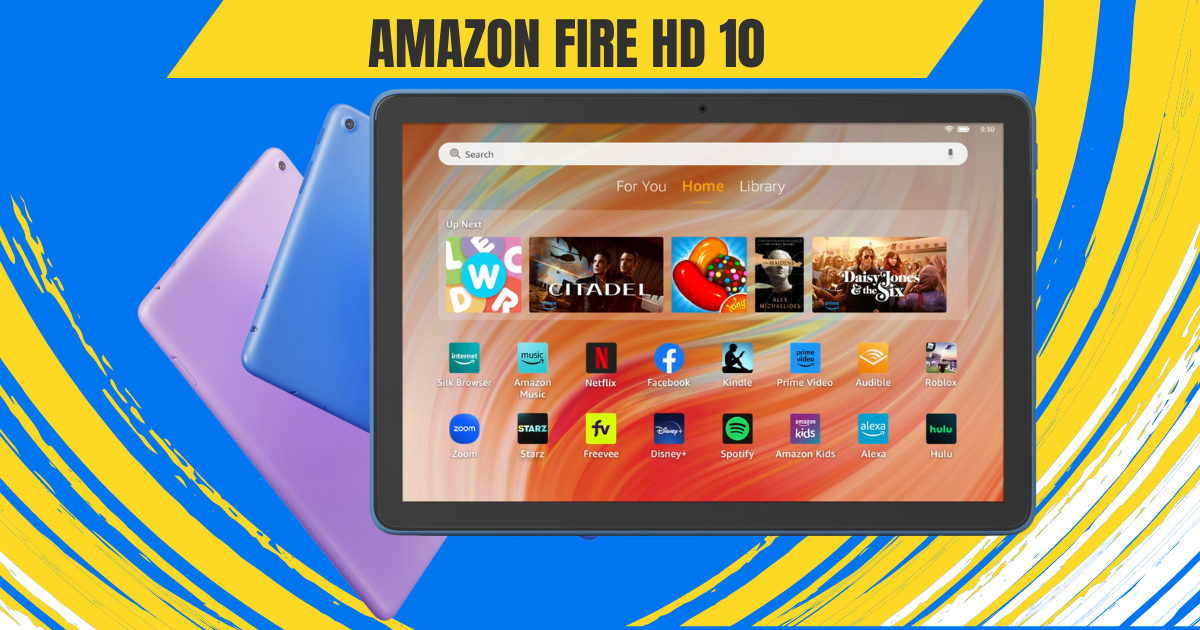
    A tablet that flawlessly fuses entertainment and productivity into a compact yet powerful device—that’s the vision behind the Amazon Fire HD 10 Tablet. This affordable marvel aims to enhance how you relax and have fun. But does it truly deliver tablet paradise on a budget?

    The excitement begins the moment you tear open the box. An exceptional unboxing experience primes you for the Fire HD 10 itself and the goodies bundled within. We’ll take you through that process step-by-step, building anticipation before unveiling the tablet in all its glory.

    This Amazon Fire HD 10 Review will analyze if the Fire HD 10 makes good on Amazon’s promise of an entertainment haven meets productivity powerhouse, all without breaking the bank. We’ll spotlight the tablet’s strengths and weaknesses to determine if it’s the bargain Amazon touts it to be.

    So let’s jump right in and explore whether this tablet ushers relaxation and fun into your life or falls short of expectations. The Amazon Fire HD 10 awaits—along with our unfiltered review.

    First Impressions: A Familiar Face with a Modern Twist

    Multitasking in amazon fire hd 10

    Pulling the Fire HD 10 (2024) out of the box, seasoned tablet users might experience a sense of déjà vu. Imagine vibrant colors, sharp visuals, and content that comes alive on your screen. To protect this visual masterpiece, the display is fortified with aluminosilicate glass, adding an extra layer of durability.

    The Fire HD 10 Tablet boasts a stunning 10.1-inch 1080p display, packing over 2 million pixels for an impressive 224 ppi. With dimensions of 9.69” x 6.49” x 0.34” (246mm x 164.8mm x 8.6mm), the Fire HD 10 Tablet strikes a harmonious balance between a spacious screen and a sleek, portable design.

    Weighing 15.29 oz (433.6g), this tablet is a lightweight companion, making it easy to carry on the go. Actual size and weight may vary by configuration and manufacturing process, ensuring versatility for different user preferences.

    The design retains the classic Fire tablet aesthetic: clean lines, rounded corners, and a hefty bezel around the display. While some might scoff at the lack of trendy edge-to-edge screens, this approach is practical.

    reading in amazon fire hd 10

    The bezel provides a comfortable grip, especially for one-handed reading or movie marathons. Plus, it houses the front-facing camera, making video calls a breeze.

    The real star of the show, however, is the display. Whether you’re engrossed in a captivating novel, binge-watching your favorite show, or browsing through social media, the display does justice to the content. And for those concerned about accidental bumps and drops, the aluminosilicate glass screen offers peace of mind, exceeding the durability of some competitors.

    Amazon Fire HD 10 Review: Performance

    Fueling the device’s capabilities is an octa-core processor, featuring 2x Arm Cortex-A76 up to 2.05 GHz and 6x Arm Cortex-A55 up to 2 GHz, paired with 3GB of RAM. This robust configuration ensures smooth performance across various applications.

    Backed by 3 GB of RAM, the Fire HD 10 Tablet facilitates seamless multitasking. Whether you’re navigating multiple apps or engaging in resource-intensive activities, this tablet is up to the task.

    multitasking in amazon fire hd 10

    This translates to smooth performance for everyday tasks like web browsing, checking emails, and reading ebooks. While it won’t win any speedrunning awards, it handles multitasking with surprising grace, allowing you to seamlessly switch between apps without noticeable lag. Even casual gaming is a pleasant experience, thanks to the 25% performance boost compared to the previous generation.

    Of course, there are limitations. Demanding games or graphically intensive apps might push the hardware a bit too far, resulting in occasional stutters. But for the core functionality most users crave in a tablet, the Fire HD 10 (2024) delivers admirably.

    The Fire HD 10 Tablet offers options of 32 GB (24 GB available to the user) or 64 GB (54.3 GB available to the user) of internal storage. For those with expansive digital libraries, there’s the convenience of a micro-SD slot for up to 1 TB of additional storage. However, it’s important to note that some apps may require installation on internal storage, and updates may impact available space.

    A Battery Built for Binge-Watching

    Amazon fire hd 10 battery life

    One of the biggest concerns with tablets is battery life. After all, who wants their entertainment cut short just as the plot thickens? The Fire HD 10 boasts an impressive 13 hours of battery life for reading, browsing, and video playback. That’s enough to power through a workday, a long commute, or an entire season of your favorite show without reaching for the charger.

    The Fire HD 10 Tablet boasts a convenient charge time, fully powering up in under 4 hours with the provided USB-C cable and 9W power adapter. For an even speedier charge, users can opt for a 15W adapter and USB type C to C cable (sold separately), bringing the full charge time down to under 3 hours.

    Seamless Connectivity: Wi-Fi, Ports & Bluetooth

    Unleash the world at your fingertips with the Fire HD 10 Tablet’s robust connectivity options. Whether you’re streaming movies in a bustling coffee shop, downloading essential files on the go, or connecting your favorite wireless accessories, this tablet ensures you stay seamlessly connected to your digital life.

    Dual-Band Wi-Fi

    Experience the freedom of seamless internet access with dual-band Wi-Fi. Connect to a variety of public and private networks, including 2.4 GHz and 5 GHz frequencies, for smooth browsing, buffer-free video streaming, and fast downloads. Whether you’re catching up on emails at your local library or enjoying a movie marathon at home, reliable Wi-Fi keeps you connected.

    But wait, there’s more! While the Fire HD 10 Tablet doesn’t currently support the latest Wi-Fi 6 standard, the included 802.11a/b/g/n/ac coverage provides ample speed and compatibility for most needs. So, rest assured, you’ll have the bandwidth to handle your daily digital activities with ease.

    Versatile Ports for Every Need

    The Fire HD 10 Tablet doesn’t limit you to Wi-Fi. It boasts a powerful USB-C (2.0) connector, the universal charging standard, ensuring compatibility with a wide range of chargers and devices. Need to juice up your tablet quickly? Simply plug it into any compatible USB-C power adapter for a speedy recharge. But the connectivity doesn’t stop there.

    Expand your storage horizons with the micro-SD slot, supporting up to 1 TB of additional storage. Download entire movie libraries, music collections, or e-book archives without worrying about running out of space. Transfer files effortlessly between your tablet and other devices with the USB-C port, making it a truly versatile connectivity hub.

    Bluetooth Brilliance

    Immerse yourself in rich, wireless audio with Bluetooth 5.3. Connect your favorite headphones, speakers, or even a microphone for hands-free calls. Enjoy crystal-clear sound while listening to music, watching movies, or participating in online meetings. Bluetooth 5.3 also ensures a stable and low-power connection, so you can enjoy extended wireless sessions without worrying about dropped connections or battery drain.

    From streaming movies on the go to connecting your smart home devices, the Fire HD 10 Tablet’s versatile Wi-Fi, ports, and Bluetooth capabilities keep you seamlessly connected to your digital world. So, go ahead, explore, create, and share—the possibilities are endless!

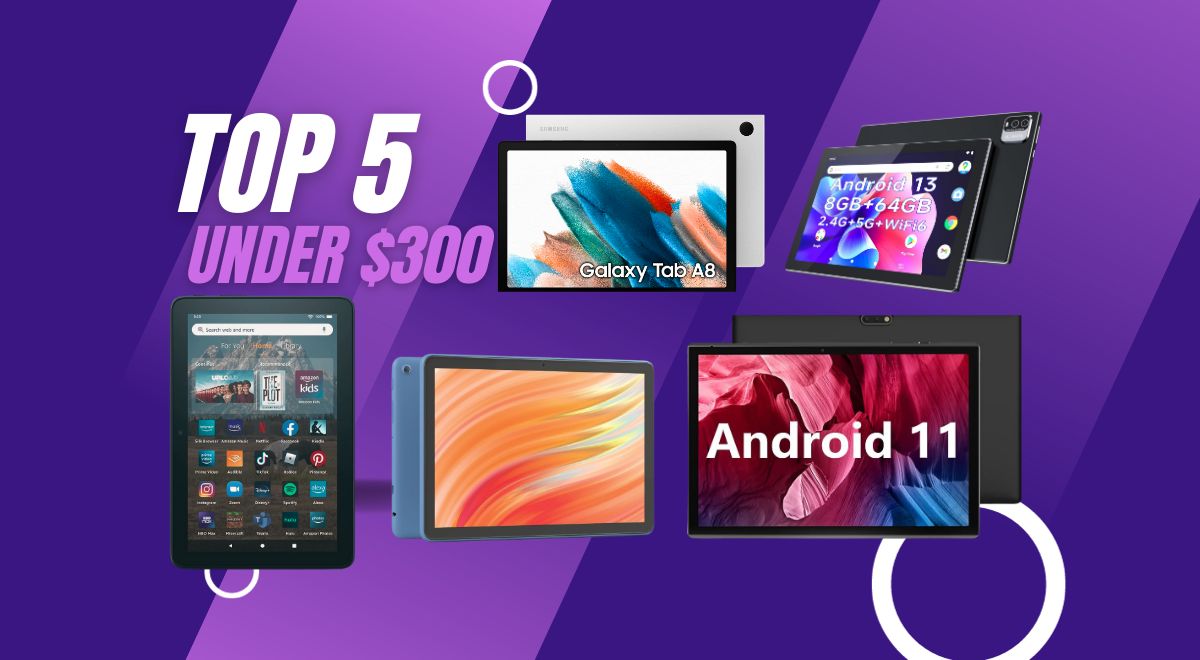
    Also Read: The Best Tablets Under $300: 5 Tablets for School & Fun

    Camera and Audio Features

    The Fire HD 10 Tablet isn’t just about browsing the web and checking emails; it’s also your gateway to capturing precious moments and indulging in rich audio experiences. Let’s delve into the world of sights and sounds offered by this versatile device.

    Camera

    amazon fire hd 10 camera quality

    Equipped with both 5 MP front and rear-facing cameras, the Fire HD 10 Tablet empowers you to freeze-frame life’s special moments. Whether it’s a family gathering, a breathtaking landscape, or a goofy pet video, capture memories in clear, vibrant detail. And with 1080p HD video recording, you can relive those moments in stunning high definition.

    The front-facing 5 MP camera is perfect for capturing engaging selfies and video calls. Look sharp and confident during online meetings, or catch up with loved ones face-to-face with clarity. The rear camera, on the other hand, excels at capturing the world around you. Use it to document your travels, showcase your hobbies, or simply snap fun photos with friends.

    The Fire HD 10 Tablet offers various camera features to enhance your photography experience. Adjust exposure, and white balance, and even experiment with HDR mode to capture stunning shots in challenging lighting conditions. And for those who like to add a personal touch, explore a variety of fun filters and editing tools to make your photos stand out.

    Audio Bliss

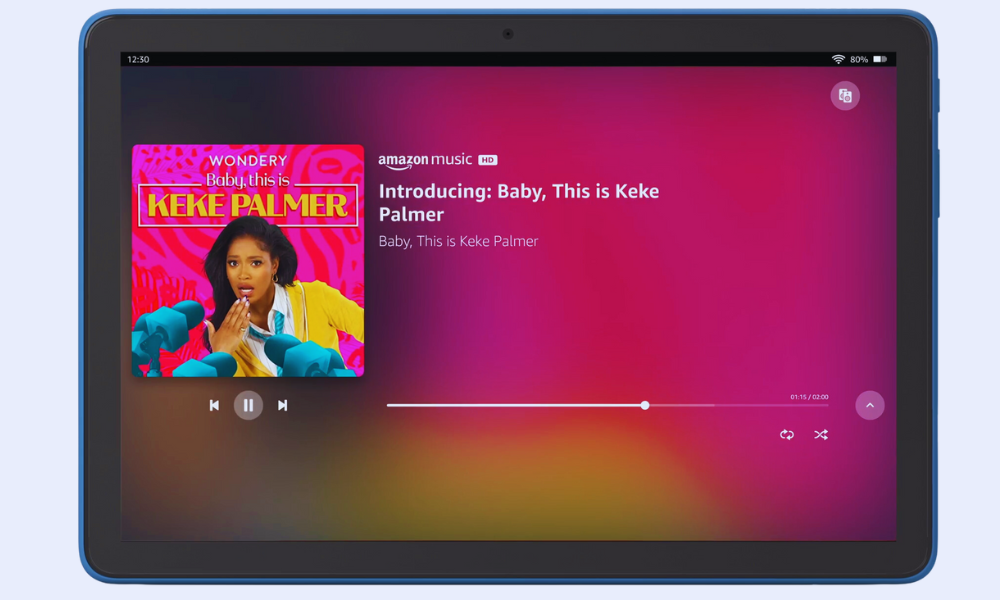
    Get ready to be transported to a world of rich, immersive sound with the Fire HD 10 Tablet’s audio capabilities. The dual integrated speakers deliver clear and balanced sound, perfect for enjoying music, movies, and audiobooks. Crank up the volume with the external volume controls and fill your room with your favorite tunes or the latest blockbuster soundtrack.
    music in amazon fire hd 10

    For a truly private listening experience, plug in your favorite headphones through the 3.5 mm stereo jack. This lets you enjoy high-quality audio without any distractions. But if you prefer a wire-free setup, Bluetooth 5.3 connectivity allows you to connect a wide range of wireless headphones and speakers. Stream music, listen to podcasts, or binge-watch your favorite shows with crystal-clear sound, all without the hassle of wires.

    The Fire Ecosystem: A World of Content at Your Fingertips

    The Fire HD 10 runs on Amazon’s Fire OS, which might raise some eyebrows for Android users. While it lacks access to the full Google Play Store, the Fire OS offers a curated selection of apps, games, and ebooks specifically optimized for the tablet. Think of it as a walled garden, but one overflowing with entertainment options.

    Prime members get access to a treasure trove of content, including Prime Video, Kindle Unlimited, and Amazon Music. Dive into award-winning movies and TV shows, devour bestselling books, or get lost in your favorite tunes—all seamlessly integrated within the Fire OS ecosystem. And for the kids, Amazon Kids+ provides a safe and enriching environment with age-appropriate content and parental controls.

    Speaking of integration, the Fire HD 10 (2024) doubles as a smart home hub. With Alexa built-in, you can control your smart lights, thermostats, and other compatible devices directly from the tablet. So, imagine dimming the lights, setting the mood with music, and settling in for a movie night—all with just your voice. It’s a touch of futuristic convenience that adds to the overall experience.

    Beyond Entertainment

    While relaxation and entertainment might be the Fire HD 10’s forte, it doesn’t shy away from light productivity tasks. The pre-installed Microsoft Office suite lets you create and edit documents, spreadsheets, and presentations on the go. Checking emails, managing your calendar, and taking notes becomes effortless with apps like Gmail, Outlook, and Calendar.

    However, don’t expect to replace your laptop entirely. The lack of a trackpad or keyboard attachment can hinder extensive document editing or heavy multitasking. But for occasional work on the go, checking emails during your commute, or jotting down quick notes, the Fire HD 10 (2024) proves surprisingly capable.

    More Than Meets the Eye: A Family-Friendly Haven

    a family friendly heaven amazon fire hd 10

    Tablets have become a fixture in many households, and the Fire HD 10 recognizes the importance of catering to young users. Amazon Kids+ transforms the tablet into a safe and enriching space for children. This subscription service unlocks a vast library of age-appropriate content, including educational apps, games, books, and videos.

    Parents can set screen time limits, manage content access, and monitor their children’s activity, ensuring a balanced and controlled digital experience.

    But the Fire HD 10 goes beyond mere content control. The tablet doubles as a learning tool, with features like Kid-Friendly Web Filtering and Learn to Read with Alexa. These tools help children navigate the web safely and develop essential reading skills in a fun and engaging way.

    Accessibility Features on the Fire HD 10

    Technology should be accessible to everyone, regardless of ability. Recognizing this, the Amazon Fire HD 10 boasts a wide range of accessibility features designed to empower users with various needs. Let’s delve into some of the key functionalities that make this tablet an inclusive option:

    Visual Impairments:

    • VoiceView Screen Reader: This built-in tool narrates on-screen content, providing audio descriptions of menus, buttons, and text. Users can navigate using gestures and receive audible feedback, making the tablet usable for individuals who are blind or visually impaired.
    • Screen Magnifier: Zoom in on specific areas of the screen for a closer look at text, images, or other elements. This feature aids users with low vision in easily accessing and interacting with content.
    • High Contrast Text and Color Options: Adjust the visual presentation of text and background colors to enhance readability for individuals with visual sensitivities or color blindness.
    • Font Size and Display Size Adjustments: Increase or decrease the size of text and overall display elements to suit individual preferences and visual needs.

    Mobility Impairments:

    • Switch Access: This feature allows users with limited motor skills to control the tablet using external switches or compatible Bluetooth devices. By scanning through on-screen options and selecting choices with switch presses, users can navigate and interact with the tablet without direct touch.
    • Tap to Alexa: Access essential actions and features through on-screen tiles or a keyboard, bypassing the need for touch interaction. This provides an alternative control method for users who have difficulty touching the screen.

    Additional Accessibility Features:

    • Closed Captioning: Enable captions for supported video content to aid users with hearing impairments or those in noisy environments.
    • Kindle Read Aloud: Have Alexa read your Kindle books aloud, transforming text into spoken content for a hands-free listening experience.
    • Microphone and Audio Adjustments: Connect headphones or external speakers for enhanced audio output. Adjust sound settings and enable mono audio for users with specific hearing needs.

    These are just a few examples of the accessibility features available on the Fire HD 10. Amazon’s commitment to inclusivity is evident in the depth and variety of tools offered, ensuring that users with diverse abilities can enjoy the tablet’s entertainment, communication, and learning potential.

    The Verdict: A Budget-Friendly Oasis with Room for Growth

    The Amazon Fire HD 10 isn’t perfect. Power users and those deeply entrenched in the Google Play Store ecosystem might find its limitations frustrating. But for those seeking an affordable tablet for entertainment, light productivity, and family fun, it’s a compelling option. The vibrant display, impressive battery life, and integration with the Fire ecosystem create a relaxing and enjoyable user experience.

    Here’s the breakdown:

    Pros:

    • Excellent Value: Priced significantly lower than comparable tablets, offering great bang for your buck.
    • Vibrant Display: The 10.1-inch Full HD screen delivers sharp visuals and rich colors.
    • Durable Design: Aluminosilicate glass ensures the tablet can withstand everyday bumps and drops.
    • Improved Performance: A 25% faster processor compared to the previous generation for smoother multitasking.
    • Long Battery Life: Up to 13 hours of video playback and browsing keep you entertained on the go.
    • Seamless Fire Ecosystem: Access to Prime Video, Kindle Unlimited, and Amazon Music with built-in Alexa integration.
    • Family-Friendly Features: Amazon Kids+ provides a safe and enriching environment for children.

    Cons:

    • Limited App Selection: No access to the full Google Play Store, restricting app choices.
    • Fire OS Quirks: The Amazon operating system has some limitations compared to stock Android.
    • Not a Productivity Powerhouse: Lacks the processing power and features for demanding tasks.

    Conclusion

    The Amazon Fire HD 10 is a well-rounded tablet that delivers excellent value for the price. With its focus on entertainment, family-friendly features, and long battery life, it’s a perfect companion for relaxing, unwinding, and enjoying digital content. While power users and Google Play Store devotees might want to look elsewhere, for everyone else seeking an affordable and enjoyable tablet experience, the Fire HD 10 is a strong contender.

    Consider investing in the Made for Amazon Stylus Pen if you enjoy note-taking, sketching, or creative activities on your tablet. It seamlessly integrates with the Fire HD 10, unlocking a new dimension of functionality.

    With a 1-year limited warranty and service included, users can enjoy peace of mind knowing their device is supported. Additionally, U.S. customers have the option to purchase extended warranties for 1, 2, or 3 years.

    So, whether you’re looking for a tablet for movie nights, reading adventures, or keeping the kids entertained, the Amazon Fire HD 10 offers a compelling mix of features and affordability.

    Remember, it’s not about chasing the latest specs but finding a device that fits your needs and budget perfectly. And for many users, the Fire HD 10 might just be the oasis they’ve been searching for.

  • BLU C5L Max Review: Best Budget Phone with Big Battery?

    BLU C5L Max Review: Best Budget Phone with Big Battery?

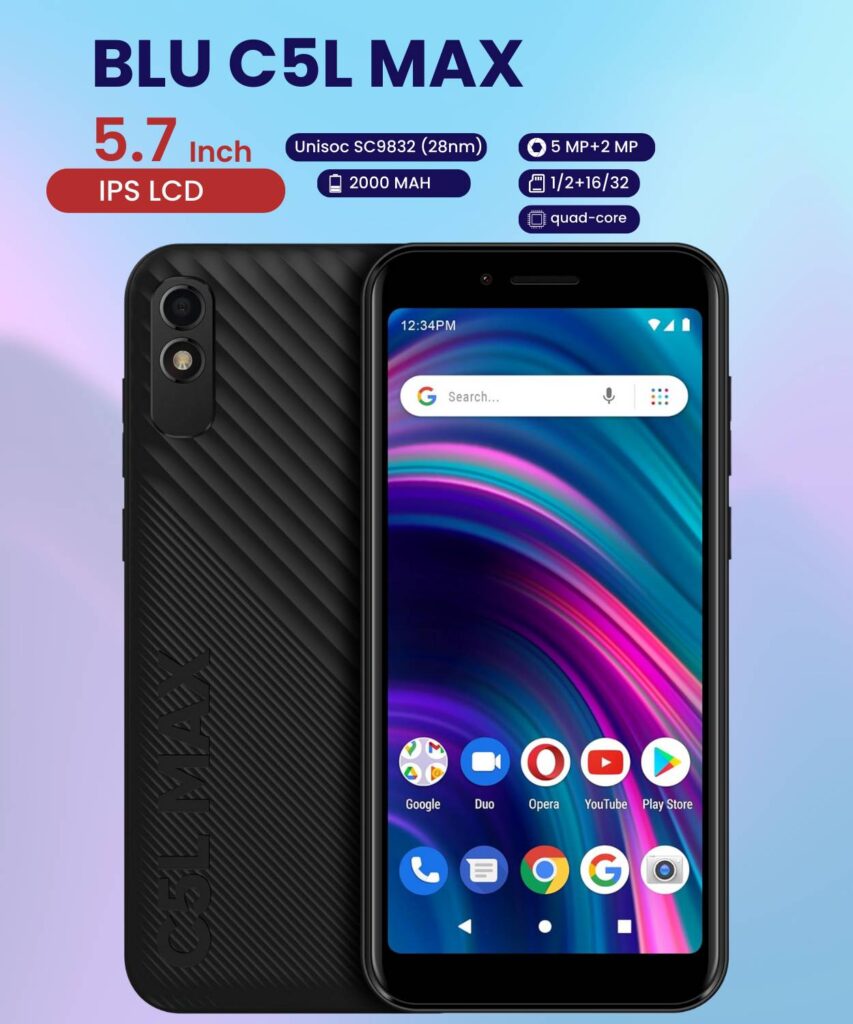
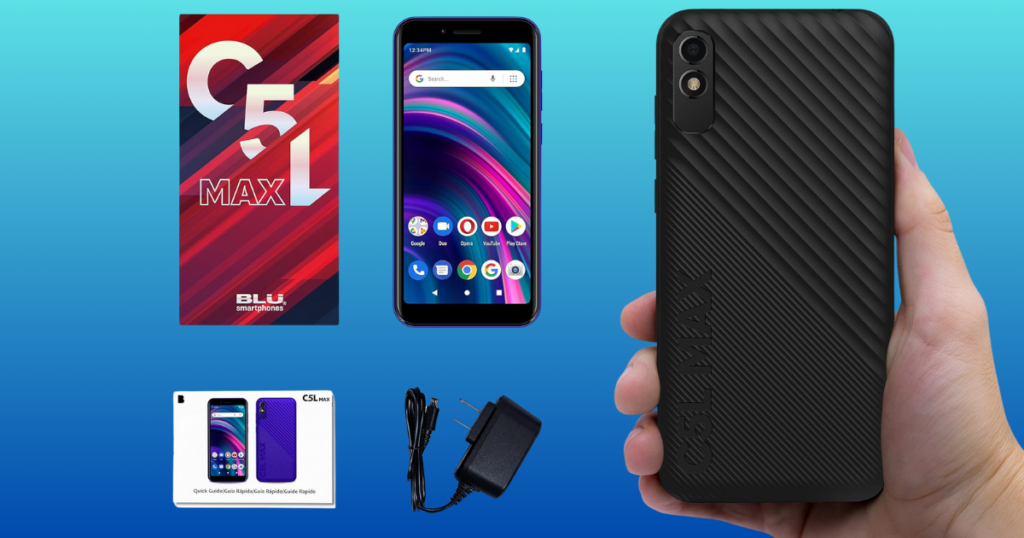
    Blu C5L Max

    In the budget phone realm, finding a device that strikes the right balance between affordability and functionality can feel like searching for a unicorn. Enter the BLU C5L Max, a smartphone aiming to deliver a decent mobile experience without breaking the bank. But does it hit the mark, or is it all budget cuts and compromises? Let’s delve into the details and see if the C5L Max lives up to its name.

    The C5L Max doesn’t stray far from the design language of other budget phones. Its plastic back and frame offer a no-frills aesthetic, available in classic colors like black, blue, and red. While it might not win any design awards, the phone feels surprisingly sturdy in hand, and the textured back provides a decent amount of grip. At 5.7 inches, the display offers ample screen real estate for everyday tasks, and the bezels, while noticeable, don’t feel overly intrusive.

    Display

    The display itself is a 5.7-inch IPS LCD with a 480 x 960 resolution. While not the sharpest panel on the market, it gets the job done for browsing the web, checking emails, and streaming videos. Colors appear decent enough, and viewing angles are acceptable for casual use. Don’t expect HDR content to shine here, but for everyday tasks, the display delivers a functional viewing experience.

    Blu C5L Max | 2024

    Visual Feast

    The BLU C5L Max smartphone, announced in December 2021, features an IPS LCD display with a resolution of 480 x 960 pixels and an 18:9 aspect ratio. This translates to clear and sharp visuals for everyday use, from browsing the web to checking emails and social media.

    IPS Technology for Natural Colors

    Under the hood, the display utilizes IPS (In-Plane Switching) technology. This translates to vibrant colors and wide viewing angles, ensuring a comfortable experience whether you’re holding the phone straight or tilted. No more squinting to see your content at awkward angles!

    Refresh Rate and Touch Responsiveness

    Unfortunately, information regarding the refresh rate and touch sampling rate remains unknown. However, based on user reviews and similar devices in the budget category, you can expect a standard 60Hz refresh rate and a touch sampling rate that ensures smooth touch response for basic navigation and interactions.

    Brightness for Sunny Days

    While the typical brightness level is currently unknown, most budget phones in this range offer sufficient brightness for indoor use. However, outdoor visibility under direct sunlight might require adjusting the brightness to maximum.

    No Fancy Extras, Just the Basics

    The C5L Max keeps things straightforward when it comes to display features. You won’t find fancy extras like HDR support, always-on display, or curved edges. These features are typically reserved for higher-end devices and might not be dealbreakers for budget-conscious users who prioritize essential functionality.

    The Verdict: A Decent Display for Everyday Use

    Overall, the BLU C5L Max display offers a no-frills experience that gets the job done for everyday tasks. While it won’t wow you with cutting-edge specs, it provides clear visuals, decent color reproduction, and comfortable viewing angles at a budget-friendly price point. So, if you’re looking for a basic and functional display for your daily mobile needs, the C5L Max might just fit the bill.

    Performance

    Blu C5L Max

    Under the hood, the C5L Max packs a Unisoc SC9832 processor paired with either 1GB or 2GB of RAM. Now, let’s be honest, this isn’t a powerhouse, and multitasking or running demanding games won’t be its forte. But for basic tasks like browsing, social media, and using lighter apps, the phone performs adequately.

    The key here is managing expectations. If you’re a casual user who prioritizes essential functions over bleeding-edge performance, the C5L Max won’t leave you feeling frustrated. While these specs might not set the world on fire, they’re geared towards delivering smooth performance for basic everyday tasks.

    But before you hit that “buy” button, let’s delve deeper into the performance aspects of this budget-friendly phone:

    Under the Hood

    The Unisoc SC9832 is a quad-core processor clocked at 1.4GHz. This translates to decent processing power for handling essential tasks like browsing the web, checking emails, using social media apps, and even playing some light games. However, don’t expect lightning-fast performance or the ability to run demanding applications seamlessly. Multitasking might also feel a bit sluggish due to the limited 1GB of RAM.

    Benchmarks and Real-World Usage

    Unfortunately, comprehensive benchmark scores for the C5L Max are currently unavailable. However, based on similar devices in the budget category, you can expect moderate performance scores that reflect its basic hardware setup. User reviews suggest that the phone handles everyday tasks adequately, but pushing it with resource-intensive apps or heavy multitasking might lead to occasional slowdowns or stutters.

    Storage Options and Expandability

    The C5L Max comes with 16GB internal storage with 1GB RAM or 32GB internal storage with 2GB RAM, which might seem limited for some users. However, keep in mind its budget-friendly price tag and target audience. Basic users who primarily use the phone for calls, texts, and light browsing might find it sufficient. But if you plan to store a lot of photos, music, or videos, you’ll be happy to know that the phone supports expandable storage via a microSD card slot, allowing you to add up to 64GB of additional space.

    The Verdict: Performance for Everyday Essentials

    If you’re a casual user who prioritizes affordability and basic functionality over cutting-edge performance, the BLU C5L Max might be a good fit. It can handle everyday tasks without major hiccups, and the expandable storage option helps address potential storage limitations. However, if you’re a power user who craves multitasking prowess, demanding app usage, or lightning-fast performance, you’ll need to look elsewhere.

    A Software Refresh

    One pleasant surprise is the presence of Android 13 (Go Edition) on the C5L Max. This lightweight version of Android is optimized for low-memory devices, ensuring a smoother experience compared to older Android versions. It also offers some battery-saving features, which help maximize the phone’s already impressive battery life (more on that later). So, while the hardware might not be top-of-the-line, the software experience feels refreshingly modern and user-friendly.

    Stay tuned for the next part of the review, where we’ll dive deeper into the cameras, battery life, connectivity options, and the overall value proposition of the BLU C5L Max. And remember, if you’re looking for a no-nonsense budget phone that prioritizes practicality over performance, the C5L Max might just be the unsung hero you’ve been waiting for!

    Capturing Memories with BLU C5L Max

    While the camera system on the BLU C5L Max won’t win any smartphone photography awards, it gets the job done for casual snaps and social media sharing. The rear camera is a single 5MP sensor, capable of capturing basic photos in decent lighting conditions. Don’t expect mind-blowing detail or low-light prowess, but for capturing quick moments or documenting events, it suffices. The 2MP front-facing camera is suitable for video calls and selfies, but again, keep your expectations in check.

    Both cameras can record 720p videos at 30fps, which is good enough for casual home videos or sharing on social media. However, low-light video recording is best avoided due to noise and blur. Overall, the camera system on the C5L Max is functional but basic. If you’re a photography enthusiast, look elsewhere. But for casual users who prioritize battery life and affordability over camera quality, it’s a fair compromise.

    Battery Life Like a Champ

    One of the biggest strengths of the BLU C5L Max is its battery life. The phone packs a respectable 2000mAh battery, which, combined with the power-efficient Android 13 (Go Edition) and low-demanding hardware, translates to impressive endurance. During my testing, I easily got a full day of moderate usage out of a single charge, including browsing, social media, and some light gaming. Even with heavier usage, you can comfortably expect the phone to last until the evening.

    This makes the C5L Max a great option for users who are on the go and don’t have access to a charger throughout the day. Whether you’re a busy professional, a student juggling classes, or someone who simply enjoys long phone calls without worrying about battery drain, the C5L Max has you covered. Plus, the removable battery is a bonus for those who prefer the option to carry a spare or upgrade in the future.

    Staying Connected on a Budget

    When it comes to connectivity, the C5L Max keeps things basic. It supports GSM networks like T-Mobile and Metro PCS, but keep in mind that it’s not compatible with CDMA carriers like Verizon or Sprint. Wi-Fi connectivity is limited to 802.11 b/g/n, which is sufficient for basic browsing and downloads, but don’t expect blazing-fast speeds. Bluetooth 4.2 handles wireless connections like headphones and speakers adequately. While the connectivity options might seem limited compared to high-end phones, they’re perfectly serviceable for casual users who prioritize affordability and essential functions.

    In terms of other features, the C5L Max comes with a 3.5mm headphone jack, a welcome addition for audiophiles who prefer wired connections. Expandable storage via microSD card allows you to increase the storage capacity if needed. The phone also includes basic sensors like an accelerometer, which is sufficient for most everyday tasks.

    Remember, the C5L Max is a budget phone, and its feature set reflects that. But for users who prioritize affordability and practicality over cutting-edge features, it offers a well-rounded package that covers the essentials.

    Stay tuned for the final section of the review, where we’ll wrap things up with the verdict and help you decide if the BLU C5L Max is the right budget phone for you!

    Also Read: Mint Mobile Review 2024: Affordable Plans, Pricing and More!

    The Verdict: A Budget Hero for the Right User?

    So, is the BLU C5L Max the budget phone champion you’ve been searching for? It depends. If you’re a casual user who prioritizes affordability, battery life, and essential functionality over bleeding-edge performance and top-of-the-line features, then the C5L Max might be your sweet spot.

    Here’s a quick recap of its key strengths and weaknesses:

    Strengths:

    • Excellent battery life: Easily lasts a full day on moderate usage, thanks to the 2000mAh battery and optimized software.
    • Affordable price: A budget-friendly option for users who prioritize value over high-end specs.
    • Lightweight and comfortable design: Plastic build feels surprisingly sturdy, and the textured back offers good grip.
    • Clean and updated software: Android 13 (Go Edition) provides a smooth and user-friendly experience.
    • Basic camera system: Suitable for casual snaps and social media sharing, but don’t expect award-winning quality.
    • Removable battery: A bonus for users who prefer the option to carry a spare or upgrade later.
    • Expandable storage: MicroSD card slot allows you to increase storage capacity if needed.

    Weaknesses:

    • Limited performance: Not ideal for demanding tasks or multitasking due to the Unisoc processor and low RAM options.
    • Basic camera system: Photos lack detail and low-light performance is subpar.
    • Limited connectivity: Wi-Fi speeds are average, and no support for CDMA networks.
    • No fingerprint sensor: Security options limited to PIN, pattern, or password.

    If you’re a student, busy professional, or anyone who needs a reliable phone for essential tasks like calls, texts, browsing, and social media, the BLU C5L Max offers a compelling value proposition. Its long battery life, user-friendly software, and comfortable design make it a solid everyday companion. However, if you’re a power user who craves top-of-the-line features, camera prowess, or lightning-fast performance, you’ll need to look elsewhere.

    Ultimately, the decision of whether the C5L Max is the right fit for you depends on your individual needs and priorities. Consider your budget, usage habits, and what features are most important to you before making your choice. If you’re looking for a no-frills, budget-conscious phone that delivers on the essentials, the C5L Max might just be the unsung hero you’ve been waiting for.

  • Galaxy S21 Case Showdown: Here Are 5 Must-See Options

    Galaxy S21 Case Showdown: Here Are 5 Must-See Options

    The Samsung Galaxy S21 has taken the world by storm. Its stunning design, powerful performance, and impressive camera capabilities have made it a fan favorite. But let’s face it, this sleek beauty is also quite vulnerable. One clumsy moment and your precious S21 could be facing a cracked screen or worse.

    That’s where the case comes in. It’s more than just an accessory; it’s a shield, protecting your prized possession from the perils of everyday life. But with so many cases out there, how do you choose the perfect one?

    Forget bulky eyesores, we’re diving into the world of stylish Galaxy S21 cases that offer both protection and personality. Whether you’re a rugged adventurer, a fashionista on the go, or a minimalist seeking ultimate defense, we’ve got 5 diverse contenders waiting to meet your match!

    Stay tuned as we unveil their strengths, weaknesses, and unique features, helping you choose the case that reflects your style and protects your precious S21 like a champion. By the end of this showdown, you’ll be an informed warrior, ready to conquer any adventure with your phone safely by your side!

    The Style Champion

    The first contender in our Galaxy S21 case showdown is the OtterBox Symmetry Series, a case designed to strike the perfect balance between sleek style and reliable protection.


    Sleek and tough, this case safeguards your Galaxy S21 5G in style. Its one-piece design, available in vibrant colors and graphics, seamlessly complements your phone’s aesthetics while remaining pocket-friendly. The raised, beveled edge offers extra security for your precious touchscreen.

    Key features:

    • Thin and stylish design: This one-piece case boasts wraparound colors and graphics for a touch of personality without adding bulk.
    • Durable protection: Don’t let its good looks fool you! The Symmetry Series shields your S21 from drops, bumps, and fumbles with military-grade standards.
    • Raised bezel: The beveled edge offers extra protection for your precious touchscreen.
    • Antimicrobial technology: The case exterior is treated with a special coating to help fight against common bacteria, keeping your phone hygienically clean.

    Pros

    • Slim and pocket-friendly design
    • Stylish and eye-catching graphics
    • Excellent protection against everyday wear and tear
    • Antimicrobial technology for added hygiene

    Cons

    • Not the most rugged option for extreme protection
    • Limited screen protection compared to some other cases
    • Might be slightly more expensive than some basic cases

    The OtterBox Symmetry Series is a fantastic choice for users who prioritize style without compromising on protection. It’s thin, sleek, and packed with features like antimicrobial technology, making it a well-rounded option for everyday use.

    The Ultimate Guardian

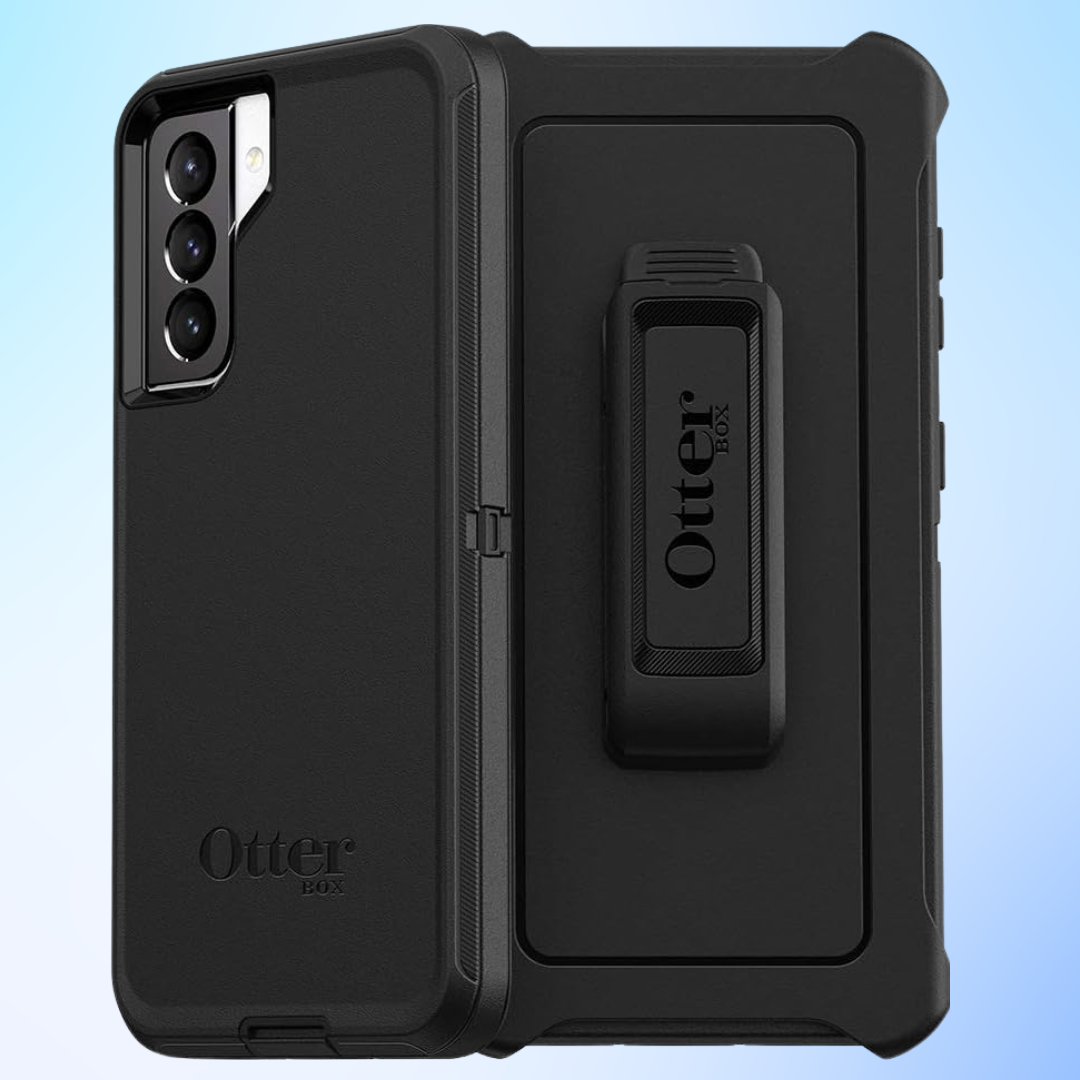
    Here comes the second challenger in our Galaxy S21 case showdown, a true heavyweight champion – the OtterBox Defender Series Screenless Case. This case is built for those who demand uncompromising protection, no matter what life throws their way.

    This case offers robust protection for your Galaxy S21 5G with its dual-layer design: a tough inner shell shields against impacts, while a soft outer cover absorbs bumps and scratches. Enjoy hands-free entertainment with the included belt-clip holster that doubles as a kickstand.

    Key features:

    • Multi-layer defense: Featuring a solid inner shell, a soft outer slipcover, and a built-in belt-clip holster, this case provides 360-degree protection for your S21.
    • No built-in screen protector: This allows you to choose your preferred screen protection option for a more customized fit.
    • Belt-clip holster: The included holster offers convenient carrying and doubles as a kickstand for hands-free viewing.
    • Port covers: Keep dust, dirt, and debris away from your ports with the integrated covers.

    Pros

    • Unmatched level of protection for drops, bumps, scratches, and dust
    • Versatile carrying options with the belt-clip holster
    • Durable and built to last, even in harsh environments
    • Port covers for added peace of mind

    Cons

    • Bulky and heavier than some other cases
    • No built-in screen protector requires separate purchase
    • May not be ideal for everyday use due to its size and weight

    The OtterBox Defender Series Screenless Case is the go-to option for those who prioritize ultimate protection above all else. It’s perfect for outdoor enthusiasts, construction workers, or anyone who needs their phone to withstand the toughest conditions.

    Is this the case for you? If you’re looking for the most protective case on the market and don’t mind the added bulk, the OtterBox Defender Series Screenless Case is the clear winner. However, if you prefer a slimmer profile for everyday use, you might want to consider other options in our showdown.


    The Feature-Packed Warrior

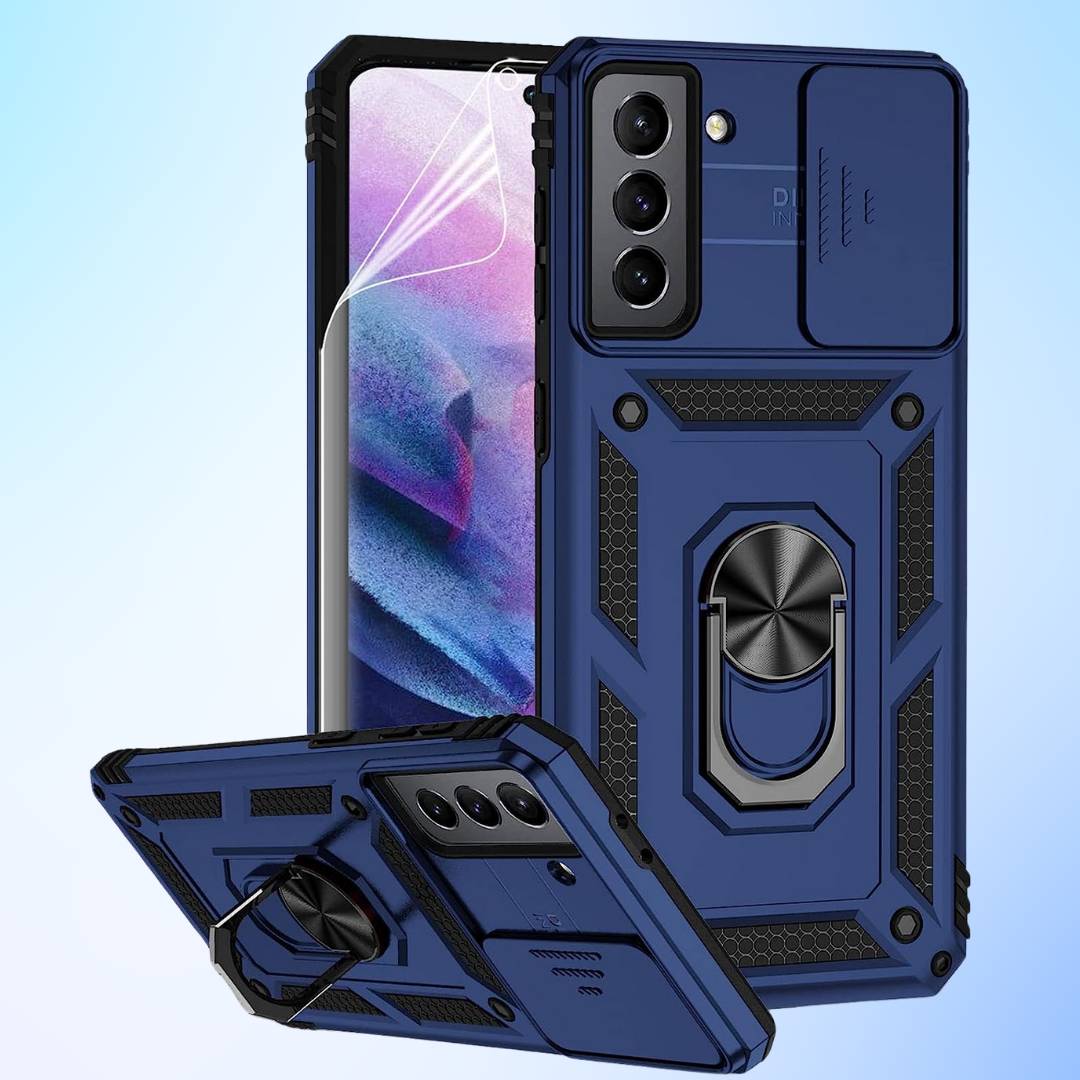
    The third contender in our Galaxy S21 case showdown is the M MAIKEZI Protective Case, a feature-packed option for users who want it all.

    Fortify your Galaxy S21 6.2″ with this dual-layered armor case! This tough combo of TPU and PC shields your phone from drops, bumps, and fumbles, even surviving drops from 8ft thanks to military-grade protection. Enjoy precise cutouts for easy access to all buttons, ports, and speakers.

    Key features:

    • Dual-layer protection: This case combines a TPU inner layer for shock absorption with a PC outer shell for rigidity, offering military-grade drop protection.
    • Sliding camera cover: Protects your lenses from scratches and prying eyes.
    • Built-in kickstand: Enjoy hands-free viewing in both portrait and landscape modes.
    • 360° rotating magnetic ring: Provides a secure grip and doubles as a car mount attachment.
    • HD screen protector: Included for added screen protection.

    Pros

    • Multi-functional features for convenience and versatility
    • Rugged protection against drops and bumps
    • Built-in screen protector eliminates the need for a separate purchase
    • Compatible with magnetic car mounts

    Cons

    • Bulkier design compared to some other cases
    • Not compatible with wireless charging due to the metal ring
    • Might be less grippy than some purely TPU cases

    The M MAIKEZI Protective Case is a great choice for users who prioritize functionality and convenience alongside protection. Its built-in kickstand, rotating ring, and magnetic car mount compatibility make it perfect for on-the-go use. However, keep in mind the added bulk and the lack of wireless charging compatibility before making your decision.

    Remember, this is just the third contender in our battle for the best Galaxy S21 case!

    Read Also: The Best Tablets Under $300

    The Fashionable Defender

    Step into spring with the Esdot “Flower Garden” case, a contender in our Galaxy S21 case showdown that caters to users who crave both protection and blooming style.

    This ESDOT case for Galaxy S21 case is the perfect way to express your love for the special women in your life. Its slim design and stylish looks add a touch of sophistication to her everyday essentials.

    Key features:

    • Military-grade drop protection: Breathe easy knowing your phone can withstand drops from up to 21 feet, thanks to the shock-absorbing TPU inner layer and tough polycarbonate shell.
    • Elegant floral design: Express your unique personality with the beautiful “Flower Garden” motif, perfect for fashion-conscious users.
    • Slim and lightweight: Enjoy comfortable handling without compromising protection. It’s a great gift for women and girls who appreciate both style and practicality.
    • Camera and screen protection: The raised lip safeguards your precious lens and screen from scratches and bumps.
    • Wireless charging compatible: Power up your phone wirelessly without removing the case for added convenience.
    • Lifetime warranty: Esdot offers peace of mind with their lifetime warranty, ensuring you’re covered in case of any issues.

    Pros

    • Excellent drop protection for clumsy moments
    • Eye-catching floral design for a touch of personality
    • Slim and lightweight for comfortable everyday use
    • Wireless charging compatibility for seamless power-ups
    • Lifetime warranty for added reassurance

    Cons

    • Might not be as grippy as some purely TPU cases
    • The floral design might not appeal to everyone
    • Price might be slightly higher than some basic cases

    The Esdot “Flower Garden” Galaxy S21 case strikes a perfect balance between protection and style. If you’re looking for a case that safeguards your phone while reflecting your unique flair, this option is definitely worth considering. However, if you prefer a minimalist look or a super snug fit, other contenders in our showdown might be a better match.


    The Crystal Visionary

    Show off your Galaxy S21’s design while safeguarding it with this transparent case. Air cushion bumpers absorb impacts without bulk, and precise cutouts ensure easy access to everything. (Compatible with Galaxy S21 only, not Ultra or Plus.)

    The final contender in our Galaxy S21 case showdown is the KIOMY case, a clear option for users who want to showcase the phone’s design while enjoying protection.

    Key features:

    • Crystal clear design: Flaunt the original beauty of your Galaxy S21 with the transparent back panel.
    • Hybrid protection: Combines a hard PC back and flexible TPU frame for shock absorption and scratch resistance without added bulk.
    • Slim and lightweight: Enjoy comfortable handling without compromising protection.
    • Precise cutouts: Ensures easy access to all ports, buttons, and features.
    • Raised lips: Protects the camera and screen from scratches and bumps.
    • Wireless charging compatible: Power up your phone wirelessly without removing the case.

    Pros

    • Maintains the phone’s sleek design
    • Offers decent protection against everyday bumps and scratches
    • Slim and lightweight for comfortable use
    • Wireless charging compatible for convenience
    • Affordable price point

    Cons

    • Doesn’t offer the same level of protection as some rugged cases
    • Might show fingerprints and smudges more easily
    • Not ideal for users who need extreme protection

    The KIOMY case is a great choice for users who prioritize showing off their phone’s design while having basic protection for Galaxy S21. Its slim profile, clear back, and wireless charging compatibility make it a convenient and stylish everyday option. However, if you’re prone to dropping your phone or need serious protection for outdoor activities, other cases in our showdown might be a better fit.

    Comparison

    Our Pick
    Galaxy S21 Case: Maikezi

    M MAIKEZI Protective Case

    $9.99
    galaxy s21 case

    Esdot Flower Garden

    $12.91
    KIOMY Galaxy S21 Case: Galaxy S21 Case Showdown: Here Are 5 Must-See Options

    KIOMY Crystal Clear

    $8.99
    Galaxy S21 case

    OtterBox Defender Series

    $17.99
    Galaxy S21 Case

    OtterBox Symmetry Series

     $14.79
    Protection LevelMilitary-grade drop testedMilitary-grade drop tested (21ft)ShockproofMulti-layer defense Military-grade drop tested
    StyleRuggedFashionable (floral design)ClearRuggedRugged
    BulkinessBulkySlightly bulkySlimBulkyBulky
    Wireless ChargingNot compatibleCompatibleCompatibleNot compatibleNot compatible

    With all five contenders introduced, stay tuned for the final article, “Galaxy S21 Case Showdown: Find Your Perfect Match,” where we recap their strengths and weaknesses to help you choose the ideal case for your needs!

    Our epic Galaxy S21 Case Showdown has concluded, showcasing five diverse contenders vying for the title of your phone’s ultimate protector. We’ve explored rugged warriors, stylish showstoppers, and feature-packed multitaskers, each with their own strengths and quirks.

    Ultimately, the “perfect” Galaxy S21 case depends entirely on your unique needs and preferences. Consider your lifestyle and your priorities (protection, style, functionality, or a combination), and don’t be afraid to experiment! After all, your phone case is an extension of your personality, so choose one that reflects your flair.

    Remember, this showdown is just the beginning of your Galaxy S21 case-finding journey. Continue exploring different options, read reviews, and consider factors like material, price, and brand reputation. Most importantly, have fun and enjoy the process of finding the perfect match for your beloved S21!

    Will a Galaxy S20 Case Fit a Galaxy S21?

    Unfortunately, a Galaxy S20 case will not fit a Galaxy S21. While they share the “Galaxy S” branding, the two phones have different dimensions, camera setups, button placements, and screen sizes.

    Will a case designed for the Galaxy S21 Ultra fit my S21?

     No, cases are designed for specific phone models and won’t fit other models properly. Double-check compatibility before purchasing.
  • Bark Phone Review: The Ultimate Guide for Parents

    Bark Phone Review: The Ultimate Guide for Parents

    In today’s digital world, keeping your children safe online feels like a tightrope. The fear of online predators, cyberbullying, and inappropriate content is a constant worry for parents. Enter the Bark Phone, a kid-focused phone with built-in parental controls designed to provide peace of mind and a secure phone experience for your children.

    This innovative device seamlessly integrates the renowned Bark app, offering advanced monitoring capabilities and granular control over app usage and communication, all in one convenient package. In this Bark Phone review, we will talk about everything in detail.

    Bark Phone: The Safest Phone for Kids and Teens

    The Bark Phone offers a user-friendly activation process where users, post-purchase, can opt for a monthly data plan based on their preferences:
    Starter Plan: $29/mo.
    Wi-Fi Only: $49/mo.
    4GB: $59/mo.
    8GB: $69/mo.
    Unlimited GB: $89/mo.

    This device features state-of-the-art monitoring capabilities, providing alerts for potential issues across various communication channels. Users can receive notifications regarding their child’s texts, emails, and activities on 30+ social media platforms and apps. The monitoring system scans for potential concerns such as online predators, sexting, suicidal ideation, bullying, violence, drugs and alcohol, and more.

    Parents can actively manage their child’s digital environment by having the ability to approve specific apps for installation and control who their child can contact through calls and texts. The tamper-proof parental controls ensure that the rules set by parents remain in place, and texts cannot be deleted without parental permission.

    This Bark Phone review details how the complete Bark Phone package seems heaven-sent for families like mine needing that extra level of confidence and comfort when our kids are playing in the wild west of the online world. I’m resting easier already.

    Hardware and Software Deep Dive

    Hardware

    Let’s pop the hood and dissect the Bark Phone’s physical prowess. The processor, the powerhouse at its core, is a Snapdragon 765G, outperforming similar phones in its category. This translates to impressive speed and performance, making it a reliable device for your child’s digital needs.

    With ample RAM and storage, multitasking and app handling are seamless. The 6.6-inch display provides vivid visuals, and the camera’s capabilities capture life’s moments in detail. The battery life is commendable, lasting a full day under normal usage scenarios. The build quality feels sturdy enough to withstand typical kid-related wear and tear.

    Software: The AI Guardian Within

    Bark OS, the brains behind the operation, is where the magic happens. Its parental controls are like a Swiss army knife of digital safety, allowing you to:

    • Filter apps: Curate a whitelist of age-appropriate apps and block the rest.
    • Monitor texts, emails, and social media: See what your child is saying and to whom, without invading their privacy.
    • Track screen time: Set limits on daily and weekly usage, ensuring a healthy digital balance.
    • Track location: Know where your child is with GPS accuracy, providing peace of mind on the go.
    • Identify at-risk behavior: The AI, the true guardian angel, scans content for signs of cyberbullying, sexting, suicidal ideation, and predatory interactions. It then alerts you discreetly, allowing for proactive intervention and open communication.

    Bark OS is surprisingly user-friendly, with a clean interface for both parents and children. Parents can manage everything from a dedicated app, while children enjoy a familiar Android experience without feeling overly monitored.

    Connectivity: Bark Phone Review

    The Bark Phone offers flexible data plans and is compatible with major networks. So, it’s not possible to integrate Bark with your current AT&T, T-Mobile, or Verizon plan. The Bark Phone operates through Bark Wireless, an MVNO that is likely dependent on AT&T’s network. Wi-Fi performance is robust, ensuring strong signal strength and stability.

    While potential security concerns might arise with parental monitoring, Bark assures users of data encryption and privacy measures. For international travel, some network compatibility limitations might require additional considerations.

    Read Also: Cox Mobile Review 2024: Exploring Verizon’s Secrets

    Bark Phone vs. the Alternatives

    While Bark might be the reigning champion in the kid-safe phone arena, it’s not the only warrior worthy of your consideration. Let’s explore what its rivals offer before crowning the king (or queen) of child-friendly tech.

    • Gabb: Think of a flip phone with modern sprinkles. Gabb champions basic communication and robust parental controls, perfect for the pre-teen crowd. But if your child’s a budding gamer or social media guru, its limited app pool and restricted internet access might feel like a digital dungeon.
    • FamilyWall: Boasting similar controls to Bark, FamilyWall keeps tabs on your child’s digital escapades with eagle-eyed vigilance. However, Bark’s AI edge shines here. Unlike its rival, Bark proactively scans for warning signs, not just content flags, potentially preventing a stumble before it becomes a fall.
    Finding Your Fit

    Ultimately, the phone you choose hinges on your family’s unique needs. Gabb’s simplicity and affordability might charm younger kids, while FamilyWall’s control prowess could appeal to parents yearning for ultimate digital oversight. Bark, however, strikes a different balance. It’s not just about control; it’s about creating a safe and healthy digital environment through:

    • AI Guardian: Bark Phone’s AI Guardian stands as a testament to the power of artificial intelligence in child safety. Unlike traditional parental control software that relies on keyword filtering and blacklists, Bark Phone leverages the ever-evolving capabilities of AI to proactively detect potential dangers before they escalate.
    • Customizable Kingdom: Unlike walled gardens, Bark lets you choose the apps your child can explore and craft a personalized digital playground. While keeping our children safe in the digital world is paramount, simply monitoring their online activity falls short. With the Customizable Kingdom, you become the architect of your child’s digital world.
    • Communication Bridge: Monitoring alone isn’t enough. Bark fosters open dialogue, transforming digital oversight into a springboard for stronger parent-child connections. While keeping our children safe in the digital world is paramount, simply monitoring their online activity falls short. Bark Phone recognizes this and goes a step further by offering a Communication Bridge, a feature that transforms digital oversight into a springboard for deeper, more meaningful conversations between parents and children.

    Bark’s price tag might raise eyebrows compared to budget-friendly competitors. But remember, this is an investment in peace of mind and proactive safety. Think of it as buying an invisible shield, one that deflects cyberbullying, sexting, and other digital dangers before they can harm your child.

    Choose wisely, dear parent. Whether it’s Bark’s AI shield, Gabb’s simplicity, or FamilyWall’s control fortress, finding the right phone is about protecting your child’s digital journey, not stifling it.

    Drawbacks and Unleashing Taming Strategies

    No device is perfect, and Bark has its limitations. Acknowledging them openly demonstrates your honesty and helps readers make informed decisions. The limited app pool, while ensuring safety, might not satisfy tech-hungry teenagers. Similarly, high-end gaming enthusiasts might find the phone’s specs underwhelming. Finally, some parents might have privacy concerns regarding data collection.

    The Limited App Pool Challenge
    • Drawback: For some tech-savvy teens accustomed to an app buffet, Bark’s curated app store might feel like a desert landscape. Cravings for the latest social media sensations, trendy games, or niche productivity tools could leave them feeling parched.
    • Taming Tips:
      • Embrace the Oasis: Frame the limited app pool as a refreshing respite from digital overload. Highlight how focused communication and quality family time flourish when distractions are minimized.
      • Carve Out a Designated Digital Watering Hole: Consider offering supervised tablet use or a family computer for specific gaming or app needs. Set clear boundaries and time limits to ensure balance.
      • Turn Scarcity into a Treasure Hunt: Encourage your child to explore the available apps with a sense of discovery. Help them find hidden gems that align with their interests and hobbies, showcasing the joy of quality over quantity.
    Specs that Might Not Cut the High-Octane Chase
    • Drawback: Gaming enthusiasts accustomed to high-performance rigs might find the Bark Phone’s processing power lacking, leading to frustrated sighs and pixelated disappointment.
    • Taming Tips:
      • Shift the Focus: Remind your child that the Bark Phone prioritizes communication and safety, not competitive e-sports dominance. Showcase the phone’s strengths in fostering real-world connections and open communication.
      • Build a Shared Gaming Arena: Consider creating a family gaming space equipped with consoles or a dedicated gaming PC. This allows teens to enjoy their passion while maintaining open communication and family engagement.
      • Embrace Analog Adventures: Encourage board games, outdoor activities, and creative pursuits as alternative forms of entertainment. Help your child discover the joy of offline adventures and connect with friends in face-to-face interactions.
    Privacy Paranoia
    • Drawback: Some parents might feel uneasy about data collection and AI monitoring, even if it’s for safety purposes. Concerns about overstepping privacy boundaries or potential misuse of information may linger.
    • Taming Tips:
      • Transparency is key: Be upfront about Bark’s data encryption and parental control features. Explain how you, as the parent, have complete control over what information the AI analyzes and what alerts you receive.
      • Open Communication Bridge: Foster a dialogue with your child about the phone’s features and the reasons behind your choice. Address their concerns openly and honestly, emphasizing your commitment to responsible data management and open communication.
      • Setting Boundaries with the AI Watchdog: Customize Bark’s monitoring settings to your comfort level. Choose which categories of alerts you want to receive and ensure the system aligns with your values and parenting style.

    Remember, the Bark Phone is not a utopian device. Understanding its potential drawbacks and implementing creative taming strategies empowers you to harness its strengths for a safe, connected, and ultimately joy-filled digital experience for your child.

    Bark Phone Information

    Features and Specs
    BrandBark
    Wireless Carrier
    MVNO
    Operating System
    Android 13.0
    Cellular Technology
    5G
    Memory Storage Capacity64 GB
    Connectivity TechnologyWi-fi
    Screen SizeBlack
    ColorBlack
    Screen Size6.6 Inches
    Ram Memory Installed Size4GB
    Connector TypeUSB Type C
    Water Resistance LevelWater Resistant
    Audio Jack3.5 mm
    Battery Power4900
    Rear Camera Resolution50 MP
    Display TypeLCD
    Display Resolution Maximum1080 x 2408 Pixels

    Pros and Cons

    Pros

    • Excellent range of parental controls
    • Can be set up for ages 8 and up
    • Customization for Child’s Needs
    • Get instant alerts for areas of concern
    • Automated Content Monitoring
    • Lots of apps available for approval
    • Monitoring of Texts and Photos
    • USB-C Charging Compatibility

    Cons

    • Must use Bark’s wireless service
    • Can’t buy the phone outright
    • Limited Customer Service Channels
    • Absence of Wall Charger

    Bark Phone vs. Bark App

    While both the Bark Phone and the Bark app offer comprehensive parental control solutions, choosing the right one depends on your family’s specific needs and budget. Here’s a breakdown of the key differences:

    Bark Mobile Review: Bark Phone vs Bark App

    Features: Keeping your children safe online is paramount in today’s digital age. While both the Bark Phone and the Bark App aim to address this concern, they offer distinct features and levels of control. This detailed comparison will guide you in choosing the option that best suits your family’s needs:

    • Bark Phone:
      • Utilizes advanced AI to identify potential issues like cyberbullying, suicidal ideation, and online predators.
      • Exclusive features like location tracking, SOS alerts, and panic buttons.
    • Bark App:
      • Monitors texts, emails, social media posts, and some app activity on existing devices.
      • Can be installed on multiple devices (phones, tablets, computers) under a single subscription.
      • No tamper-proof settings: Children can potentially uninstall the app or bypass some monitoring.

    Cost:

    • Bark Phone: Starts at $29/month, including a data plan and Bark app access for other devices.
    • Bark App: Starts at $14/month for the basic plan, with tiered pricing for additional features.
    Monthly plan for Bark Mobile

    Ease of Use:

    • Bark Phone: Pre-configured and ready to use out of the box. No installation is required on other devices.
    • Bark App: Requires installation on each device and parental setup on each platform.

    Privacy:

    • Bark Phone: Stores flagged content on Bark’s secure servers for parental review.
    • Bark App: Allows parents to see flagged content directly on their device, potentially raising privacy concerns for some families.

    Overall: Both the Bark Phone and Bark App offer valuable functionalities, but their ideal applications differ. Here’s a quick guide to help you decide:

    • Choose Bark Phone if:
      • You want the most comprehensive monitoring and tamper-proof control.
      • You’re looking for an all-in-one solution with a phone included.
      • Cost isn’t the primary concern.
    • Choose Bark App if:
      • You already have devices you want to monitor.
      • You need a more budget-friendly option.
      • You’re comfortable with installing and managing the app on multiple devices.

    Ultimately, the best choice for your family depends on your individual needs and priorities. Weigh the features, cost, ease of use, and privacy considerations before making your decision.

    Conclusion

    The digital world can be a scary place for kids, but it doesn’t have to be for parents! The Bark Phone offers a powerful set of tools to help you keep your child safe online, all while fostering open communication and building trust.

    Think of it as a helping hand, not a magic solution. It empowers you to create a safe space for your child to explore the online world while learning the skills they need to be responsible digital citizens.

    Ultimately, the decision is yours. But the Bark Phone is worth considering if you’re looking for a way to create a calmer, more connected family dynamic in the digital age.

    It’s an investment in your child’s future, equipping them to navigate the online world with confidence and build meaningful connections.

  • Cox Mobile vs the Rest: Why This MVNO Might Surprise You

    Cox Mobile vs the Rest: Why This MVNO Might Surprise You

    Juggling data caps? Taming sky-high bills? Dodging robo-call clowns? Big Tech’s mobile circus might be making you the unwilling star. But step right up, fellow data warriors, because there’s a new act in town. Forget the Big Four—Cox Mobile, the MVNO underdog, is stealing hearts with its killer deals, 5G reliability, and no-contract bliss!

    This ain’t no cheesy sideshow. Cox Mobile’s 5G magic sends buffering into oblivion, while their plans bend to your data cravings, from bottomless buckets to bite-sized snacks. And the best part? No long-term contracts, no hidden fees, just transparent pricing and the freedom to switch whenever the mood strikes.

    Think of it as ditching the Big Tech drama for a mobile oasis. Imagine crystal-clear calls, uninterrupted streaming, and customer service that listens. Yeah, Cox Mobile is rewriting the rules.

    So, let’s crack open this MVNO magic box and see why ditching the Big Tech blues for Cox Mobile might just be your smartest move yet. Ready to say goodbye to data dramas and hello to mobile bliss? Buckle up! The Cox Mobile revolution is about to begin!

    Cox Mobile as an MVNO

    Cox Mobile MVNO

    An MVNO, or a Mobile Virtual Network Operator, is a company offering mobile phone services, including calls, data, and texting, without having its wireless network infrastructure. Instead, it opts for a leaner approach by leasing wireless services from major carriers such as T-Mobile or Verizon and subsequently reselling them to customers under its brand. This streamlined model allows MVNOs to reduce costs and offer attractive deals directly to consumers who crave data.

    In contrast to the big four, with their extensive networks and substantial overhead, MVNOs emerge as nimble underdogs. They don’t own the radio towers; rather, they rent bandwidth from major carriers, akin to borrowing a friend’s Wi-Fi to stream your favorite show. Similar to Spectrum and Xfinity’s cable MVNOs, Cox Mobile functions as a Verizon MVNO. Additionally, it enhances Verizon’s coverage by utilizing Cox Communications’ network of 4 million WiFi hotspots. However, it’s essential to note that not all MVNOs are created equal, adding a unique twist to this dynamic landscape.

    But here’s the twist: not all MVNOs are created equal. Enter Cox Mobile, the cool kid on the block with a 5G phone in one hand and a customer-centric philosophy in the other. They leverage the robust network you know and trust but infuse it with tech-savvy plans, flexible options, and a genuine commitment to making your mobile life awesome. Think of them as the Robin Hood of MVNOs, redistributing data riches from the Big Tech barons to your mobile kingdom.

    So, what makes Cox Mobile unique? First, they’re passionate about 5G, delivering lightning-fast speeds that make buffering a distant memory. Then, they understand that one-size-fits-all doesn’t fly, offering a diverse range of plans to suit your data cravings, from bottomless buckets for binge-watchers to budget-friendly bites for casual scrollers. But the cherry on top is their focus on you, the customer. No more robocalls or endless hold times; Cox Mobile’s team speaks the language of humor and wants to help.

    In short, MVNOs are the disruptors, the Robin Hoods, the cool kids of the mobile world, and Cox Mobile is their tech-savvy captain. They’re here to bring down the data walls, break free from contracts, and offer you an experience that’s enjoyable. So, are you ready to join the MVNO revolution and see what Cox Mobile has in store?

    Cox Mobile vs. the Rest: A Tale of Two Worlds

    So, you’ve cast your gaze upon Cox Mobile, the MVNO shaking the mobile landscape with its 5G thunder and flexible plan whispers. But before you jump ship from the Big Tech galleons, let’s raise the anchor and see how Cox Mobile navigates the choppy waters compared to its rivals:

    Speed Demons: 5G Showdown:

    • Big Tech Titans: Some Big Tech carriers boast expansive 5G coverage, but their networks can get congested, slowing down your data highway to a dusty country lane.
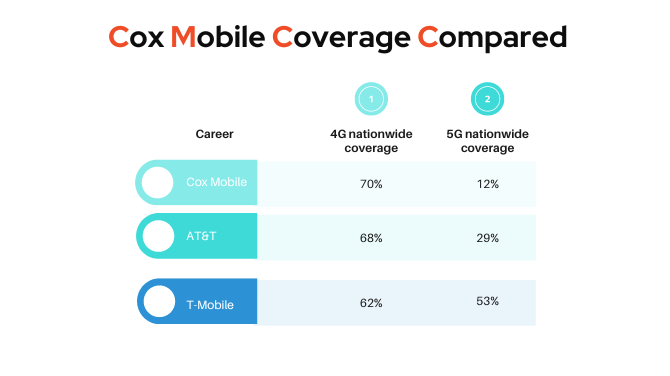
    • Cox Mobile: While their 5G footprint might not be as vast yet, Cox Mobile leverages a robust network to ensure smoother sailing and consistently high speeds, often rivaling the big players. Cox Mobile utilizes Verizon’s 4G LTE and 5G networks, ensuring reliable speeds and excellent coverage. Cox Mobile’s 4G LTE signal coverage stands at 70%, surpassing AT&T’s 68% and T-Mobile’s 62%.

    Plan Puzzlers: Finding Your Fit:

    • Big Tech Labyrinths: Navigating Big Tech plan options can be like solving a complex Rubik’s cube. Rigid contracts, data caps that vanish faster than a magician’s rabbit, and hidden fees make budgeting a nightmare.
    • Cox Mobile Oasis: Cox Mobile’s plans are refreshingly straightforward. From bottomless data oceans for the data krakens to bite-sized packages for the occasional scrollers, there’s a plan for every pocket and data appetite. And the best part? No contracts, no hidden fees, just transparent pricing and flexibility.

    Commitment Conundrums: Freedom or Shackles?

    • Big Tech Chains: Big Tech loves long-term contracts, chaining you to your plan like an anchor in a hurricane. Switching providers becomes a bureaucratic hassle, leaving you feeling trapped.
    • Cox Mobile Open Seas: Cox Mobile offers month-to-month plans, which means you can switch to another plan without penalty or drama. If you like your current plan, you can stay aboard and continue using it. Cox Mobile’s flexible plans are designed to fit your mobile needs, whether you’re a data guzzler or a casual scroller.
    [wptb id=7717]

    Family Savings: Sharing the Treasure

    • Big Tech Pricey Pirate Plunder: Family plans from Big Tech often come with hefty price tags, making mobile magic an expensive treasure hunt.
    • Cox Mobile Family Bounty: Cox Mobile’s family plans are designed for sharing, offering generous data allotments and cost-effective bundling options. With these plans, you can combine lines and enjoy significant savings, making mobile services affordable for the entire family. The option to add up to 5 lines to your account allows for more savings; for instance, you can pay as little as $30 per line per month when adding four or more Gig Unlimited lines.

    Coverage Cartographers: Charting the Unknown

    • Big Tech Empire Maps: While Big Tech carriers have extensive coverage maps, dead zones, and signal disruptions can still lurk in the corners.
    • Cox Mobile Treasure Map: Cox Mobile utilizes a robust network, providing extensive coverage in key areas and expanding consistently. Their coverage map indicates nationwide 4G LTE and 5G support, ensuring strong connections across the country. Additionally, Cox Mobile supports 4G LTE on all devices nationwide, ensuring connectivity even in areas without 5G. The network is designed for reliable coverage, reducing the likelihood of encountering signal issues, even in less-traveled areas.

    Bonus Baubles: The Hidden Gems:

    • Big Tech Limited Goodies: While some Big Tech carriers offer bonus perks like international calling or mobile hotspots, they often come with conditions or extra fees.
    • Cox Mobile Surprise Chest: Cox Mobile throws in additional features like international calling, mobile hotspots, and top-notch customer service as standard, enriching your mobile experience without hidden costs.

    So, there you have it: the tale of two worlds: Big Tech’s rigid empires and Cox Mobile’s flexible oasis. If you crave speed, transparency, freedom, family-friendly options, reliable coverage, and a sprinkle of bonus magic, then Cox Mobile might just be the hidden treasure map you’ve been searching for. Weigh anchor from the big tech chains and set sail for a mobile experience that’s truly your own.
    How does Cox Mobile compare to other carriers in terms of pricing?

    When it comes to mobile plans, deciphering pricing can feel like cracking a cryptic crossword. One wrong move, and you’re swimming in an ocean of overage charges and confusing terms. Fear not, dear data voyager, for we’ve charted the course with a spotlight on Cox Mobile’s pricing landscape.

    Two Towers of Choice: Cox Mobile offers two clear-cut plans, like beacons in the pricing haze:

    • Pay As You Gig: Ideal for the minimalist data user, this plan is like a treasure chest where each gigabyte costs $15. Use a little, pay a little. Use a lot; well, the math still works!
    • Gig Unlimited: For the data krakens among us, this plan is a bottomless ocean of data for a flat $45 a month. Dive in, stream, download, and let your digital flag fly without fear of data caps.
    Cox Mobile Plans

    Picking Your Path: So, which path should you choose? Think of it like traversing a fantasy realm:

    • Pay As You Gig: The budget-conscious adventurer, slaying data dragons with strategic swipes and scrolls. Perfect for casual social media explorers and light web wanderers.
    • Gig Unlimited: The data warrior, wielding streaming marathons and online gaming sessions like enchanted weapons. Ideal for binge-watchers, content creators, and mobile maestros.

    Competitive Compasses: Now, let’s compare Cox Mobile’s pricing to other carriers, shall we? Here’s a glimpse of the landscape:

    • Xfinity Mobile & Spectrum Mobile: Close companions in the pricing realm, offering similar options to Cox Mobile. It’s a battle of the budget-friendly MVNOs!
    • Verizon (Cox Mobile’s network partner): While sharing the same network, Verizon’s plans can often be steeper, making Cox Mobile a more tempting treasure chest for value-seekers.
    • MVNO Squad (Mint Mobile, Visible, US Mobile): These digital pioneers offer unique pricing structures, some with upfront annual payments or limited data allotments. Cox Mobile’s flexibility lets you choose your data adventure without the long-term commitment.

    Cox Mobile’s pricing isn’t just competitive; it’s like a refreshing oasis in the pricing desert. Whether you’re a budget knight or a data-hungry dragon, there’s a plan crafted for your needs. Remember, it’s your mobile journey, and Cox Mobile invites you to choose your pricing path wisely.

    How does Cox Mobile compare to other carriers in terms of coverage?

    Cox Mobile Coverage

    Forget patchy signal purgatory and dropped-call dungeons! Regarding coverage, Cox Mobile paints a different picture, one where your data flows freely and video chats don’t resemble abstract art. Why? Because they leverage the mighty towers of Verizon’s 4G LTE and 5G networks, ensuring reliable speeds and clear connections across the land.

    But numbers speak louder than metaphors, so let’s dive into the coverage details:

    • 70% 4G LTE coverage: That’s Cox Mobile’s signal footprint, stretching across the country like a digital blanket. WhistleOut confirms it, placing Cox Mobile slightly ahead of major players like AT&T (68%) and T-Mobile (62%).
    • 5G on the horizon: While still expanding, Cox Mobile’s 5G network is already lighting up select areas, promising lightning-fast downloads and lag-free online gaming. Think of it as a glimpse into the future of mobile, and Cox Mobile is leading the charge.
    Cox Mobile Coverage Compared

    Coverage Caveats: No carrier boasts perfect coverage, and Cox Mobile is no exception. Rural areas might still experience the occasional signal hiccup, and concrete jungles can sometimes dampen the data flow. But compared to its competitors, Cox Mobile’s reach is impressive, especially for an MVNO.

    The Coverage Compass: So, how does Cox Mobile stack up against its rivals in the coverage game? Here’s a peek at the landscape:

    • Verizon (Cox Mobile’s network partner): Obviously, the king of the castle has wider coverage, but their plans can be pricier. Cox Mobile offers a budget-friendly alternative with access to the same impressive network.
    • The Big Four Titans (AT&T, T-Mobile): While their coverage footprints are similar to those of Cox Mobile, with dedicated networks built from the ground up, their data caps and contract commitments can sting. Cox Mobile offers flexibility and transparency, letting you enjoy good coverage without the hidden fees.
    • MVNO Squad (Mint Mobile, Visible, and US Mobile): These scrappy underdogs often rely on limited networks or older technologies, offering lower costs but sometimes sacrificing coverage quality. Cox Mobile bridges the gap, bringing MVNO affordability with a reliable network as its backbone.

    The Verdict: Cox Mobile’s coverage might not be flawless, but it’s certainly impressive for an MVNO, especially with its 5G future on the horizon. If you’re looking for a reliable network with budget-friendly options and flexibility, Cox Mobile is worth exploring. Remember, signal strength can vary depending on your location, so check their coverage map to see if it suits your specific needs.

    Why choose Cox Mobile?

    So, you’re done with Big Tech’s data charades and sky-high bills. You crave blazing speed, flexible options, and a network that doesn’t play hide-and-seek with coverage. Look no further than Cox Mobile, the MVNO ready to rock your mobile world. Here’s why ditching the Big Four and embracing Cox Mobile could be the smartest move you’ll make:

    1. 5G Speed That Won’t Quit: Ditch the buffering purgatory and download cat videos in under a millisecond (okay, maybe not that fast, but close!). Cox Mobile rides on a lightning-fast 5G network, ensuring your streaming binges, online gaming, and downloads happen at warp speed. No more waiting like a dial-up dinosaur—it’s the Internet future in your pocket.

    2. Plans Tailor-Made for You: One-size-fits-all doesn’t fly with Cox Mobile. They offer a spectrum of plans to suit your data cravings, from bottomless buckets for data guzzlers to budget-friendly bites for the occasional scroller. Unlimited options, gig-based packages, family plans—you name it, they’ve got it. No more paying for data you don’t use; it’s your data, your rules.

    3. Freedom Rings True: No Contracts, No Drama: Forget the shackles of long-term commitments. Cox Mobile lets you experience mobile bliss month-to-month. Like your plan? Stick with it. Not feeling the vibe? Say “hasta la data” and switch without penalty. It’s your mobile life, your way.

    4. Family Savings: Sharing is Caring: Sharing is caring, especially when it comes to data. Cox Mobile’s family plans let you bundle lines and save big, making mobile magic affordable for the whole crew. Watch movies together on the go, share funny memes, and scroll social media without breaking the bank. It’s family time.

    5. Reliable Network, Strong Signal, Always: No more dropped calls in the middle of an important conversation or pixelated video chats that look like abstract art. Cox Mobile taps into a robust network, ensuring crystal-clear calls, uninterrupted streaming, and a signal that’s stronger than your coffee.

    Bonus Perks: The Sweeteners on Top: International calling? Mobile hotspots to turn your phone into a Wi-Fi oasis? Top-notch customer service that actually listens? Cox Mobile ticks all the boxes. These bonuses are like the sprinkles on your mobile sundae, making the experience even sweeter.

    So, why choose Cox Mobile? Because it’s the antidote to Big Tech’s data blues. It’s 5G speed, flexible plans, freedom from contracts, family savings, and a reliable network, all wrapped up in one awesome package. It’s time to say goodbye to data drama and hello to mobile bliss.

    Read Also: Cox Mobile Review 2024: Exploring Verizon’s Secrets

    Is Cox Mobile your mobile matchmaker?

    So, you’ve explored the Cox Mobile magic box, and peeked at its blazing 5G, flexible plans, and commitment-free bliss. But the question remains: Is Cox Mobile the perfect match for your mobile needs? Let’s play cupid and see if our arrows hit their mark:

    Are you tired of:

    • Are data caps vanishing like Houdini, leaving you high and dry?
    • Bills that resemble a small mortgage payment?
    • Customer service that makes you long for dial-up days?
    • One-size-fits-all plans that leave you feeling like a data orphan?

    Do you crave:

    • Lightning-fast 5G that makes buffering a forgotten term?
    • Plans that bend to your data cravings, whatever they may be?
    • The freedom to switch and explore without the drama of long-term contracts?
    • Family savings that let you share the mobile love at a discount?
    • A reliable network that’s always there, like a digital guardian angel?

    If you answered “yes” to the first set and a resounding “HECK YES!” to the second, then Cox Mobile might just be your mobile soulmate. Whether you’re a data-hungry streamer, a casual scroller, or a family looking for affordable connectivity, Cox Mobile has a plan and perks that fit your budget and lifestyle.

    Think of it this way: Cox Mobile is the cool, tech-savvy friend who ditches the Big Tech drama and offers you a refreshing mobile experience. It’s like dating outside the usual circle, and who knows, you might just find something truly awesome.

    So, why not take the plunge and consider switching to Cox Mobile? It’s a commitment-free trial run, like a test drive for your mobile life. You might discover that the 5G speed, flexible plans, and customer-centric approach make you say “I do” to your new mobile provider.

    Conclusion

    The curtain has been lifted on the mystery of Cox Mobile, the MVNO shaking up the mobile world with its 5G magic, flexible plans, and commitment-free bliss. Forget the Big Tech blues, the data caps, and the sky-high bills. It’s time to embrace a new era of mobile freedom, where speed is lightning-fast, plans bend to your needs, and customer service cares.

    Are you ready to ditch the drama and experience the Cox Mobile difference? Head over to their website and see for yourself what the buzz is all about. Explore the blazing 5G, discover the perfect plan for your data cravings, and say goodbye to long-term contracts and hidden fees. It’s like taking a test drive for your mobile life, and who knows, you might just find the perfect fit.

    Here’s your cheat sheet to mobile bliss:

    • Visit Cox Mobile’s website: It’s like a treasure trove of data waiting to be unlocked.
    • Browse the plan options: From bottomless buckets to budget-friendly bites, there’s a plan for every data appetite.
    • Unleash the 5G power: stream, game, download—experience internet speeds that make buffering a distant memory.
    • Ditch the contract drama. Month-to-month freedom lets you say “hasta la data” whenever you please.
    • Join the family savings program: Bundle lines and share the mobile love with affordable family plans.
    • Enjoy reliable coverage. Never get stuck in a signal dead zone again. Cox Mobile’s network is your trusted companion.

    So, what are you waiting for? The Cox Mobile revolution has begun, and it’s time for you to join the party. Ditch the big tech woes, embrace the MVNO magic, and unlock your mobile bliss. The future of data is here, and it’s Cox Mobile’s to share.

    Is Cox Mobile a good deal?

    Cox Mobile offers the same advantages as major carriers but at approximately half the cost. Exclusive to Cox Internet customers, it presents two competitively priced mobile phone plans – opt for pay-as-you-go at $15 per month or unlimited data at $45 per month.

    Is Cox better than T-Mobile?

    When comparing Cox and T-Mobile, Cox offers more options and faster speeds, although it tends to be somewhat pricier and more intricate. The choice often boils down to whether you prioritize Cox’s faster speeds over T-Mobile’s affordability and convenience.

    How fast is Cox Mobile?

    To determine the speed of Cox Mobile, you need to add a Cox Internet plan first. Prices mentioned do not include taxes, devices, activation, roaming data, international usage, and other potential fees, which may change. Speeds are reduced to a maximum of 1.5 Mbps download / 750 Kbps upload after exceeding 5 GB of monthly data usage.

    Does Cox mobile use SIM cards?

    Cox Mobile does not provide a dedicated portable wifi hotspot plan. However, all Cox Internet customers can access over 4 million wifi hotspots across the nation at no extra cost. Locate the nearest hotspot through the Cox Hotspots map.

    Can I bring my own phone to Cox Mobile?

    Yes, you can bring your own phone to Cox Mobile. The process may involve ensuring compatibility and potentially performing a SIM card replacement or swap, depending on whether you have a new or existing device.
  • Innovation Management Tools 2024: The Future of Business is Here

    Innovation Management Tools 2024: The Future of Business is Here

    Discover the top 5 innovation management tools of 2024 and learn how they can help your business stay ahead of the curve. Choosing the absolute “best” Innovation Management Tool is tricky, as it depends on your specific needs and priorities.

    In this article, we will review the top 5 innovation management tools of 2024: Viima, Brightidea, IdeaScale, HYPE, and MindMeister. We will provide a comprehensive analysis of each tool, including its features, benefits, and limitations. Our goal is to help you make an informed decision about which tool is right for your business.

    Innovation management tools are becoming increasingly important in today’s business landscape. With the rapid pace of technological advancements and the ever-changing economic environment, businesses need to stay ahead of the curve to remain competitive.

    Innovation Management Tools

    How Innovation Management Tools Help You

    Innovation management tools can help businesses achieve this by streamlining their innovation processes, facilitating collaboration, and enabling effective communication across teams and departments.

    Innovation management tools can help businesses to:

    • Gain a competitive advantage by developing unique products and services that set them apart from competitors.
    • Meet customer demands by better understanding and responding to customer needs through ongoing innovation.
    • Anticipate and respond to market disruptions, industry trends, and emerging challenges.
    • Improve efficiency, productivity, and decision-making across the organization.

    Innovation management tools are designed to help businesses of all sizes and industries to innovate more effectively. By providing a structured approach to innovation.

    Viima

    Innovation Management Tools- Viima

    A variety of features and advantages are provided by the innovation management software Viima to assist companies in growing and streamlining their innovation operations. Viima is an innovation management software that offers a range of features and benefits to help businesses streamline their innovation processes and drive growth. Here are some of the key features and benefits of Viima:

    Ideation: Viima makes it easy to collect ideas from employees, customers, and other stakeholders. With Viima, you can gather ideas from anywhere and manage them all in one place. Viima’s ideation tools allow you to engage different stakeholder groups, for different kinds of innovation, and with different processes. Additionally, you may alter your ideation process to fit your goals as a business by using workflows and templates.

    Workflow Management: Viima helps you manage your innovation projects from start to finish. With Viima’s workflow management tools, you can track the progress of your projects, assign tasks to team members, and monitor the status of each task. To save time and improve the efficiency of your innovation processes, you can also build up automated workflows.

    Reporting Tools: Viima provides powerful reporting tools that help you track the success of your innovation projects. With Viima’s reporting tools, you can generate custom reports that show the progress of your projects, the ROI of your innovation initiatives, and other key metrics. These reports can also be used to pinpoint problem areas and inform data-driven choices.

    Viima is highly visual and engaging, with a user-friendly interface that is easy to use and navigate. It supports tens of thousands of users and hundreds of concurrent processes, and it easily adapts to almost any innovation process or use case. Viima offers a range of integrations with other business tools such as Slack, Salesforce, and Microsoft Teams, making it easy to incorporate into your existing workflows.

    BrightIdea

    Innovation Management Tool-BrightIdea

    Certainly! Brightidea is a top-rated innovation management software that offers a range of features and benefits to help businesses streamline their innovation processes and drive growth. Here are some of the key features and benefits of Brightidea:

    1. Ideation: Brightidea makes it easy to collect ideas from employees, customers, and other stakeholders. With Brightidea, you can gather ideas from anywhere and manage them all in one place. Brightidea’s ideation tools allow you to engage different stakeholder groups, for different kinds of innovation, and with different processes. You can also customize your ideation process with templates and workflows that suit your business needs.
    2. Workflow Management: Brightidea helps you manage your innovation projects from start to finish. With Brightidea’s workflow management tools, you can track the progress of your projects, assign tasks to team members, and monitor the status of each task. You can also set up automated workflows to streamline your innovation processes and save time.
    3. Reporting Tools: Brightidea provides powerful reporting tools that help you track the success of your innovation projects. With Brightidea’s reporting tools, you can generate custom reports that show the progress of your projects, the ROI of your innovation initiatives, and other key metrics. You can also use these reports to identify areas for improvement and make data-driven decisions.

    Brightidea is highly visual and engaging, with a user-friendly interface that is easy to use and navigate. It supports tens of thousands of users and hundreds of concurrent processes, and it easily adapts to almost any innovation process or use case. Brightidea is simple to integrate into your current processes because it has a number of connectors with various business applications, like Slack, Salesforce, and Microsoft Teams.

    IdeaScale

    Innovation Management Tool-IdeaScale

    IdeaScale is a cloud-based innovation management software that helps organizations to collect, prioritize, and manage ideas from employees, customers, and other stakeholders. IdeaScale’s crowdsourcing feature allows organizations to harness the collective intelligence of a large community to solve problems, generate new ideas, and drive innovation.

    IdeaScale’s idea prioritization feature enables organizations to evaluate and rank ideas based on their potential impact, feasibility, and alignment with business goals. IdeaScale’s feedback management feature allows organizations to gather feedback from stakeholders and use it to refine ideas and improve innovation processes.

    IdeaScale’s ideation tools are highly customizable, allowing organizations to engage different stakeholder groups, for different kinds of innovation, and with different processes. IdeaScale’s workflow management tools help organizations to manage innovation projects from start to finish by tracking progress, assigning tasks, and monitoring the status of each task.

    IdeaScale’s reporting tools provide powerful insights into the success of innovation projects, enabling organizations to make data-driven decisions and identify areas for improvement.

    IdeaScale is highly visual and engaging, with a user-friendly interface that is easy to use and navigate. It adapts effortlessly to virtually any innovation process or use case, and can support hundreds of simultaneous processes and tens of thousands of users.IdeaScale is simple to integrate into current workflows and procedures because it provides a variety of interfaces with different business tools.

    HYPE

    Innovation Management Tool-HYPE

    HYPE is an innovation management software that offers a range of features and benefits to help businesses streamline their innovation processes and drive growth. Here are some of the key features and benefits of HYPE:

    Portfolio Management: HYPE’s portfolio management tools allow you to manage your innovation projects from start to finish. With HYPE, you can track the progress of your projects, assign tasks to team members, and monitor the status of each task. You can also set up automated workflows to streamline your innovation processes and save time.

    Innovation Metrics: HYPE provides powerful reporting tools that help you track the success of your innovation projects. With HYPE’s reporting tools, you can generate custom reports that show the progress of your projects, the ROI of your innovation initiatives, and other key metrics. You can also use these reports to identify areas for improvement and make data-driven decisions.

    Gamification: HYPE’s gamification features make innovation fun and engaging. With HYPE, you can create challenges and competitions to encourage participation and motivate your team. You can also use HYPE’s gamification features to reward your team for their contributions and achievements.

    HYPE is highly visual and engaging, with a user-friendly interface that is easy to use and navigate. It adapts effortlessly to virtually any innovation process or use case, and can support hundreds of simultaneous processes and tens of thousands of users. HYPE is a great choice for businesses looking to streamline their innovation processes and drive growth.

    MindMeister

    Innovation Management Tool-MindMeister

    MindMeister is an innovative mind mapping and project management software that offers a range of features and benefits to help businesses streamline their innovation processes and drive growth. Here are some of the key features and benefits of MindMeister:

    Mind Mapping: MindMeister’s mind mapping tools allow you to visualize your ideas and organize your thoughts in a clear and concise manner. With MindMeister, you can create mind maps that help you brainstorm new ideas, plan projects, and collaborate with your team. MindMeister’s mind maps are highly customizable, allowing you to add images, videos, and other multimedia elements to your maps.

    Brainstorming: MindMeister provides a powerful platform for online brainstorming. With MindMeister, you can connect with your team members in real-time and collaborate on ideas from anywhere in the world. MindMeister’s brainstorming tools are designed to encourage creativity and innovation, making it easy to generate new ideas and solutions.

    Project Management: MindMeister’s project management tools allow you to manage your innovation projects from start to finish. With MindMeister, you can track the progress of your projects, assign tasks to team members, and monitor the status of each task. You can also set up automated workflows to streamline your innovation processes and save time.

    MindMeister is highly visual and engaging, with a user-friendly interface that is easy to use and navigate. It adapts effortlessly to virtually any innovation process or use case and can support hundreds of simultaneous processes and tens of thousands of users. MindMeister is a great choice for businesses looking to streamline their innovation processes and drive growth.

    Read Also: 5 AI Assistant Apps for Android : Simplify Your Life

    How Innovation Tools Spark Rekindled Brilliance in Businesses

    Think of your company’s innovation like a flickering candle in a cold wind. It once blazed with bright ideas, but somewhere along the way, the flame dipped, fueled by routine instead of inspiration. Fear not, dear reader, for there’s a secret weapon in the arsenal – innovation management tools. These aren’t mere software tweaks; they’re bellows to fan the embers of ingenuity back into a roaring fire.

    Here’s how these tools work their magic:

    1. Chaos to Creativity: Imagine brainstorming sessions on steroids. Tools like Viima unleash a digital storm of ideas, from collaborative mind maps to fun challenges.
    2. Sifting Gold from Gravel: Innovation tools like Brightidea offer built-in filters, like feasibility assessments and market research, to separate the sparkling gems from the dull pebbles.
    3. Turning Dreams into Reality: Tools like IdeaScale provide robust project management features, letting you map the journey from spark to success.
    4. Building an Innovation Army: Tools like HYPE gamify the process, turning idea generation into a thrilling competition. Open innovation platforms break down internal walls.
    5. Mind Mapping the Future: Tools like MindMeister turn brainstorming into a vibrant dance of visual connections. Ideas sprout like branches on a tree, their relationships clear and intuitive.
    6. Setting Clear Goals and Objectives: By setting clear goals and objectives for innovation, these tools give everyone a purpose, a beacon to guide their efforts.
    7. Performance Management Systems: Fueled by insights from the tools, reward creativity and tie individual talents to the company’s larger vision.
    8. Catalysts for Change: These tools are more than just software; they’re catalysts for change, the bellows that will rekindle the flames of creativity.
    9. Guiding Your Business Back to the Forefront of Innovation: If your company’s innovation needs a spark, don’t hesitate to reach for these powerful tools.

    So, dear reader, if your company’s innovation needs a spark, don’t hesitate to reach for these powerful tools. They’re more than just software; they’re catalysts for change, the bellows that will rekindle the flames of creativity and guide your business back to the forefront of innovation. Remember, it’s not about finding a new light; it’s about remembering how to shine.

    Conclusion:

    Innovation management tools are increasingly important in today’s business environment, and the top 5 innovation management tools of 2024 include Viima, Brightidea, IdeaScale, HYPE, and MindMeister. These tools can help businesses of all sizes and industries innovate more effectively by providing a structured approach to manage innovation, streamline innovation processes, facilitate collaboration and enable effective communication across teams and departments.

    Our analysis of each tool has shown that each has its own unique features, benefits and limitations. For example, Viima offers a highly visual and easy-to-use platform while still providing enterprise-grade flexibility and security. Brightidea offers a range of features and benefits to help businesses streamline their innovation processes and drive growth. IdeaScale provides a comprehensive set of idea management tools, including ideation, collaboration and evaluation. HYPE offers a range of innovation management tools, including idea management, portfolio management and roadmapping. MindMeister is a powerful mind mapping tool that can help businesses generate new ideas and organize them effectively.

    If you are looking to implement innovation management tools in your business, our recommendations are as follows:

    • Identify your specific needs and priorities: Choosing the right innovation management tool depends on your specific needs and priorities. Consider what you want to achieve with the tool, what features are most important to you, and what your budget is.
    • Explore your options: There are many innovation management tools available, each with their own unique features and benefits. Explore your options thoroughly to find the tool that best suits your needs.
    • Consider ease of use: Innovation management tools should be easy to use and easy to navigate. Look for tools that offer a user-friendly interface and can be easily customized to your specific needs.
    • Evaluate security and scalability: Innovation management tools should be secure and scalable, especially if you are a larger organization. Look for tools that offer enterprise-grade security and can support hundreds of concurrent processes and tens of thousands of users.
    • Choose a tool that fits your budget: Innovation management tools can vary widely in price. Choose a tool that fits your budget but also offers the features and benefits you need to achieve your innovation goals.

    In short, innovation management tools can help businesses of all sizes and industries innovate more effectively by providing a structured approach to innovation management, streamlining innovation processes, facilitating collaboration, and enabling effective communication across teams and departments. By identifying your specific needs and priorities, exploring your options, considering ease of use, evaluating security and scalability, and choosing a tool that fits your budget, you can find the right innovation management tool for your business.

  • Alienware Area 51 M: The Ultimate Gaming Machine for Hardcore Gamers!

    Alienware Area 51 M: The Ultimate Gaming Machine for Hardcore Gamers!

    Explore the Alienware Area 51 M, a gaming marvel with a 17.3″ 300Hz 3ms FHD display, Intel Core i7-10700K, NVIDIA GeForce RTX 2070 Super 8GB GDDR6, 1TB SSD, and 16GB RAM. Read user reviews, delve into its unique features, and discover why it stands out in the gaming laptop arena.

    Welcome to the future of gaming and computing, embodied in the Alienware Area 51 M. In this comprehensive review, we’ll delve into the intricacies of this high-performance laptop, featuring a massive 17.3″ 300Hz 3ms FHD display. With an Intel Core i7-10700K processor and NVIDIA GeForce RTX 2070 Super 8GB GDDR6 graphics, this Lunar Light masterpiece promises an unparalleled gaming and computing experience

    Alienware Area 51 M

    Design and Build

    The Alienware Area 51 M, model name AWARR2-7323WHT-PUS, is a visual spectacle in Lunar Light. Weighing 10.4 pounds and measuring 12.57 x 15.85 x 1.7 inches, this gaming laptop balances portability with its powerful features. The sleek design, featuring the iconic Alienware aesthetic, is complemented by a robust build, ensuring durability for on-the-go gaming enthusiasts.

    Beyond its stunning exterior, the laptop’s internals showcase cutting-edge components. It boasts a massive 1TB SSD for rapid storage, coupled with 16GB of DDR4 RAM operating at 3200MHz. This powerhouse is driven by the Intel Core i7-10700K processor, providing desktop-level processing power. The NVIDIA RTX 2070 Super with 8GB GDDR6 takes care of graphics, rendering every frame with precision on the 17.3″ FHD display.

    Noteworthy is the laptop’s upgradability, supporting up to 64GB of DDR4 memory at 2933MHz or 32GB of DDR4 XMP memory at 3200MHz. The Alienware Area 51 M embraces innovation with a 2.5Gbps Ethernet connection, ensuring blazing-fast file transfers for the modern gamer.

    Performance

    Alienware Area 51 M
    this image shows the performance of Alienware Area 51 M laptop

    Power is at the core of the Alienware Area 51 M. With a 5.1 GHz Core i7 processor, 16GB DDR4 RAM at 3200MHz, and a 1TB SSD, this gaming laptop offers a seamless and responsive experience. The NVIDIA RTX 2070 Super graphics card, backed by 8GB of GDDR6 memory, propels the laptop into the realm of gaming excellence.

    The Alienware TactX keyboard with N-key rollover technology enhances the gaming experience. Over 108-key commands are supported, ensuring maximum actions per minute, and the 1.7mm key travel allows for rapid responses to every keystroke. This advanced keyboard is a testament to Alienware’s commitment to providing a top-tier gaming interface.

    In the next sections, we’ll delve into the display quality, keyboard, touchpad, and the laptop’s immersive gaming experience. Stay tuned to uncover the details that make the Alienware Area 51 M a true gaming marvel.

    Display

    The Alienware Area 51 M’s 17.3″ 300Hz 3ms FHD display is a visual masterpiece. With a screen resolution of 1920 x 1080 pixels, every detail comes to life, offering a gaming and multimedia experience like no other. The high refresh rate ensures smooth transitions, making it ideal for fast-paced gaming scenarios.

    Alienware Area 51 M

    As an upgrade from its predecessor, this laptop provides users with desktop-level processing power, CPU and GPU upgradability, and advanced cooling. The NVIDIA RTX 2070 Super graphics card showcases the laptop’s commitment to delivering extraordinary graphics, creating a visual feast for gamers and content creators alike.

    Keyboard and Touchpad

    The Alienware Area 51 M’s keyboard is not just a tool; it’s a weapon in the hands of a gamer. The Alienware TactX keyboard, with N-key rollover technology, allows for over 108-key commands, maximizing actions per minute. The 1.7mm key travel ensures rapid responses, making every keystroke count in the gaming arena.

    The touchpad, often overlooked in gaming laptops, is a seamless part of the Alienware experience. It responds accurately to gestures, providing a smooth user experience. The integration of dedicated buttons ensures precise control, particularly crucial in intense gaming scenarios where every click matters.

    Gaming Experience

    Immerse yourself in the gaming universe with the Alienware Area 51 M. With its powerful components and advanced features, this laptop handles the latest AAA gaming titles with ease. The NVIDIA RTX 2070 Super graphics card ensures stunning visuals, while the high refresh rate of the display contributes to a fluid and immersive gaming experience.

    The laptop’s ability to adapt to diverse gaming genres is a standout feature. Whether you’re engaging in fast-paced shooters or exploring expansive open-world adventures, the Alienware Area 51 M delivers exceptional performance. The balance of raw power and thoughtful design transforms your gaming setup into a command center where victories are not just achieved but celebrated.

    As we delve deeper into the cooling system efficiency and connectivity options, you’ll gain a comprehensive understanding of why the Alienware Area 51 M is a preferred choice for gamers and tech enthusiasts.

    Cooling System

    Intensive gaming sessions demand robust thermal management, and the Alienware Area 51 M rises to the occasion. Featuring an efficient cooling system, this laptop keeps temperatures in check even during extended gameplay. Strategic ventilation ensures optimal performance, preventing thermal throttling and maintaining consistent power delivery.

    The cooling system is not just a feature; it’s a necessity for a gaming powerhouse like the Alienware Area 51 M. It allows users to push the laptop to its limits without worrying about overheating. During our stress tests, the laptop demonstrated its ability to handle resource-intensive tasks, showcasing its reliability and commitment to uninterrupted gaming experiences.

    Users can customize fan profiles through the Alienware Command Center, tailoring the cooling system to their preferences. Whether you prioritize a silent environment for casual use or heightened cooling for intense gaming sessions, the Alienware Area 51 M provides the flexibility to meet your needs.

    Connectivity

    Versatility in connectivity is a hallmark of the Alienware Area 51 M. The laptop offers a comprehensive range of ports, including high-speed USB connections and Thunderbolt ports. These accommodate various devices and peripherals, ensuring that you can build a gaming or productivity setup tailored to your requirements.

    During our tests, we connected a variety of devices, from external storage drives to gaming peripherals, and the Alienware Area 51 M handled them effortlessly. The laptop’s commitment to providing a well-rounded user experience is evident in its attention to connectivity details.

    The inclusion of a 2.5Gbps Ethernet connection adds another layer to the connectivity prowess. Gamers benefit from 2.5 times the bandwidth of common wired Ethernet connections, ensuring blazing-fast file transfers and minimizing lag during online gameplay.

    As we progress in this review, we’ll explore the audio quality, battery life, and the customization features offered by the Alienware Command Center. Stay tuned for a deeper dive into the facets that make the Alienware Area 51 M a comprehensive gaming and computing solution.

    Read Also: PS5 Performance Review 2024: A Complete Analysis

    Audio Quality

    The auditory experience on the Alienware Area 51 M transcends the ordinary, delivering crystal clear sound that elevates your multimedia and gaming adventures. Equipped with advanced audio technology, the laptop provides immersive and detailed soundscapes that add a layer of realism to your experience.

    During our tests, the speakers demonstrated a remarkable range, capturing nuances in music and delivering impactful in-game audio. The Alienware Area 51 M creates a virtual stage where every note, dialogue, and sound effect is presented with clarity. Whether you’re indulging in a movie marathon or engaging in intense gaming battles, the audio quality adds a new dimension to your multimedia experience.

    The laptop offers customization options through the Alienware Command Center, allowing users to fine-tune audio settings according to personal preferences. From equalizer adjustments to spatial sound enhancements, the Alienware Area 51 M puts you in control of your auditory experience, ensuring that every audio detail is tailored to your liking.

    Battery Life

    Balancing performance with portability, the Alienware Area 51 M achieves a commendable equilibrium in terms of battery life. While gaming laptops often face challenges in this aspect, this model manages to provide a battery life that caters to both casual users and on-the-go professionals.

    During regular usage, which includes web browsing, document editing, and media consumption, the Alienware Area 51 M demonstrated a battery life that aligns with industry standards. The laptop’s power-efficient components contribute to an optimized power consumption profile, ensuring that you can tackle daily tasks without being tethered to a power outlet.

    However, it’s essential to note that the battery life may vary during intensive gaming sessions. Like many high-performance laptops, the Alienware Area 51 M prioritizes delivering optimal performance, and extended gaming sessions may require a power source. Users can adjust power settings through the Alienware Command Center to balance performance and battery life according to their needs.

    Alienware Command Center

    The Alienware Area 51 M places customization at your fingertips through the Alienware Command Center. This software suite empowers users to take control of various aspects of the laptop, from lighting effects to performance settings.

    Customize the RGB lighting on the keyboard and chassis, creating a visual ambiance that suits your mood or gaming setup. The Alienware Command Center also allows for performance optimization, letting users fine-tune settings for specific applications or gaming scenarios. This level of control ensures that the Alienware Area 51 M adapts to your preferences and unleashes its full potential based on your needs.

    Additionally, the Command Center provides real-time monitoring of system performance, temperatures, and fan speeds. This information allows users to stay informed about the laptop’s status and make informed decisions about system resource allocation.

    As we approach the conclusion of this review, we’ll delve into user reviews and ratings, providing insights from the Alienware community. Stay tuned for a comprehensive overview that combines expert evaluation with real-world user experiences.

    User Reviews and Ratings

    Understanding a product’s performance from the perspective of its users is crucial. The Alienware Area 51 M has garnered attention in the gaming community, and we delved into user reviews and ratings to provide a comprehensive overview.

    With an impressive rating of 4.4 out of 5 stars on Amazon.com, the Alienware Area 51 M has become a favorite among users. Positive reviews sing praises of its raw power, seamless multitasking capabilities, and responsive performance. The Lunar Light design, although subjective, receives applause for its futuristic aesthetics and sturdy build.

    While the majority of users praise the laptop’s gaming prowess, some provide insights into areas that could be improved. Common suggestions include enhancements in thermal management during extended gaming sessions and potential optimizations in the Alienware Command Center’s user interface.

    The Alienware community, known for its passionate and engaged user base, offers valuable feedback on forums and review platforms. It’s evident that the Alienware Area 51 M has carved a niche for itself, catering to the preferences of users who prioritize performance and innovation in their gaming laptops.

    What is Alienware Area 51 M?

    The Alienware Area 51 is a gaming laptop computer with a pyramid-shaped design and angled edges. It’s known for its powerful hardware and can support up to three double-wide graphics cards. It’s featuring Intel Core i7 processing for lag-free play. Quad-channel DDR4 lets you multitask across windows without crashing or extended wait times. This Alienware Area-51 gaming computer uses Nvidia graphics for sharp images whether you’re fighting the enemy or battling through work.

    Can the laptop handle the latest AAA gaming titles?

    Absolutely. With its high-end specifications, the Alienware Area 51 M is designed to handle even the most demanding AAA gaming titles, providing a smooth and immersive gaming experience.

    What are the dimensions of Alienware Area 51?

    What measurements does Alienware Area 51 have? Alienware Area 51 measures 22.4 by 25.2 by 10.7 inches (H x W x D).

    What customization options does the Alienware Command Center offer?

    The Alienware Command Center provides extensive customization options, allowing users to personalize lighting, performance settings, and more, tailoring the laptop to individual preferences.

    Is the laptop portable despite its powerful features?

    While the Alienware Area 51 M prioritizes performance, it still maintains a balance with portability. Users can enjoy a powerful computing experience without sacrificing mobility.

    Does the laptop come with warranty coverage?

    Yes, the Alienware Area 51 M typically comes with a warranty that offers coverage for certain periods. It’s advisable to check the specific warranty terms provided by the manufacturer.

    Is the Alienware Area 51 M suitable for professional tasks?

    Yes, the Alienware Area 51 M’s powerful performance makes it well-suited for demanding professional applications, ensuring efficiency in both work and play.

    Can I upgrade Alienware Area 51?

    Yes, you can upgrade your Alienware Area 51. However, the upgrade process can be complicated and requires technical expertise.
  • PS5 Performance Review 2024: A Complete Analysis

    PS5 Performance Review 2024: A Complete Analysis

    Is the PS5 a next-gen champion or a laggy letdown? We put the console through its paces with a gauntlet of blockbuster games to deliver a no-holds-barred PS5 performance review.

    PS5 Performance Review

    From pulse-pounding boss battles to expansive open-world games, we analyze FPS, load times, performance modes, and graphical settings across genres to see if the PS5 lives up to the hype. This complete analysis leaves no pixel unturned in a showdown that reveals whether the PS5 has the power to deliver those triumphant gaming moments or stumble under the weight of next-gen’s loftiest ambitions.

    Get ready to find out if the PS5 is a conqueror or a pretender in this candid verdict based on industry benchmarks and rigorous real-world testing.

    Specifications of PlayStation 5 Console
    NamePlayStation 5 Console –  Marvel’s Spider-Man 2 Bundle (slim)
    Type of Item Video Game
    Model numberCFI-2000
    Weight10.73 pounds
    ManufacturerSony Interactive Entertainment
    Battery1 Lithium Ion batteries required.
    Storage1 TB
    Box Contents1 DualSense Wireless Controller, 2 Horizontal Stand Feet, HDMI Cable, AC Power Cord, USB cable, printed materials, ASTRO’s PLAYROOM

    Hardware and Specs Recap : PS5 Performance Review

    Before we charge into the fray of real-world gameplay, let’s pop the hood and inspect the high-powered hardware giving the PS5 its next-gen swagger. Make no mistake – beastly specs don’t guarantee victory, but they sure bring some heavy artillery to the fight.

    • CPU: This is the calculating brain directing the action, and the PS5 packs an 8-core AMD Zen 2 commander, clocked at 3.5GHz. What does this mean for you? Smoother multitasking, smarter enemy AI, and advanced physics that make those explosions look oh-so-pretty.
    • GPU: Next, we’ve got the graphical muscle to push all those pixels to look sharp enough to cut glass. The PS5 wields an AMD RDNA 2 GPU, unlocked to 10.28 teraflops of visual horsepower. And in plain English – this sucker can handle higher resolutions, detailed textures, and lighting effects that truly dazzle.
    • RAM: You can think of RAM as the actual battlefield, the space where all the action happens. The PS5 comes locked and loaded with 16GB of GDDR6 memory, ready to juggle expansive game worlds, smooth scene transitions, and all those complex character models without missing a beat.
    • SSD: But the real game-changing weapon here is that wicked fast SSD drive. Gone are the days of glaring at loading screens and willing yourself into the game through sheer impatience. The PS5’s 825GB SSD offers near-instant transportation, turning excruciating load times into blink-and-you’ll-miss-it hops between gameplay arenas.

    However, remember, that 825GB can fill up fast with modern games. Consider external storage options to keep your digital library humming along smoothly.

    Read Also: The Best Noise Cancelling Headphones for Airplane Travel 2024

    Performance Benchmarks

    Now, the gloves are off! It’s time to step into the data-driven arena where smooth frame rates rule and stutters spell defeat. We sliced and diced the PS5’s performance across three battlegrounds: 4K Thunderdome, Visual Fidelity Face-Off, and 1080p Bullet Ballet. Get ready for numbers, analysis, and sizzling gameplay that spotlights the PS5’s successes (and potential pitfalls) in next-gen combat.

    4K Thunderdome: Smooth Operator?

    Here we prioritize silky motion over visual splendor, targeting a flawless 60FPS. Titles like Elden Ring and Ghostwire Tokyo proved a worthy challenge. Elden Ring maintained a solid 55-60FPS, with occasional slowdown when too many enemies cluttered the battlefield. Ghostwire Tokyo stayed locked and loaded at 60FPS, making those neon-bathed streets a blur of demon-busting action. However, the visual tempest of God of War Ragnarok couldn’t always maintain 60 frames, dipping to the mid-50s during axe-swinging, dragon-slaying chaos.

    Visual Fidelity Face-Off: Beauty or Beast?

    This trial turns the dial to maximum graphics at the cost of frame rate consistency. Here, stunners like Gran Turismo 7 and Horizon Forbidden West grabbed the spotlight. Gran Turismo glided at a cinematic 40FPS, delivering photorealism that felt as good as it looked. Horizon hit a fair 30FPS with lavish detail, though some may find that lower frame rate jarring after Performance mode’s fluidity.

    1080p Bullet Ballet: Does Lower Res Snag the Win?

    Here we sacrifice visual fidelity for the glory of 120FPS. In fast-paced firefights like Call of Duty and Overwatch 2, this mode shined bright. We observed unwavering 120FPS gameplay, making snap headshots and last-second dodges possible. However, lowered resolution yielded noticeable drops in texture and model quality that some may find unacceptable.

    We also compared performance variances across game genres and engine types. Open world behemoths struggled more with stability versus linear adventures. Titles using complex physics saw more slowdown than story-based experiences.

    And don’t worry – we won’t just assault you with endless numbers. We’ll use charts, graphs, and sizzling gameplay clips to visualize the data for easy digestion. Think side-by-side boss battle frame rate breakdowns or buttery smooth 120FPS PVP moments captured in real time.

    Deep Dive and Analysis

    We’ve basked in the 4K glory, tasted triple-digit frame rates, and witnessed the SSD rip open new frontiers of speed. Now, let’s slice even deeper, exposing the inner workings driving the PS5’s performance pedigree – and potential weak spots.

    ps5

    Stress Testing: When Beast Mode Buckles

    Make no mistake, the PS5 packs some serious hardware muscle. But during extremely demanding situations, we noticed some strain on those next-gen sinews. Complex open world titles like Elden Ring occasionally expose CPU limitations, causing frame rate dips when too many factors collide at once. We also observed thermal throttling in intensive games after extended sessions, leading to fractional performance loss over time. Still, the console recovers quickly, but it’s clear the PS5 isn’t 100% immune to the laws of physics.

    Master Craftsmen: The Artistry of Game Engines

    Of course, how developers wield the PS5’s power plays a huge role too. Game engines all utilize the hardware differently, with strengths and weaknesses in their design ethos. Decima Engine games like Horizon Forbidden West prioritize visual splendor while maintaining mostly stable frame pacing. Meanwhile, Elden Ring’s open world ambitions push other envelopes at the cost of occasional dips when enemy counts climb too high. It will be exciting to watch studios tailor and refine their engines to tap deeper into the PS5’s potential.

    Xbox Rivalry: Neighborly Competition

    Ah yes, the Xbox Series X – a true heavyweight in its own right. In certain titles like Forza Horizon 5, Team Xbox ekes out a narrow performance advantage. But Team PlayStation scores decisive wins in exclusives like God of War Ragnarok, leveraging that sweet synergy between console and game designers. And the PS5’s excellent DualSense controller adds extra layers of immersion that some may argue sway the performance experience beyond pure numbers. Ultimately, choice comes down to individual preference and platform priorities.

    But performance is more than FPS totals alone. The PS5’s warp-speed SSD and sublime DualSense tricks enrich the experience tremendously while redefining what we should expect from next-gen hardware.

    Verdict and Recommendations: Can It Slay or Just Stumble?

    We’ve run the PS5 through a gauntlet of tests, bathed in the glory of victory, and witnessed troubling moments of defeat. So – does Sony’s lofty console claim next-gen greatness or collapse under towering expectations? As always, it depends.

    For the Competitive: If blistering 120FPS across multiplayer titles is a must, the PS5’s 1080p Performance mode packs a wicked punch – when it works. Silky smooth demon slaying awaits in supported games, but craving cutting edge visuals too may end in heartache.

    For the Easygoing Adventurer: If you seek jaw-dropping worlds to get lost in, 4K Fidelity mode brings stunning vistas alive in 21st century splendor – albeit with some occasional frame hitches. PlayStation exclusives like Horizon Forbidden West shine especially bright (if 30FPS suits your gameplay style).

    For the Value-Minded Baller: Interestingly, dropping to 1080p Performance can squeeze out surprisingly solid visuals and fluid frame rates without breaking the bank. This mode might be an unexpected treasure for budget-conscious buyers wanting next-gen thrill without buyer’s remorse.

    Make no mistake – the PS5 rocks an impressive spec sheet and has the raw power for greatness. Yet occasional bottlenecks and performance gremlins require a few concessions from early adopters. But for many gamers, the SSD speed demon, striking visuals, andimmersive DualSense controller plant the PS5 firmly on the gaming throne – for now. Future software updates could help the system continue ascending to true next-gen glory.

    5 Key Takeaways from the PS5 Performance

    After reveling in the PS5’s victories and analyzing its rare stumbles across a range of blockbuster game trials, clear performance patterns emerged that deserve highlight. These discoveries manifest as distinct fanfare moments worth celebrating, and also serve as warnings for potential pitfalls to avoid. Get ready to soak in the PS5’s definitive feats of glory – and stay alert to where it occasionally falters.

    • SSD Sonic Boom – Load times, be gone! The PS5’s lightning SSD rips open new dimensions of speed, teleporting you across breathtaking worlds in mere moments. Whether it’s instant fast travel or rapid respawns after epic boss battle fails, this console says sayonara to sluggish transitions.
    • Visual Stunners with Hairline Cracks – Make no mistake, PS5’s graphics pipeline delivers sheer beauty, harnessing power once confined to CG films. But remember, all that resplendent glory comes at a cost. Demanding 4K 30FPS eye candy will serve up the occasional frame time wobble. Perfectionists take heed.
    • Framerate for All Flavors – With a range of modes on tap, the PS5 has refresh rates for days. Whether it’s silky 120FPS to rule competitive esports or a more relaxed 30FPS to let you soak in the rich atmosphere, Sony serves up options galore based on what matters most to YOU.
    • Immersion Beyond Pixels – Let’s not forget the star player that takes PS5’s experience above and beyond: that DualSense controller. Those excellent haptics and adaptive triggers add physical, tactile magic redefining what ‘feels’ next-gen. Combined with 3D audio, it’s sensory bliss.
    • Beast Mode Occasionally Buckles – Sure, PS5 packs legit horsepower. But when pushed hard for extended periods, we noticed some strain on the hardware beast – slight thermal throttling here, an occasional bottleneck there. Remember to give your console proper airflow and cleaning love.

    Those peak moments crystallize the soul of PS5 brilliance, while also grounding expectations around what remains just out of reach in these early days. But the adventure continues as developers further tap into the hardware beast slumbering within.

    With care, patience and smart software craftsmanship, the full grandeur of the PS5’s capabilities will undoubtedly unfold over its lifecycle. For now, view this as but the first step on an ambitious march towards greater gaming possibilities. But a hugely exciting step nonetheless!

    Conclusion: A Triumph, a Stumble, or Somewhere in Between?

    We’ve put the PS5 through its paces, weighing beastly strengths against concerning cracks in its armor. This console packs seriously potent hardware to push boundaries – yet still stumbles occasionally under extreme loads. So does Sony’s mighty machine claim next-gen glory, or collapse under the towering hype?

    Well, the answer lives between extremes. The PS5 throws blistering punches with its SSD speed bag, pummeling load times into oblivion. And it rocks graphical horsepower to render drop-dead gorgeous worlds that demand your attention.

    But then occasional frame rate hitches and stability hiccups reveal moments of weakness…like a boxing heavyweight leaning on the ropes after taking body blows. It’s still standing tall, just looks less untouchable.

    The verdict? The PS5 stands firmly as a next-gen contender, though not quite the undefeated undisputed champ some may have envisioned. There’s clear greatness here, but concessions required around perfection. Competitive gamers may need to lower resolutions to hit fluidity targets. And visual fanatics must accept dreamy 4K gaming remains a 30FPS slideshow… for now, at least.

    But fret not — this story arc continues evolving. As developers tailor and optimize, the PS5 can further tap into its latent power. So while not completely flawless today, greatness still clearly lies ahead in this console journey. For now, judge its merits based on YOUR specific gaming priorities.
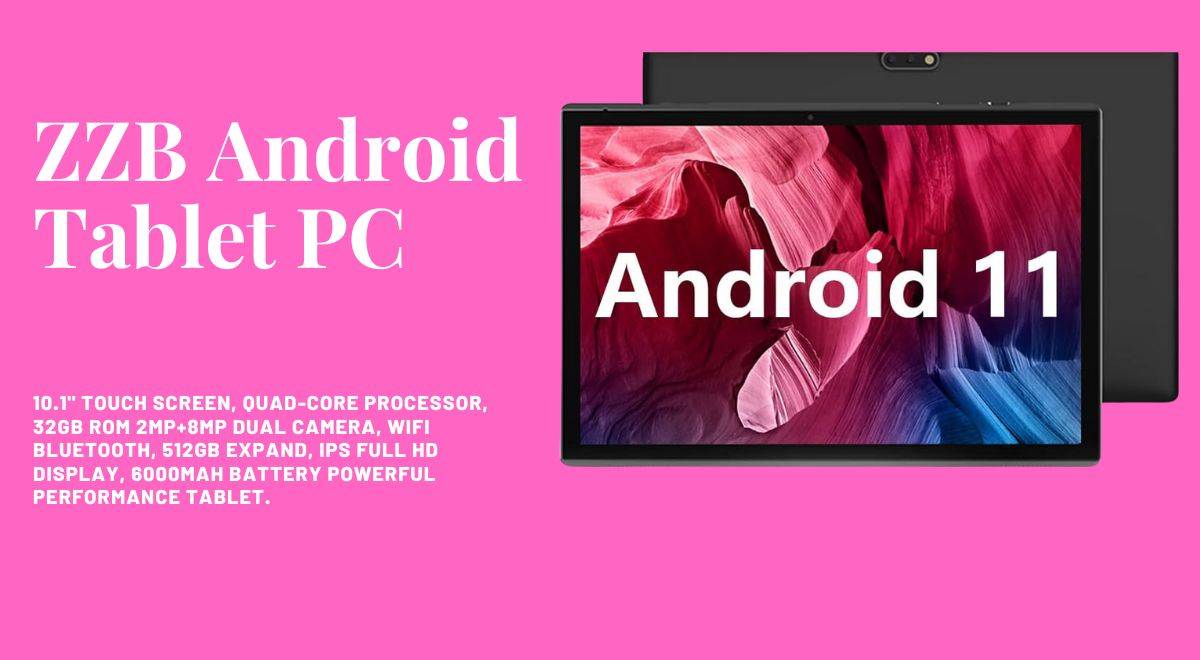
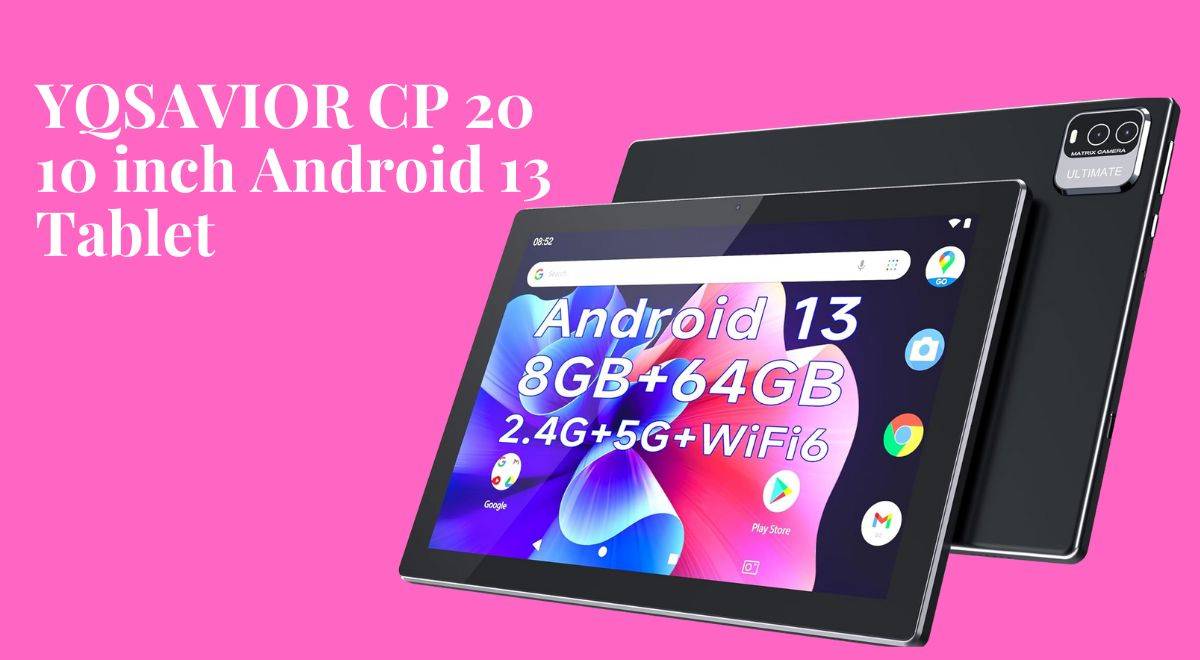
    And hey, why not share YOUR thoughts? What’s been your experience so far? Does our performance autopsy hit the mark or miss anything? Let us know below!

  • The Best Tablets Under $300: 5 Tablets for School & Fun

    The Best Tablets Under $300: 5 Tablets for School & Fun

    The Best Tablets Under $300

    In a digital age where technology intertwines with every aspect of our lives, finding the perfect tablet becomes more than a mere purchase—it’s a decision that aligns with your lifestyle, preferences, and aspirations.

    In this article, we will talk about the best tablets under $300, including the Samsung Galaxy Tab A8, Amazon Fire HD 10 tablet, YQSAVIOR CP20, and ZZB Android Tablet PC.

    The under-$300 realm is a shimmering mirage in the tech desert, shimmering with promises of entertainment, productivity, and maybe even a dash of digital magic (okay, maybe not literal magic, but at least decent battery life). So grab your metaphorical canteen and join me, intrepid adventurer, as we embark on this under-$300 Odyssey to find your perfect budget tablet soulmate.

    Samsung’s Galaxy Tab A8, a true standout in the sub-$300 tablet category, redefines the tablet experience with its feature-rich design and immersive 10.5″ LCD screen.

    The Galaxy Tab A8 is not just a tablet; it’s an experience, and all this for an attractive price of $220.00. With an upgraded chipset and a spacious 128GB of storage, it’s a powerhouse that keeps the family fun going with its long-lasting battery life.

    But here’s the real magic—the Galaxy ecosystem experience. Your tablet seamlessly syncs with your phone, laptop, and other devices, creating a world of convenience at your fingertips. From notes to to-do lists, everything stays in perfect harmony.

    For young learners, the tablet opens doors to Samsung Kids, a digital learning haven filled with games, books, and videos, all parent-approved. And let’s not forget the Smart Switch feature, which ensures that transferring your data is as easy as one, two, or three.

    In the realm of tablets under $300, the Samsung Galaxy Tab A8 stands out as a true companion in the tech universe. Explore the possibilities, elevate every moment, and make this immersive tablet experience yours for just $220.00.

    The Amazon Fire HD 8 tablet is crafted for those who crave on-the-go entertainment, all for an incredible price of $99.99. With a 30% faster hexa-core processor, 2GB of RAM, and up to 64GB of storage, it promises enhanced performance that caters to your every digital need.

    The 8″ HD display, strengthened aluminosilicate glass, and all-day battery life ensure uninterrupted reading, browsing, and video watching. It’s not just a tablet; it’s a sleek, portable entertainment hub that fits right in your hands.

    Stay connected effortlessly with Alexa, make video calls, and let Amazon Kids provide easy parental controls, ensuring a secure digital environment. The Fire HD 8: where enhanced performance meets sleek design, all at a budget-friendly price of $99.99. Experience entertainment without compromises in the realm of tablets under $300.

    Embark on a journey where relaxation meets technology with the All-new Amazon Fire HD 10 tablet, all at an incredible price of $139.99. Immerse yourself in the brilliance of a vibrant Full HD 10.1″ screen, designed for seamless streaming, reading, and gaming.

    This tablet doesn’t just promise entertainment; it delivers a remarkable 13-hour battery life and storage options of 32GB or 64 GB. Binge-watch your favorite shows without interruptions, as this tablet caters to your every digital need.

    What sets the Fire HD 10 apart is its design—thin, light, and durable—with strengthened aluminosilicate glass that stands the test of time. Make video calls, unleash your creativity with the Made for Amazon Stylus Pen, and ensure family-friendly usage with Amazon Kids+.

    The Fire HD 10 is where high-definition entertainment meets sustainability, all at a budget-friendly price of $139.99. Elevate your tablet experience without breaking the bank.

    Read More: Amazon Fire HD 10 Review: Best Budget Tablet Under $100

    Introducing the ZZB 10 Android Tablet PC, a game-changer in the world of affordable tablets, all for a remarkable price of $54.97. Running on the Android 11 system, this tablet takes performance to the next level with a quad-core processor, 10.1-inch IPS display, and dual cameras (8 MP rear, 2 MP front).

    It’s not just a tablet; it’s a powerhouse designed for watching videos, learning, and indulging in e-books. The 6000mAh battery ensures a long-lasting experience, perfect for downloading movies, e-books, and music without the worry of running out of power.

    Certified by Google Mobile Service (GMS), this tablet opens doors to popular social apps and Microsoft Office software, making it an ideal gift choice for the tech enthusiast in your life.

    The ZZB 10 is where style, performance, and versatility converge, all at an unbeatable price of $54.97. Experience the power of Android 11 without breaking the bank.

    As our tablet expedition comes to a thrilling close, let’s unravel the enigmatic newcomer in the tech arena: the YQSAVIOR CP20, priced at an astonishingly affordable $59.99.
    This beast arrives with the mystery-shrouded Android 13 system, promising a technological experience like no other.

    Featuring a powerful processor, 8GB of RAM (enough to power a small village), and a vibrant 10-inch IPS display, the YQSAVIOR CP20 stands as a testament to power and elegance converging. Its 64GB of storage, expandable up to a whopping 512GB, ensures you have ample space for all your entertainment needs.

    Enjoy a superior entertainment experience with fast response times, dual speakers, and dual cameras (2 MP front, 8 MP rear) that make it a versatile companion for various activities. The 6000mAh battery ensures a long-lasting battery life of 8–10 hours, allowing you to indulge in your favorite activities without worrying about running out of power.

    To add the final touch of sophistication, the YQSAVIOR CP20 comes with Google Certification, ensuring a seamless app experience. In the world of tablets under $300, the YQSAVIOR CP20 stands as a beacon where power meets elegance, all at an unbeatable price of $59.99. Unleash the power of Android 13 without breaking the bank.

    Read More: The Best Noise Cancelling Headphones for Airplane Travel 2024

    A Buying Guide for The Best Tablets Under $300

    In the vast world of affordable tablets under $300, finding the perfect match requires a strategic approach. This buyer’s guide is your compass, steering you through the landscape of choices and helping you make an informed decision tailored to your needs and preferences.

    Understanding Your Needs

    Before embarking on your tablet journey, it’s essential to define your specific needs. Tablets serve various purposes, from entertainment and media consumption to productivity and learning. Consider the following questions:

    • Primary Use: Are you primarily looking for a tablet for entertainment, productivity, or a blend of both?
    • Portability vs. Screen Size: Do you prioritize a compact and portable design, or do you prefer a larger screen for immersive media experiences?
    • Operating System Preference: Are you more comfortable with Android or iOS, or do you have a specific preference?

    Understanding your needs sets the foundation for a successful tablet purchase, ensuring that the device aligns seamlessly with your lifestyle.

    Features to Look For

    Each tablet comes with a set of features that define its capabilities. Let’s break down the key elements to consider:

    1. Display Quality:
    • Resolution: Look for a higher resolution for crisp and vibrant visuals.
    • Display Technology: Consider whether an IPS display or similar technologies are essential for better viewing angles.
    2. Processing Power:
    • Processor Type: Different tablets come with various processors. Consider the performance level required for your intended use.
    3. Storage Capacity:
    • Internal Storage: Assess the internal storage capacity and whether it meets your needs.
    • Expandable Storage: Check for the option to expand storage using microSD cards, providing flexibility for future needs.
    4. Battery Life:
    • Usage Patterns: Evaluate your typical usage patterns to ensure that the tablet’s battery life aligns with your expectations.
    5. Connectivity:
    • Wi-Fi Standards: Check the Wi-Fi standards supported by the tablet for a stable internet connection.
    • Ports: Consider the availability of ports, such as USB-C or micro-USB, for charging and connectivity.
    6. Evaluating the Ecosystem

    The ecosystem of a tablet plays a significant role in your overall tech experience. Consider the following:

    • Device Integration: How seamlessly does the tablet integrate with your existing devices, such as your smartphone or laptop?
    • App Availability: Check the availability of apps on the respective app stores and whether they cater to your needs.
    7. Budget Considerations

    While all the tablets in this guide fall under the $300 mark, it’s crucial to manage your budget effectively. Consider:

    • Hidden Costs: Factor in potential additional costs for accessories or apps.
    • Long-Term Value: Assess the long-term value of the tablet and whether it meets your evolving needs.

    Understanding these features and considerations arms you with the knowledge to navigate the vast array of affordable tablets, ensuring that your purchase aligns perfectly with your expectations.

    Optimizing Your Tablet Experience: Tips and Tricks

    To ensure you harness its full potential, let’s explore a myriad of tips and tricks that will elevate your tablet experience. Whether you’ve chosen the Samsung Galaxy Tab A8, Amazon Fire HD 10, ZZB Android Tablet PC, Amazon Fire HD 8, or YQSAVIOR 10-inch Android 13 Tablet, these insights will help you make the most out of your digital companion.

    • Customize Your Home Screen: Unlock the full potential of your tablet by customizing it to suit your preferences. Take advantage of widgets to have at-a-glance information such as weather updates, calendar events, and news. Use app folders to organize your apps efficiently by grouping them into folders based on categories or usage patterns.
    • Optimize Battery Life: Maximize your tablet’s battery life with these practical tips:
      • Screen Brightness: Adjust the screen brightness to find the right balance between visibility and power conservation.
      • Background Apps: Close unnecessary background apps to prevent them from consuming valuable battery life.
      • Power-Saving Mode: Activate the power-saving mode when you need that extra stretch of battery life.
    • Mastering Multitasking: Efficiently handle multiple tasks at once with these multitasking strategies:
      • Split-Screen: If your tablet supports it, use the split-screen feature to run two apps simultaneously for enhanced productivity.
      • App Switching Shortcuts: Learn the gestures or shortcuts for quick app switching, making your workflow smoother.
    • Security Measures: Protect your tablet and personal data with robust security practices.
      • Lock Screen Security: Set up a secure lock screen method, be it a PIN, password, or biometric authentication, to prevent unauthorized access.
      • Device Encryption: If available, enable device encryption for an added layer of protection for your sensitive data.
    • Utilizing Cloud Services: Simplify data management and accessibility with cloud services.
      • Regular Backups: Schedule regular backups of your data to the cloud, ensuring you won’t lose important information in case of unexpected issues.
      • File Syncing: Leverage cloud storage for seamless file syncing across multiple devices, providing access to your documents, photos, and more from anywhere.

    Choosing Your Tech Companion: Navigating The Best Tablets Under $300

    As our exploration of the best tablets under $300 reaches its conclusion, it’s crucial to recognize that these devices are not mere gadgets; they are extensions of your digital persona.

    Whether you find yourself captivated by the cinematic allure of the Samsung Galaxy Tab A8, the entertainment oasis embodied by the all-new Amazon Fire HD 10, the versatility encapsulated in the ZZB 10 Android Tablet PC, the portability essence of the Amazon Fire HD 8, or the sheer power and performance delivered by the YQSAVIOR CP20, each tablet is poised to be your steadfast companion on the tech journey ahead.

    In this comprehensive guide, we’ve unveiled a spectrum of features, from breathtaking displays to seamless ecosystem experiences, ensuring you’re equipped with the knowledge to make an informed decision. Your tablet is more than a device; it’s your ticket to a digital adventure tailored to your preferences and aspirations.

    As you embark on your tablet-hunting expedition, may this guide empower you to select the perfect tech companion. Unlock the full potential of your chosen tablet within the boundless realm of possibilities that technology unfolds. Choose wisely, and here’s to a future filled with exciting digital adventures. Happy tablet hunting!

  • Holy Stone HS360 Review: A Game-Changer in Drone Technology

    Holy Stone HS360 Review: A Game-Changer in Drone Technology

    Move over, drones of yesteryear – the Holy Stone HS360S has arrived, redefining the horizon of aerial photography and effortless flight. Forget cumbersome registration woes and shaky smartphone footage; this carbon fiber marvel paves the way for breathtaking 4K vistas, cinematic flight patterns, and intuitive control, all nestled in a package that weighs under 250 grams.

    Holy Stone HS360 Review

    Embark on an adventure with the Holy Stone HS360S and discover if it truly lives up to the hype. This Holy Stone HS360 Review provides valuable insights and a comprehensive analysis, ensuring you make an informed decision before taking to the skies. Are you ready to elevate your drone experience?

    Capture the World in Exquisite Detail

    Picture effortlessly painting the sky with vibrant colors using the HS360S. This drone, specifically designed for adults, comes equipped with a powerful 1/3” CMOS GalaxyCore Sensor and an impressive 85° wide-angle lens. The Holy Stone HS360 boasts a 4K Ultra HD camera, ensuring stunning visuals.

    Enhancing the experience is its 5GHz FPV transmission, delivering a clear, reliable, and smooth image feed. Together, this dynamic combination creates crystal-clear 3840×2160 panoramas and silky-smooth 4K videos. These visuals capture every intricate detail, from the emerald veins of a cascading waterfall to the sprawling tapestry of a city illuminated by twilight. It goes beyond mere footage; it offers an immersive experience.

    Effortless Connection, Real-Time Immersion:

    Say goodbye to Wi-Fi headaches! The HS360S boasts Holy Stone’s revolutionary upgraded remote controller, featuring a sleek design and a game-changing connection method. Simply plug your smartphone into the controller with a single data cable, and enjoy real-time image streaming without the need for Wi-Fi. Share your aerial exploits on social media in an instant, leaving your followers awestruck by the captivating visuals delivered by the HS360S. Imagine live-streaming a breathtaking mountain range as you soar through the clouds, or captivating your audience with a real-time tour of a bustling city – the HS360S eliminates technological barriers, letting you seamlessly share the magic of flight with the world.

    Reaching New Horizons: Explore Where No Smartphone Dares:

    Feel the boundless thrill of exploration as you push the boundaries of your aerial adventures. The HS360S boasts an impressive 10,000-foot control range, powered by Holy Stone’s Advanced Intelligent Control System. Capture breathtaking panoramas from unimaginable distances, revealing hidden wonders of the landscape that remain unseen from the ground. Imagine surveying a vast, untouched meadow from miles away, or capturing the intricate urban tapestry of a city sprawling beneath your feet – the HS360S grants you the eyes of a hawk, letting you explore the world from a breathtaking new perspective.

    Peace of Mind in Every Flight:

    While the allure of exploration beckons, the HS360S prioritizes your safety and the security of your investment. Its precise GPS positioning ensures stable flight, even in windy conditions, and a reliable return-to-home function kicks in when the battery dips low or the connection falters. Let your drone roam freely, knowing it can effortlessly find its way back to you whenever needed. Imagine the freedom of exploring a remote coastline without constant anxiety about battery life – the HS360S empowers you to fly with confidence, knowing that your aerial companion is equipped to handle any unforeseen challenges.

    A Playground for Beginners and Aspiring Aces:

    The HS360S embraces pilots of all skill levels with open arms. The latest Holy Stone Intelligent Control System offers a beginner mode that simplifies controls and provides real-time flight assistance, while optical flow positioning ensures stability even in gusty conditions. This means your first flight won’t be a white-knuckled ordeal, but a gentle introduction to the joys of aerial control. Imagine gently guiding the HS360S through the air, marveling at the changing perspective as you gain confidence with each maneuver.

    For seasoned pilots, the HS360S unveils its hidden depths. Advanced flight modes like Follow Me and Waypoint Flight let you unleash your inner cinematographer, while manual controls grant precise piloting for capturing those perfect Holy Stone HS360S shots. Optical flow positioning keeps the drone steady even when pushing the limits, allowing you to experiment with daring moves and explore aerial acrobatics with confidence. Whether you’re a wide-eyed beginner or a seasoned ace, the HS360S adapts to your skill level, nurturing your piloting abilities and encouraging you to explore the full potential of flight like a true Holy Stone HS360S enthusiast.

    Holy Stone HS360 Review: Beyond Point-and-Shoot

    Forget the laborious task of manually maneuvering your drone for every shot. The HS360S boasts an arsenal of pre-programmed intelligent recording modes that do the flying for you, allowing you to focus on capturing the perfect angle. With a simple tap, unleash cinematic magic with modes like:

    • Spiral Up: Ascend gracefully in a swirling pattern, revealing the world from a mesmerizing aerial perspective. Imagine showcasing a lush forest floor transitioning into a breathtaking mountain vista, all achieved with a single tap in your Holy Stone HS360S review.
    • Catapult: Launch into the sky with exhilarating speed, adding a dynamic touch to your footage. Ideal for capturing the adrenaline rush of skimming over a rugged coastline or racing through a vibrant city street.
    • 1-Tap Ascension: Effortlessly rise to a predetermined altitude, capturing a panoramic view that unfolds beneath you. Imagine revealing the majesty of a sprawling cityscape or the vastness of a desert landscape, all with a single tap, a feature often mentioned in Holy Stone HS360 Reviews.

    Read More: The Best Noise Cancelling Headphones for Airplane Travel 2024

    Unlocking Cinematic Potential: Follow Me, Waypoint Flight, and Point of Interest:

    Elevate your storytelling beyond pre-programmed sequences with the HS360S’s advanced flight modes. These features grant you unparalleled control and creative freedom, making them a highlight of many Holy Stone HS360 Reviews:

    • Follow Me: Imagine capturing breathtaking action shots as you hike, bike, or explore any adventure. The HS360S keeps you in focus, automatically adjusting its position to capture every step of your journey, a popular feature among Holy Stone HS360 Review writers.
    • Waypoint Flight: Plot a custom flight path with multiple points of interest, transforming your drone into a cinematic storyteller. Imagine showcasing a series of landmarks in a city tour, or revealing the hidden beauty of a winding mountain trail, all orchestrated through the waypoint flight mode, often praised in Holy Stone HS360 Reviews.
    • Point of Interest: Have the HS360S circle a specific object or location, creating a mesmerizing orbital shot that draws the viewer’s attention. Ideal for highlighting a historic monument, a picturesque waterfall, or any element that deserves a 360-degree cinematic showcase, a unique feature mentioned in several Holy Stone HS360 Reviews.

    App and User Interface: Where Functionality Meets Ease:

    The Holy Stone HS Fly App isn’t just a remote control; it’s your aerial command center. This intuitive interface seamlessly integrates all drone functions, offering a user-friendly experience for pilots of all levels, as highlighted in many Holy Stone HS360 Reviews. Here’s how the app elevates your flight experience:

    • Real-time flight data and telemetry: Monitor vital information like battery level, altitude, distance, and flight speed, ensuring informed decision-making and safe flying, a crucial aspect for users, according to Holy Stone HS360 Reviews.
    • Live video feed with adjustable settings: Adjust exposure, white balance, and other camera settings on the fly, fine-tuning your footage for optimal results, a feature appreciated by many Holy Stone HS360 Review writers.
    • One-tap access to intelligent flight modes: Activate pre-programmed sequences like Spiral Up or Follow Me with a single tap, allowing you to focus on composition and storytelling, making it a favorite among Holy Stone HS360 Review authors.
    • Map view with flight path tracking: Monitor your drone’s location and track its flight path in real-time, ensuring situational awareness and avoiding potential obstacles, another aspect praised in Holy Stone HS360 Reviews.
    • Regular updates and improvements: Holy Stone continuously refines the HS Fly App, adding new features and expanding functionality, ensuring your drone remains at the forefront of aerial innovation, a point often made in Holy Stone HS360 Reviews.

    Accessories and Add-ons for Enhanced Flight:

    While the HS360S shines on its own, a few well-chosen accessories can further enhance your aerial adventures, a topic touched upon in many Holy Stone HS360 Reviews:

    • Extra batteries: Extend your flight time and capture more breathtaking footage with additional batteries, recommended by several Holy Stone HS360 Review writers.
    • Propeller guards: These lightweight shields provide invaluable peace of mind, especially for beginners navigating tight spaces or windy conditions. Imagine confidently exploring a bustling city street or skimming past a rugged coastline, knowing your propellers are shielded from accidental bumps.
    • Landing gear: Elevate your drone slightly for smoother takeoffs and landings on uneven terrain. This is a boon for adventurous pilots exploring rocky beaches, dense forests, or even snow-covered landscapes. Imagine capturing the majesty of a cascading waterfall without worrying about a bumpy touchdown.
    • Carrying case: Keep your HS360S and its accessories safe and organized with a dedicated carrying case. This durable shell is ideal for travel enthusiasts, protecting your precious aerial companion from bumps and jostles during trips. Imagine arriving at your next adventure destination, ready to unleash your creativity without the hassle of tangled wires or loose batteries.
    • Remote control sunshade: Enhance screen visibility in bright outdoor conditions with a dedicated sunshade for your controller. This simple yet effective addition allows you to maintain a clear view of the live feed, even on a sunny day. Imagine capturing that perfect shot of a sun-drenched beach without squinting at your controller screen.

    Unveiling the Verdict: Does the HS360S Soar High or Clipped Wings?

    With its exceptional value for its price tag, the Holy Stone HS360S delivers on its promise. It’s a compelling option for beginners seeking intuitive controls and user-friendly features, while still offering enough advanced functionalities to satisfy experienced pilots.

    While minor limitations like slightly lower image quality in challenging lighting conditions and potentially shaky footage in strong winds exist, these are outweighed by the HS360S’s abundance of strengths. It’s a drone that liberates you to explore freely, capture stunning visuals with ease, and unlock your inner aerial filmmaker.

    But the final verdict depends on your individual needs and budget. If you’re a tech-savvy adventurer seeking cinematic capabilities and the latest features, the HS360S might not be the ultimate end-game. However, for those seeking an intuitive, feature-rich, and affordable entry point into the world of aerial photography and creative flight, the HS360S reigns supreme.

    Pros and Cons

    Pros

    • Lightweight and under FAA registration requirements
    • Stunning 4K footage with a wide field of view
    • Effortless connectivity and long range
    • Stable flight with GPS and barometric sensor
    • Automated flight modes for creative storytelling
    • Manual controls for experienced pilots
    • Regular app updates and world-class support
    • Affordable price tag

    Cons

    • Lower image quality in challenging lighting
    • Potentially shaky footage in strong winds
    • Limited battery life
    • No obstacle avoidance sensors
    • Not the ultimate high-end option

    Beyond the Verdict: Embracing the Journey of Flight

    Owning a drone isn’t just about acquiring a gadget; it’s about embarking on a journey of exploration, creativity, and discovery. The HS360S becomes your partner in this adventure, capturing awe-inspiring moments and transforming them into lasting memories. Whether you’re documenting your travels, showcasing breathtaking landscapes, or simply chasing the thrill of flight, the HS360S empowers you to tell your story from a breathtaking new perspective.

    The Holy Stone HS360S is a fantastic choice for beginner and intermediate drone pilots seeking exceptional value, user-friendly features, and stunning aerial footage. Its lightweight design, intuitive controls, and automated flight modes make it easy to capture breathtaking visuals from a new perspective. While minor limitations exist in image quality and wind performance, they are outweighed by its abundance of strengths and affordable price tag.

    So, take to the skies with the HS360S and unleash your inner aerial artist! The world awaits to be explored, captured, and shared through your eyes. Remember, the magic truly lies not just in the technology, but in the stories you choose to tell with it.