Tag: Boost Mobile

  • What Network is Boost Mobile On: The Ultimate Guide

    What Network is Boost Mobile On: The Ultimate Guide

    Unlock Boost Mobile’s network secrets in this comprehensive guide. Learn about key partnerships with T-Mobile and Dish, and how they can benefit you.

    Are you curious about the network behind Boost Mobile? Do you want to know how it can benefit you? Our comprehensive guide provides all the information you need to know about Boost Mobile’s network, including its powerful partnerships with T-Mobile and Dish.

    In today’s fast-paced digital world, where everything hinges on seamless connectivity, the question “What network is Boost Mobile on?” echoes frequently. With rising competition and ever-evolving technologies, understanding the backbone of your mobile service is key.

    Fortunately, Boost Mobile, a wireless provider carving its niche in the industry, offers the flexibility of two powerful networks: T-Mobile’s expansive reach and Dish’s burgeoning 5G future. Dive deep with us as we uncover the intricacies of Boost Mobile’s network symphony, ensuring you make informed choices for your connectivity needs.

    What Network is Boost Mobile On: Exploring the Partnership

    When it comes to the network behind Boost Mobile, it’s essential to understand the partnership that drives its connectivity. Boost Mobile operates as a mobile virtual network operator (MVNO), which means it doesn’t own or operate its physical network infrastructure. Instead, Boost Mobile relies on partnerships with established network providers to offer its services.

    Boost Mobile was launched in 2000 as a prepaid mobile brand operated by Nextel. In 2006, Boost was purchased by Sprint and operated on the Sprint Nationwide Network for over a decade.

    What Network is Boost Mobile On

    In the past, Boost Mobile utilized the Sprint network for its coverage and services. However, with recent developments in the telecommunications industry, including the merger between Sprint and T-Mobile, there have been changes in the partnership landscape.

    In 2019, Boost was acquired by Dish Network and continued to utilize Sprint’s legacy CDMA network during a transitional period. By the middle of 2020, Boost had officially shifted a majority of its customers over to the T-Mobile network as part of a revised operational agreement.

    Following the merger, Boost Mobile now utilizes the T-Mobile network for its coverage. This transition from a CDMA (Code Division Multiple Access) network to a GSM (Global System for Mobile Communications) network brings several benefits for Boost Mobile customers.

    Boost Mobile currently relies on access to the nationwide T-Mobile 3G, 4G LTE, and 5G networks to provide service. This allows Boost to have extensive reach across the United States by tapping into T-Mobile’s network resources. T-Mobile’s network incorporates 5G and 4G LTE coverage, spanning 1.6 million square miles and reaching over 315 million people in the country.

    While most Boost Mobile subscribers primarily use T-Mobile and Dish networks, there are some situations where you might be connected to AT&T’s network:

    1. Newer Boost Mobile plans using AT&T’s 5G network: In July 2021, Dish and AT&T signed a wholesale agreement where Boost Mobile could access limited parts of AT&T’s 5G network, particularly in some rural areas where T-Mobile or Dish coverage is lacking. This is primarily targeted at newer Boost Mobile plans offering 5G access.
    2. Boost Mobile customers with specific SIM cards: Certain Boost Mobile SIM cards with identifiers starting with “890141…” are designed to specifically connect to AT&T’s network. These SIM cards were primarily used for legacy Boost Mobile plans acquired before the Dish acquisition.

    Here are two things to remember for the Boost Mobile Network. Number 1. Connecting to AT&T’s network with Boost Mobile is not the default for most users. You’ll mostly be switched to AT&T only if T-Mobile or Dish coverage is extremely limited in your area, and even then, it’s not guaranteed. Number 2. Coverage on AT&T’s network might be limited. Boost Mobile customers accessing AT&T’s network likely won’t have the same extensive coverage as dedicated AT&T subscribers.

    Therefore, while AT&T is technically another network Boost Mobile can utilize in specific situations, for the vast majority of users, T-Mobile and Dish remain the primary network partners, with AT&T playing a more niche role for rural 5G access and legacy plans.

    Boost Mobile, an American wireless service provider, is held by Dish Wireless and utilizes the networks of Dish, AT&T, and T-Mobile to deliver its range of wireless services.

    The Big Kahuna: T-Mobile’s Widespread Embrace

    Think of T-Mobile as the veteran star of Boost Mobile’s show. Most customers, especially those who joined after the 2021 Dish acquisition, find themselves cruising on T-Mobile’s expansive network. This translates to:

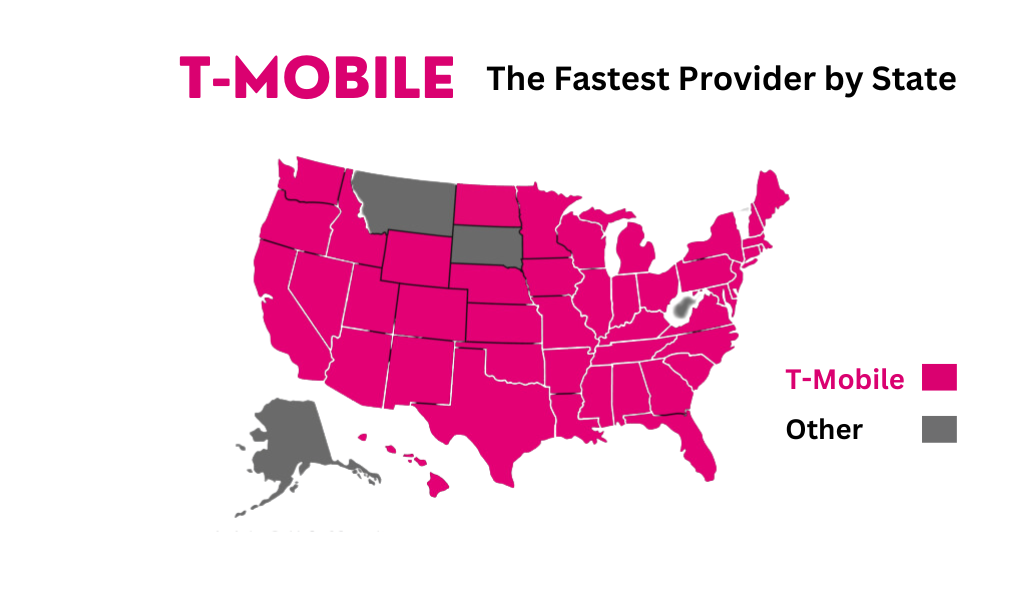
    • Coverage that’s hard to beat: T-Mobile boasts 4G LTE coverage for over 96% of the US population, with 5G reaching a whopping 326 million people. No matter if you’re scaling mountains or sipping lattes in the city, T-Mobile’s got you covered (mostly).
    • Speed that makes you say “whew”: T-Mobile consistently ranks among the fastest mobile networks in the US, meaning those Instagram uploads and TikTok dances happen in a blink.

    The Rising Star: Dish Network’s Ambitious Climb
    dish network

    But wait, there’s more! Enter Dish Network, the ambitious newcomer building its own nationwide 5G network. While not as extensive as T-Mobile’s reach yet, Dish is rapidly expanding, and some Boost Mobile customers, particularly newer ones, might find themselves connected to its growing web. Here’s what to expect:

    • Coverage on the rise: While Dish’s current footprint is smaller than T-Mobile’s, it’s steadily growing, especially in rural areas where T-Mobile might struggle. Keep an eye out for that Dish logo on your phone.
    • The future of 5G: Dish is heavily invested in building a robust 5G network, potentially offering even faster speeds and lower latency than T-Mobile in the future. Think ultra-fast downloads and seamless streaming, all powered by Dish.

    So, Who Are You On? A Detective’s Guide

    Curious to know which network is currently playing your mobile music? Here’s how to crack the case:

    • Boost Mobile Website: Log in to your account and look for your network information under “My Plan.” Easy peasy!
    • Phone Settings: Dive into your phone’s settings, navigate to “About Phone,” and then “Network.” The carrier name (T-Mobile or Dish) should be right there.
    • Network Signal Indicator: Keep an eye on that little symbol by your signal bars. “T” or “TMUS” stands for T-Mobile, while “Dish” speaks for itself.

    Read: How to Unlock a Boost Mobile Phone: Your Comprehensive Guide

    The Verdict: Choosing Your Network Adventure

    Ultimately, the “best” network depends on your individual needs and location. Here’s a quick cheat sheet:

    • Need the widest coverage and fastest speeds? T-Mobile is your jam.
    • Live in a rural area or want to be part of the 5G wave of the future? Dish might be your hidden gem.
    • Happy with whatever works and keeps the price tag low? Both networks will keep you connected, though T-Mobile currently has the upper hand in coverage.

    No matter which network powers your Boost Mobile experience, one thing’s for sure: you’re getting reliable connectivity without breaking the bank. So, go forth, explore, and let the signal guide you, whether it’s the familiar embrace of T-Mobile or the exciting climb with Dish.

    Check out Boost Mobile’s coverage map to see which network reigns supreme in your area: https://www.boostmobile.com/

    Coverage and Availability: Where Can You Use Boost Mobile?

    Boost Mobile offers extensive coverage across the United States, ensuring that customers can stay connected wherever they go. With a nationwide coverage map that spans urban areas and reaches into rural regions, Boost Mobile provides reliable signal strength for its users.

    Whether you’re in a bustling city or exploring the great outdoors, Boost Mobile’s network is designed to keep you connected. Urban areas benefit from robust coverage, allowing users to enjoy seamless communication and fast data speeds in densely populated regions.

    But Boost Mobile doesn’t stop in urban areas. They understand the importance of connectivity in rural communities as well. Their commitment to providing coverage in remote and less-populated areas ensures that even those living off the beaten path can enjoy reliable service.

    With Boost Mobile’s comprehensive coverage map, customers can confidently rely on their network wherever they may be. Whether it’s checking emails on the go or streaming your favorite shows while camping under the stars, Boost Mobile has you covered with strong signal strength and widespread availability.

    Beyond the Basics: Additional Features and Benefits of Boost Mobile’s Network

    When it comes to mobile networks, Boost Mobile goes above and beyond the basics. Not only do they offer reliable 4G LTE speeds, but they also provide a range of additional features and benefits that set them apart from the competition.

    One of the standout features of Boost Mobile’s network is its diverse range of data plan options. Whether you’re a light user or a data-hungry individual, they have plans to suit every need. From affordable options with limited data to unlimited data plans that keep you connected without worrying about overages, Boost Mobile has you covered.

    But it doesn’t stop there. Boost Mobile also offers international calling options, allowing you to stay connected with friends and family around the world. With competitive rates and clear call quality, you can make international calls without breaking the bank.

    With Boost Mobile’s network, you not only get blazing-fast 4G LTE speeds but also a range of additional features and benefits that enhance your mobile experience. From flexible data plans to international calling options, they ensure that your connectivity needs are met wherever you go.

    In summary, Boost Mobile, owned by Dish Wireless, primarily relies on access to T-Mobile’s robust 3G, 4G, and 5G networks across the country to deliver affordable prepaid cell service with impressive speed, reliability, and broad reach. This T-Mobile partnership forms the backbone for most Boost Mobile customers.

    However, in select cases, particularly for newer 5G plans in rural areas and with certain legacy SIM cards, Boost Mobile can also utilize AT&T’s network for additional coverage options.

    Does Boost Mobile have its own network?

    No, Boost Mobile does not have its own cellular network infrastructure. It relies on other established networks to provide service to its customers.

    Which networks does Boost Mobile use?

    Boost Mobile primarily uses two networks:
    T-Mobile: This is the main network for most Boost Mobile customers, offering extensive coverage across the United States and access to 3G, 4G, and 5G networks.
    Dish Network: Boost Mobile’s parent company, Dish Wireless, is building its own 5G network, and some newer Boost Mobile customers may be connected to this network, particularly in rural areas where T-Mobile coverage is limited.

    How can I tell which network I’m on?

    There are a few ways to check which network you’re connected to:
    Boost Mobile website: Log in to your account and look for your network information under “My Plan.”
    Phone settings: On your phone, go to Settings > About Phone > Network. This will usually show you the carrier name (T-Mobile or Dish).
    Network signal indicator: On your phone’s screen, look at the network signal indicator. If it says “T” or “TMUS,” you’re on the T-Mobile network. If it says “Dish,” you’re on the Dish network.

    Can I choose which network I’m on?

    No, you cannot manually choose which network you’re connected to. Your phone will automatically connect to the strongest available signal from the networks Boost Mobile has access to in your location.

    Why does Boost Mobile use multiple networks?

    By partnering with multiple networks, Boost Mobile can offer:
    Wider coverage: Combining networks allows Boost Mobile to reach more areas and provide service to customers in places where one network might have weak coverage.
    Faster speeds: In some areas, Dish’s 5G network may offer faster speeds than T-Mobile’s network.
    Competitive pricing: Partnering with multiple networks allows Boost Mobile to negotiate better deals and offer affordable plans to its customers.
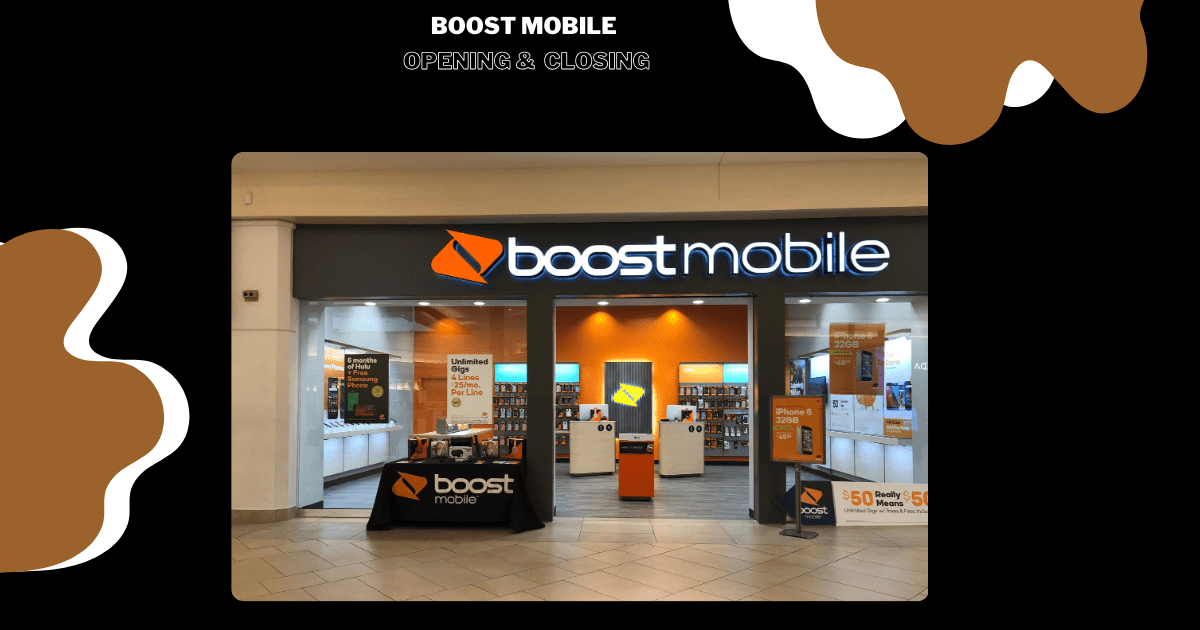
  • What Time Does Boost Mobile Open And Close

    What Time Does Boost Mobile Open And Close

    What Time Does Boost Mobile Open

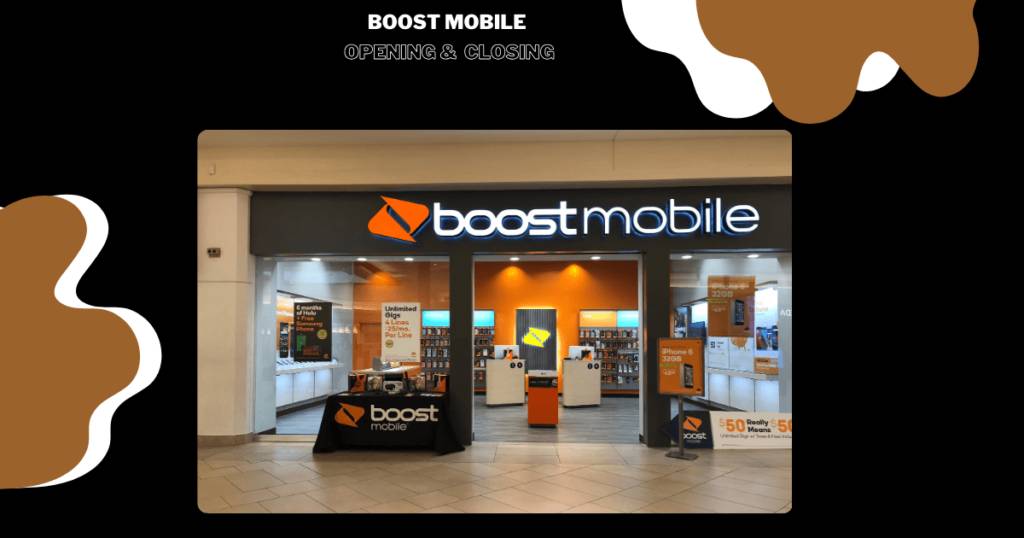
    Ever found yourself pacing outside a Boost Mobile store, unsure of their opening and closing times? We’ve all been there! In this article, we’ll save you frustration by shedding light on Boost Mobile’s operating hours. Whether you’re an early bird looking to snag the latest smartphone deal or a night owl in need of a late-night tech fix, we’ve got you covered.

    Get ready to sync your schedule with Boost Mobile’s opening and closing times, ensuring you never miss a beat. Let’s dive in and uncover the precise hours that Boost Mobile unlocks its doors and when they draw the curtain on their exceptional service.

    Boost Mobile Opening Hours: What Time Does Boost Mobile Open?

    Boost Mobile understands the hectic pace of modern life. Between work, studies, and personal commitments, finding time for errands can feel like running a marathon. That’s why Boost Mobile prioritizes convenience and accessibility in its operating hours.

    Generally, Boost Mobile stores in the USA open at 10:00 AM and close at 7:00 PM. However, it’s crucial to remember that specific opening and closing times might vary depending on the location. To avoid any disappointment, it’s always best to check the hours of your nearest Boost Mobile store using their store locator tool on their website.

    [wptb id=7313]

    By opening early, Boost Mobile ensures you have ample time to:

    • Address any concerns or questions you have about your mobile plan or device.
    • Seek assistance with purchasing a new phone.
    • Activate a new plan.
    • Get help troubleshooting technical issues.

    Their dedicated team will be ready and waiting to assist you from the moment they open their doors. No more rushing, no more last-minute panic! Boost Mobile wants to make sure you get the service you need when you need it most.

    So, the next time you find yourself wondering, “What time does Boost Mobile open?”, remember that they’re committed to your convenience. They strive to offer accessible service during hours that fit your busy lifestyle, ensuring a smooth and efficient experience for all their customers.

    Here are some Boost Mobile locations and their phone numbers to help you connect:

    [wptb id=7310]

    These stores are open from 10 a.m. to 7 p.m., offering a wide range of services, including:

    • Upgrading your phone
    • Activating new lines
    • Paying your bill
    • Choosing the perfect plan for your needs
    • Getting expert advice from friendly staff

    Here are some additional tips for finding Boost Mobile’s opening hours:

    • Download the Boost Mobile app: The app has a built-in store locator that will show you the hours of operation for nearby stores.
    • Call customer service: You can reach Boost Mobile customer service at 1-833-502-6678. They can tell you the hours of operation for any store in the USA.
    • Follow Boost Mobile on social media: Boost Mobile often posts store hours on their social media pages.

    With a little planning, you can easily find the time that works best for you to visit your nearest Boost Mobile store. No more waiting around outside closed doors! Get ready to experience the convenience and exceptional service that Boost Mobile is known for.

    Boost Mobile Closing Hours: When Does Boost Mobile Close?

    Boost Mobile is a popular prepaid phone carrier known for its affordable plans and reliable coverage. But when do they close?

    Boost Mobile stores typically operate within specific business hours that may vary from location to location. To find out the exact closing time of your nearest Boost Mobile store, it is recommended to visit their official website or contact their customer support for accurate information.

    Here’s what you need to know:

    • Most Boost Mobile stores are open from 10 a.m. to 7 p.m. However, this can vary depending on the location.
    • Some stores may have extended hours on certain days, such as weekends or holidays.
    • Always check the official Boost Mobile website or app to confirm the closing time of your nearest store.
    • Feel free to contact the store directly for their operating hours. Call 1-833-502-6678 for assistance.

    It’s important to note that these are general guidelines. The specific closing time of your local Boost Mobile store may vary, so it’s always best to check beforehand.

    Here are some resources to help you find your nearest Boost Mobile store and their closing hours:

    • Store locator
    • Boost Mobile website
    • Boost Mobile app: Download the app and use the store locator feature.
    • Direct contact: Call your local store directly to confirm their hours.

    Keep in mind that Boost Mobile may have different closing times on certain days, such as holidays or special occasions. It is always advisable to check for any updates or announcements regarding changes in their store hours through their official channels. By knowing the Boost Mobile closing hours in advance, you can avoid any inconvenience and ensure a smooth experience during your next visit.

    Boost Mobile Holiday Schedule

    As the festive season approaches, it’s crucial to stay in the loop about Boost Mobile’s holiday schedule. During special occasions like Christmas, New Year’s Day, Thanksgiving, and other major public holidays, Boost Mobile tweaks its operating hours to ensure continued support and customer satisfaction.

    [wptb id=7315]

    To find out more about the specific holiday schedule and any adjustments in operating hours during these periods, please visit the Boost Mobile website or contact the customer service team directly. Locate your nearest Boost Mobile store and its holiday hours.

    In the world of connectivity, Boost Mobile aims to remain accessible and responsive to your needs, regardless of the occasion.

    Finding the Nearest Boost Mobile Store and Cracking the Code of Their Hours

    Looking for a Boost Mobile store but don’t want to play hide-and-seek? Fear not, fellow Boost enthusiasts! Finding your nearest store and figuring out their hours is a breeze with these simple tips:

    1. Channel your inner detective with the Boost Mobile store locator:

    • Utilize the Boost mobile store locator tool available on their official website.
    • Enter your zip code or city name.
    • The tool will provide you with a list of nearby stores along with relevant details such as addresses and contact numbers.
    • Clicking on each specific store will give you additional information, including opening and closing times. 

    2. Map your way to Boost Mobile glory:

    Feeling tech-savvy? Use your favorite online map service, like Google Maps or Apple Maps. Just search for “Boost Mobile stores” and your location, and the map will reveal nearby stores like hidden treasures. Click on one to unlock the secrets of their operating hours.

    3. Boost your knowledge on the go:

    Download the Boost Mobile app and access the store locator directly from your phone. It’s like having a personal guide to Boost Mobile stores in your pocket! Find the nearest store, check their hours, and head straight there without any hassle.

    With these tips, finding a Boost Mobile store and cracking the code of their hours becomes a walk in the park. Whether you’re looking for a new phone, activating a plan, or simply seeking help, finding the store nearest you is now a smooth and effortless journey. So, get out there and explore the world of Boost Mobile with confidence!

    Read More: Who Owns Boost Mobile: A Comprehensive Guide to Its Ownership Journey

    Boost Mobile’s Online Presence

    What Time Does Boost Mobile Open

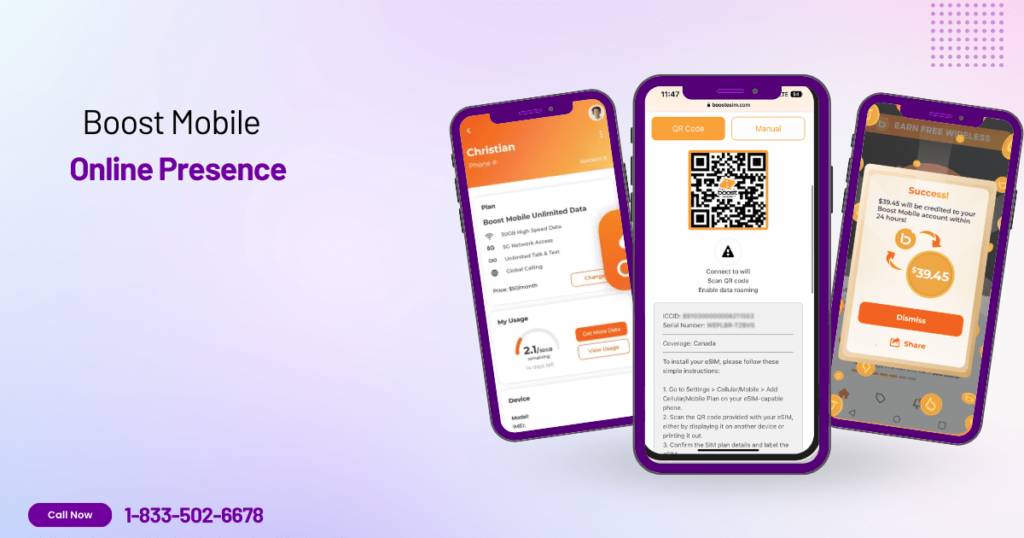
    Boost Mobile understands the importance of being available whenever you need it. That’s why they offer a comprehensive suite of online services accessible 24/7, 365 days a year. No more waiting on hold or scheduling appointments; manage your account and access essential services at your convenience.

    Here’s a glimpse into the online services available to Boost Mobile customers:

    • Account Management: View and update your account information, pay bills, manage data usage, track payments, and more.
    • Plan Changes: Easily switch plans, upgrade your device, or add features to your existing plan.
    • Device Activation: Activate your new Boost Mobile phone quickly and easily online.
    • Technical Support: Get help with troubleshooting, device settings, and other technical issues through online resources and chat support.
    • Order Tracking: Track the status of your online orders and check their estimated delivery time.
    • Store Locator: Find the nearest Boost Mobile store for in-person assistance.

    With Boost Mobile’s online services, you’re always in control. Manage your account, troubleshoot issues, and access essential information whenever you need it, from anywhere in the world.

    Connect with Boost Mobile: Multiple Channels for Support

    Need help with your Boost Mobile account or have a burning question? Don’t worry; Boost Mobile has multiple channels to get you the support you need fast and easily.

    Here’s how you can connect:

    Online Chat: No time for delays? Get instant assistance from a customer service representative through the convenient online chat feature available on the Boost Mobile website. It’s a quick and efficient way to get personalized help.

    Phone Support: Would you prefer the human touch? Dial the dedicated customer service line at 1-833-50-BOOST (1-833-502-6678) and speak directly with a representative. They’ll be happy to assist you with any questions or concerns you may have.

    Email Support: Want to take your time and explain your query in detail? Send an email to the customer support team and you will receive a comprehensive response promptly.

    Social Media: Stay connected and engaged with Boost Mobile on social media platforms like Facebook and Twitter. Get updates, resolve general inquiries, and connect with the Boost Mobile community.

    Help Center: Feeling like a self-sufficient hero? No problem! Access the comprehensive online help center with a vast library of articles, FAQs, and troubleshooting guides. Find answers to common questions and solve problems at your own pace.

    Remember, if you ever have any questions or concerns about Boost Mobile store timings or others, don’t hesitate to reach out to their customer service team, who will be happy to assist you.

    In conclusion, understanding the frequently asked questions about Boost mobile store hours helps ensure that your visit is convenient and hassle-free. Whether it’s weekdays or weekends, knowing when they are open allows you to plan your visit accordingly.

    What are the regular operating hours of Boost Mobile stores?

    Boost Mobile stores typically follow standard business hours, opening around 10:00 AM and closing at 7:00 PM. However, it’s important to note that store hours may vary depending on location and day of the week.

    Are Boost Mobile stores open on weekends?

    Yes, most Boost Mobile stores are open on weekends. They understand that customers may have busy schedules during weekdays and strive to provide convenience by extending their operating hours on Saturdays and Sundays.

    Do Boost Mobile stores have any extended or special operating hours?

    Some Boost Mobile stores may have extended or special operating hours during peak seasons or holidays. It’s always a good idea to check with your local store for any updates or changes in their schedule.

    Can I find Boost Mobile store timings online?

    Yes, you can easily find information about Boost Mobile store timings online. The official website provides a store locator feature where you can search for your nearest store and view their specific operating hours.

    How can I confirm the opening and closing times of a specific Boost Mobile store?

    To ensure accuracy, it is recommended to directly contact the specific Boost Mobile store you plan to visit for the most up-to-date information regarding their opening and closing times.
  • Top 3 Ways to Unlock Your Boost Mobile Phone in Minutes

    Top 3 Ways to Unlock Your Boost Mobile Phone in Minutes

    How to Unlock a Boost Mobile Phone

    Tired of being locked to Boost Mobile? Want to use your phone with any carrier and ditch those contract fees? This guide reveals the TOP 3 ways to unlock your Boost Mobile phone in MINUTES!

    We’ll show you exactly what to do, so you can unlock your phone quickly and easily. Get ready for freedom and flexibility with your mobile service!

    Unlocking Your Boost Mobile Phone: A Free Guide

    To initiate the unlocking process, it’s crucial to grasp the requirements set by Boost Mobile. Unlike the common misconception that owning the phone outright guarantees its unlockability, Boost Mobile has specific criteria. The phone must be active for at least 12 consecutive months without any interruptions. In this guide, we will provide valuable insights into the unlocking policy and help you determine your eligibility.

    Policy for Boost Mobile Unlocking

    Postpaid Devices

    • Within two working days, Boost will remotely unlock qualifying postpaid smartphones automatically and without charging extra.
    • If remote unlocking isn’t technically feasible, Boost will let the user know that their device can be unlocked.
    Policy for Boost Mobile Unlocking

    Prepaid Devices

    • Within two business days, Boost will remotely unlock qualifying prepaid devices automatically and at no additional cost. Prepaid devices cannot be unlocked beforehand (for instance, for overseas travel), they cannot have any balance, and they cannot be in “suspended” condition.
    • Once the device is eligible for unlocking, Boost will provide a written notification if remote unlocking is not possible or if the device does not match the conditions.

    Unlocking for Military Personnel

    • The subscriber must have foreign deployment documents, the device must be able to unlock international SIM cards, and the account must be in good standing.
    • Within 12 months, each phone number is permitted to have up to two unlocked devices.

    For an overseas SIM unlock, contact Boost Customer Care at 833-50-BOOST (833-502-6678).

    Here are the simple steps that are needed to unlock Boost Mobile.

    Read: Who Owns Boost Mobile | A Comprehensive Guide to Its Ownership Journey

    Step 1: Check Your Eligibility

    Before embarking on the unlocking journey, it’s crucial to assess whether your Boost Mobile phone meets the eligibility criteria. The unlocking policy outlines specific requirements that your phone must fulfill to be eligible for unlocking.

    1. Device Type: Only postpaid Boost Mobile phones can be unlocked. Prepaid devices are not eligible for unlocking.
    2. Fulfilled Service Commitment: Your phone must have completed the minimum service commitment period specified in your Boost Mobile contract. This period typically ranges from 12 to 18 months.
    3. Outstanding Payments: Your Boost Mobile account must be in good standing, with no outstanding balances or unpaid charges.
    4. IMEI Status: The phone’s IMEI (International Mobile Equipment Identity) number should not be reported as lost or stolen.
    5. Device Origin: The phone must have been originally purchased from Boost Mobile. Devices obtained through other sources, such as third-party sellers or used markets, may not be eligible for unlocking.

    Step 2: Locate Your Phone’s IMEI Number
    Dial *#06# on your phone to retrieve the IMEI number, a crucial detail needed for the unlocking procedure.

    Step 3: Reach Out to Boost Mobile Customer Service
    Contact Boost Mobile’s customer service at 833-50-BOOST (833-502-6678). Provide them with your phone’s IMEI number and any additional information they may request.

    Step 4: Receive the Unlock Code
    If deemed eligible, Boost Mobile will furnish you with an unlock code, usually a sequence of numbers. Jot it down and keep it in a secure place.

    Step 5: Enter the Unlock Code
    Turn off your phone, replace the Boost Mobile SIM card with a new one from your desired carrier, power up your phone, and enter the unlock code when prompted.

    Step 6: Confirm Your Phone’s Unlocked Status
    Validate that your phone is successfully unlocked by making a call or using data with the new SIM card. This ensures a seamless transition to your chosen carrier.

    Boost Mobile Unlocking Process

    Unlock your Boost Mobile freedom! Dive into our guide & explore 3 methods: official unlocking, trusted services & DIY options. Find the perfect key to unleash your phone’s full potential.

    1. Official Unlocking Methods
    2. Third-Party Unlocking Services
    3. DIY Unlocking Methods and Risks

    Method 1: Official Unlocking Method

    Unlocking your Boost Mobile phone officially involves a series of steps to ensure a smooth and legitimate process. Here’s a detailed breakdown:

    A. Contacting Boost Mobile Customer Support

    Policy for Boost Mobile Unlocking

    The first crucial step in the official unlocking process is reaching out to Boost Mobile’s customer support. This can be done by calling their dedicated helpline at 833-50-BOOST (833-502-6678). Follow these steps:

    1. Dial the Number: Use your phone to dial 833-50-BOOST (833-502-6678).
    2. Provide Information: Once connected, you’ll likely be prompted to provide certain information. This may include your account details, phone number, and other relevant information to verify your identity.
    3. Express Intent: Clearly state that you are seeking assistance with unlocking your Boost Mobile phone.
    4. Follow Instructions: The customer support representative will guide you through the process. Listen carefully, and don’t hesitate to ask for clarification if needed.

    B. Providing Necessary Information

    Boost Mobile will require specific details to process your unlocking request. Be prepared to provide the following information:

    1. IMEI Number: This is a unique identifier for your phone. You can find it by dialing *#06# on your phone.
    2. Account Information: Details related to your Boost Mobile account, such as your account number, phone number, and any other information they may request to verify your identity and ownership of the device.
    3. Contractual Compliance: Ensure your account is in good standing and that you’ve met any contractual obligations, such as using the phone on the Boost Mobile network for at least 12 months.

    C. Waiting Period and Confirmation

    After providing the necessary information, there is a waiting period as Boost Mobile processes your unlocking request. Here’s what to expect:

    1. Waiting Period: The duration can vary, but Boost Mobile will inform you of the expected waiting time. This is the period during which they review and process your request.
    2. Confirmation: Once the unlocking process is completed, Boost Mobile will confirm the status. This confirmation may come via email, SMS, or through a customer support representative during your initial contact.
    3. Next Steps: If approved, Boost Mobile will provide you with an unlock code. This code is essential for the next steps in the unlocking process, including entering it into your phone.

    Understanding these steps ensures that you navigate the official unlocking process with clarity and confidence, enabling you to enjoy the benefits of a legally and officially unlocked Boost Mobile phone.

    Method 2: Third-Party Unlocking Services

    Unlocking a Boost Mobile phone unlocking using third-party services involves contacting a reputable unlocking service, providing them with your phone’s information, and paying a fee for the unlocking process. Here’s a step-by-step guide:

    1. Choose a Reputable Unlocking Service: Research and select a trusted unlocking service with a proven track record and positive customer reviews. Look for services that specialise in unlocking Boost Mobile phones and offer a money-back guarantee.
    2. Check Unlock Eligibility: Confirm that your Boost Mobile phone is eligible for unlocking by checking the following criteria:
      • Device Compatibility: Ensure your phone model is supported by the unlocking service.
      • Unlock Period: Verify that your phone has been active on the Boost Mobile network for at least 12 months.
      • Account Status: Check that your Boost Mobile account is active and in good standing.
      • Device Status: Ensure your phone is not reported lost, stolen, or flagged as unlockable.
    3. Gather Phone Information: Locate your phone’s IMEI (International Mobile Equipment Identity) number. This unique, 15-digit number is essential for identifying your device. You can find the IMEI by dialing *#06# on your phone’s keypad.
    4. Contact Unlocking Service: Initiate contact with the chosen unlocking service. Most services provide online forms, email support, or phone support to gather your information and process the unlocking request.
    5. Provide Phone Details: Share your phone’s IMEI number, device model, and contact information with the unlocking service. They may also ask for your Boost Mobile account details to verify eligibility.
    6. Pay Unlocking Fee: Pay the designated unlocking fee, which varies depending on the device model and service provider. Most services accept credit cards or PayPal payments.
    7. Receive Unlock Code: Wait for the unlocking service to process your request and send you the unlock code. This may take a few hours or a few days, depending on the service’s processing time.
    8. Enter Unlock Code: Insert a non-Boost Mobile SIM card into your phone. When prompted, enter the unlock code provided by the unlocking service. Your phone should then display a message confirming that it is unlocked.
    9. Verify Unlocking: To ensure complete unlocking, restart your phone and check if it can successfully connect to the new SIM card’s network. If the network connection is established, your phone is now unlocked and can be used with any compatible carrier.

    Unlocking your Boost Mobile phone by yourself is a straightforward and effective procedure. Follow these steps to achieve it:

    Method 3: DIY Unlocking Method and Risks

    Step 1: Prepare Your Device
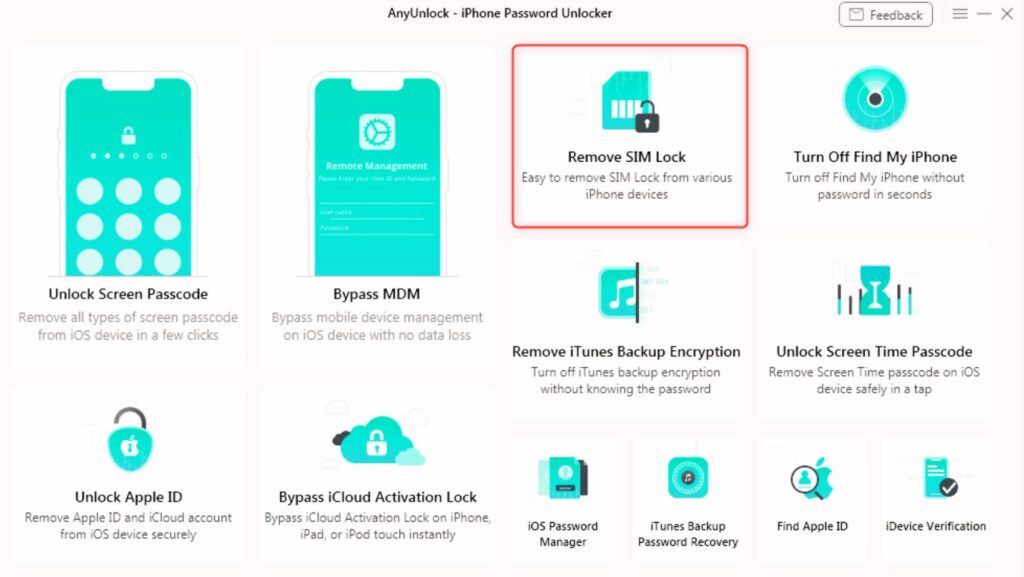
    Commence by downloading AnyUnlock on your computer. After downloading, connect your iPhone to the computer using a USB cable. On the main interface of AnyUnlock, select “Remove SIM Lock,” and then click “Start Now” to begin the SIM unlocking process.

    How to Unlock a Boost Mobile Phone

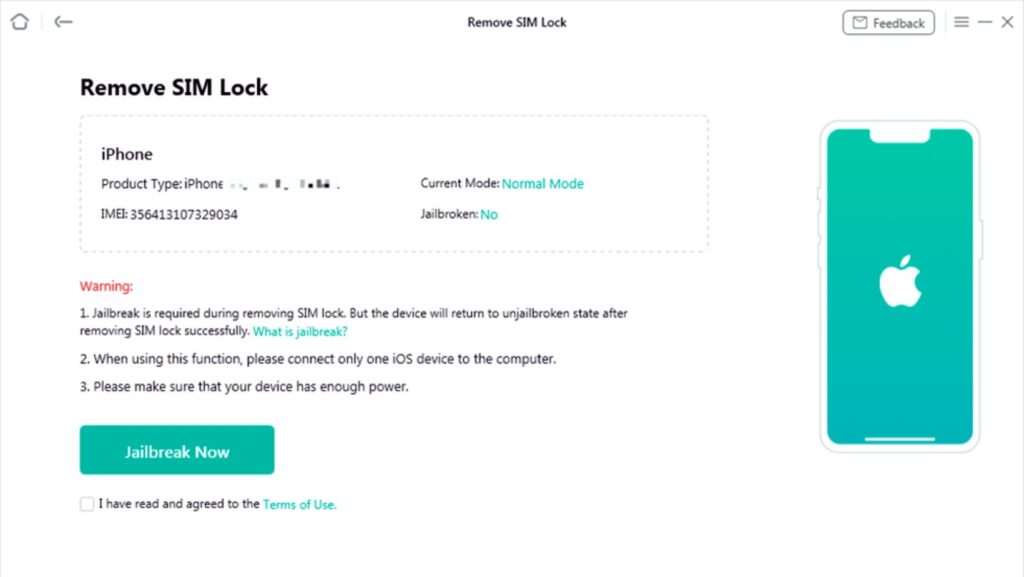
    Step 2: Initiate Jailbreak
    Tap the “Jailbreak Now” button and agree to the terms of use to proceed. It’s crucial to note that AnyUnlock doesn’t require your IMEI code, ensuring the security of your privacy and device information.

    How to Unlock a Boost Mobile Phone

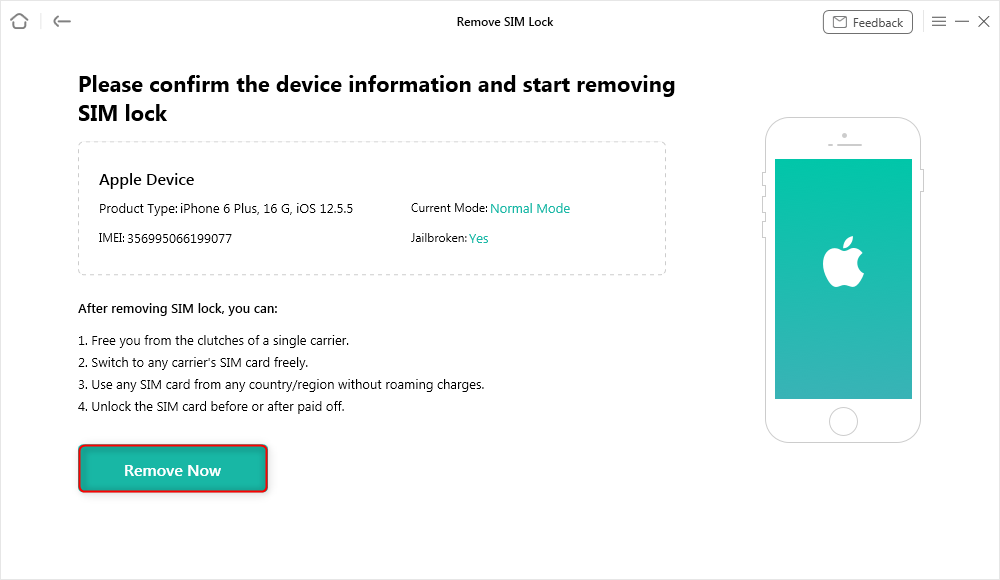
    Step 3: Confirm Device Information
    AnyUnlock will display your device’s information, including details like the model and operating system. Verify the correctness of the information, then click “Remove Now” to proceed with the SIM unlock process.

    How to Unlock a Boost Mobile Phone

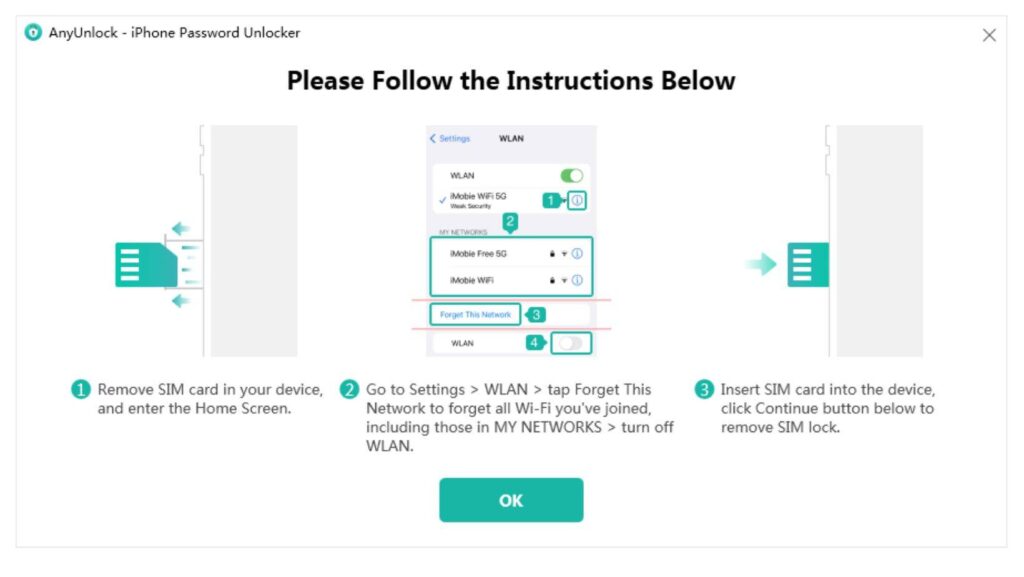
    Step 4: Prepare Your iPhone
    Before proceeding with the SIM unlock, turn off the Wi-Fi on your iPhone. Remove the SIM card from your iPhone and re-insert it. Once done, click “OK” to continue with the unlocking process.

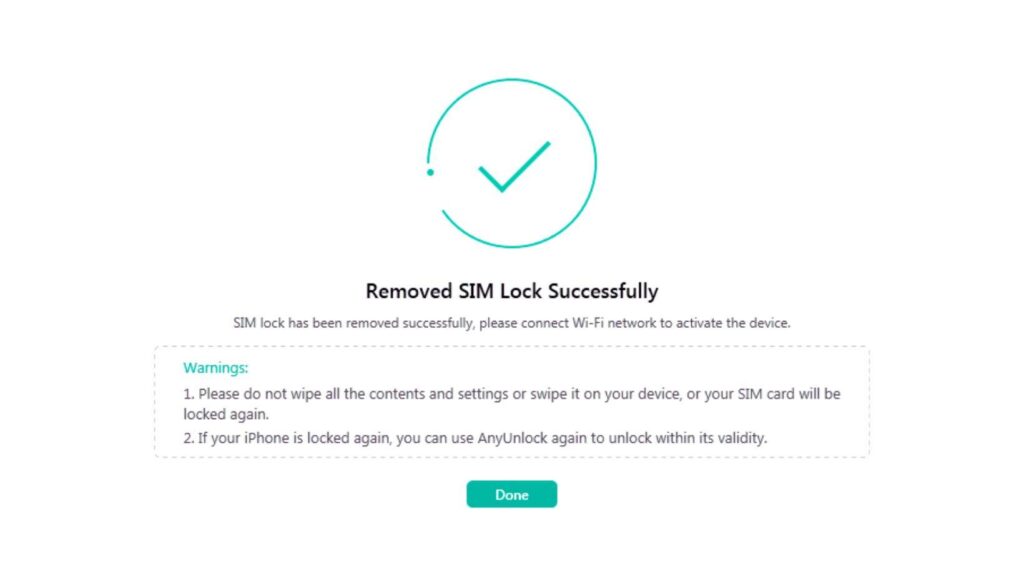
    Step 5: Unlock SIM Lock
    AnyUnlock will initiate the process of removing the SIM lock from your device. This may take a few minutes, so it’s essential not to unplug or use your device during this period. Upon successful removal of the SIM lock, you’ll receive a notification confirming the accomplishment.

    How to Unlock a Boost Mobile Phone

    Weighing the Risks of DIY Methods

    Before attempting DIY methods to unlock your Boost Mobile phone, it’s crucial to understand the potential risks involved. DIY unlocking methods often involve rooting or flashing the phone’s firmware, which can lead to bricking the device if not done correctly. Bricking refers to rendering the phone unusable due to software modifications that compromise its functionality.

    Here are some of the potential risks associated with DIY unlocking methods:

    1. Bricking: Improper rooting or flashing procedures can irreparably damage the phone’s software, rendering it unusable.
    2. Data Loss: Rooting or flashing may involve wiping the phone’s data, resulting in the loss of personal files, contacts, and settings.
    3. Security Vulnerabilities: Rooting or installing third-party unlocking tools can introduce security vulnerabilities, making the phone susceptible to malware and cyberattacks.
    4. Warranty Void: Attempting DIY unlocking methods may void the phone’s warranty, eliminating manufacturer support in case of hardware malfunctions.
    5. Network Compatibility Issues: DIY unlocking methods may not always guarantee compatibility with new SIM cards or network providers.

    Despite these risks, some DIY unlocking methods may be available for specific Boost Mobile phones. However, it’s strongly recommended to seek assistance from a reputable unlocking service to minimize the risks and ensure a successful unlocking process. Unlocking services typically employ secure and tested methods, reducing the chances of bricking or damaging the phone.

    If you still choose to pursue DIY unlocking methods, thoroughly research the specific method for your phone model and follow the instructions carefully to avoid potential complications. Always back up your phone’s data before attempting any modifications.

    Unlock your Boost Mobile by AskUnlock.net

    One of the easiest ways to unlock your Boost Mobile is by using AskUnlock. In this process, you do not need to download any software. Here are the steps to unlock your Boost Mobile phone using askunlock.net’s service.

    Unlock your Boost Mobile by AskUnlock.net
    1. Check if your phone is eligible for unlocking. Most GSM Boost Mobile phones can be unlocked, except for new phones or those still under contract.
    2. Confirm your device type and model by checking the label or menu settings. Be sure you have your correct 15-digit IMEI number as well. Copy this IMEI number.
    3. Now, go to your browser and go to www.askunlock.net. Then, select the exact phone model, type your IMEI number, and lastly, enter your e-mail address. Here, you will receive the unlock code as well as unlock instructions.
    4. Insert a non-Boost SIM card into your Boost Mobile phone if you haven’t already. This step is crucial.
    5. Power on your phone with the new SIM card inserted. An unlock screen should appear as a prompt.
    6. Enter the special unlock code you received from askunlock.net in your email.
    7. If the code was successfully entered, your phone should now be unlocked! You can now use it on any GSM network worldwide.

    That’s it! Just be sure to use that SAVE50 code for a half-off unlocking discount. Let askunlock.net free your Boost Mobile phone so you can use it to access globally supported carriers. Enjoy your newly unlocked freedom!

    How Long Does It Take to Unlock a Boost Mobile Phone?

    The time required to unlock a Boost Mobile phone hinges on the chosen method and your phone’s eligibility. For postpaid and prepaid devices that meet the eligibility criteria, Boost will automatically unlock the device remotely within two business days of reaching eligibility. However, if remote unlocking proves technically infeasible, Boost will inform the customer.

    Opting for third-party tools like AnyUnlock expedites the process, enabling completion within a matter of minutes. On the other hand, unlocking through Boost’s customer service may extend to two working days, influenced by the device’s eligibility and other factors.

    In essence, the unlocking timeframe can range from a few swift minutes to two business days, dictated by the selected method and prevailing circumstances.

  • Who Owns Boost Mobile 2024: What You Need to Know Now!

    Who Owns Boost Mobile 2024: What You Need to Know Now!

    Who Owns Boost Mobile

    Wondering who owns Boost Mobile? Dive into the full ownership story, from founding fathers to the latest Dish takeover. Get the answers you need here!

    The Evolution of Boost Mobile

    2000: Down Under Beginnings with a Visionary Spark

    Imagine a world where everyone can connect, regardless of budget. That’s the dream that Australian entrepreneur Peter Adderton brought to life when he founded Boost Mobile in Sydney back in 2000. He set out to shake up the industry with affordable, no-frills plans, making mobile accessible to everyone. Soon, that Aussie spirit crossed the Pacific, hitting the shores of the US in 2001.

    Early Adrenaline Rush: Nextel Fuels the Growth Engine

    Nextel, another disruptor in the game, saw Boost’s potential and took the wheel in 2003. Together, they fueled the brand’s growth, pushing innovative features like push-to-talk and those iconic $1-a-day plans. Boost became synonymous with value and freedom, attracting millions of fans who craved a break from the big-name giants.

    Sprint Takes the Reins: Navigating the Merger Maze

    In 2004, Sprint merged with Nextel, bringing Boost along for the ride. This marked a period of expansion and change, with Boost integrating into Sprint’s network and customer base. While it opened new doors, it also brought challenges, as Boost had to adapt to a larger, more complex environment.

    Current Ownership: Who Owns Boost Mobile Now

    Guess who took the wheel at Boost Mobile in 2020? That’s right, none other than Dish Network Corporation, the satellite TV giant. Boost Mobile has been under the operation of Dish Network since July 1, 2020. This $1.4 billion acquisition wasn’t just a random pit stop – it was a strategic move to give Dish a foot in the booming wireless market.

    Why Boost? Simple: a ready-made audience of 9 million prepaid customers. That’s a head start that any newcomer would envy.

    But it’s not just about the existing fans. Dish has bigger plans: building the first standalone 5G network in the US through their Boost Infinite service. Think of it as a whole new highway just for you to zoom on.

    So, if you’re wondering who’s steering the Boost Mobile ship, it’s now firmly under the command of Dish Network. And with their ambitious vision for the future, buckle up – things are about to get fast and furious in the wireless world!

    Dish Wireless LLC: A Driving Force

    Dish Wireless LLC

    Leveraging T-Mobile’s Network: A Strategic Alliance

    Service Offerings: Catering to Diverse Needs

    • Budget-Friendly Options for Occasional Users
    • Mid-Tier Plans for Moderate Users
    • High-End Packages for Data-Intensive Subscribers
    • Tailored Plans for Specific Needs

    Boost Mobile’s Unique Selling Proposition (USP)

    • Competitive Pricing: Striking a Balance between Affordability and Value
    • Expansive Network Coverage: Reaching Far and Wide
    • Diverse Range of Plans: Tailored to Individual Needs
    • The USP in Action: A Symphony of Value

    Boost Mobile: A Champion of Affordability and Choice